


I spent three months last year at a Series B startup burning $40K/month on Snowflake. The CEO was convinced they had a database problem. They didn’t.
They had a senior data engineer (let’s call her Maya) who tracked her interruptions for two weeks just to prove a point. Sixty-seven. That’s 67 times in ten working days someone slacked her with “quick question” or “pipeline’s down” or “these numbers look weird.” She started blocking off “fake meetings” on her calendar just to get 90 minutes to actually think.
Maya’s not special. I’ve seen this same pattern at maybe fifteen different companies now. And here’s the thing that’ll piss you off: the solution is never where anyone’s looking. Everyone’s optimizing queries and scaling infrastructure while the real problem is sitting in plain sight. It’s the handoffs between your transformation logic and the humans trying to keep it running.
Last updated: June 9, 2026
Table of Contents
- The Invisible Tax of Context Switching in ETL Workflows
- Why Pipeline Observability Gets Built Too Late
- Rethinking Incremental Load Strategies Beyond Timestamps
- The Configuration Sprawl Problem Nobody Talks About
- How Schema Drift Compounds Faster Than You Monitor It
- Treating Your ETL Jobs as Stateful Systems
- Building Recovery Mechanisms That Don’t Require Manual Intervention
- The Real Cost of Over-Normalized Staging Layers
- When to Break Your Own Transformation Best Practices
- Making Your ETL Process Legible to Non-Engineers
TL;DR
- Context switching murders productivity way more than slow queries (we’re talking 10-26 weeks of lost work per engineer annually)
- Observability needs to be day-one architecture, not a retrofit you’ll “add later”
- Timestamp-based incremental loads silently lose data. I’ve seen gaps of 3-7% go unnoticed for months
- Config files breed faster than rabbits and nobody documents them
- Schema changes break things three layers downstream from where they actually happened
- Your “stateless” ETL jobs aren’t stateless and pretending they are is why recovery sucks
- Automated recovery should handle the weird edge cases, not just the happy path
- Sometimes your staging layer should be a denormalized mess (yes, really)
- Best practices that create more problems than they solve aren’t best practices
- If only engineers can debug your pipelines, you’ve built a knowledge silo that’ll strangle your team

The Invisible Tax of Context Switching in ETL Workflows
Query optimization gets all the blog posts. All the tooling. All the attention.
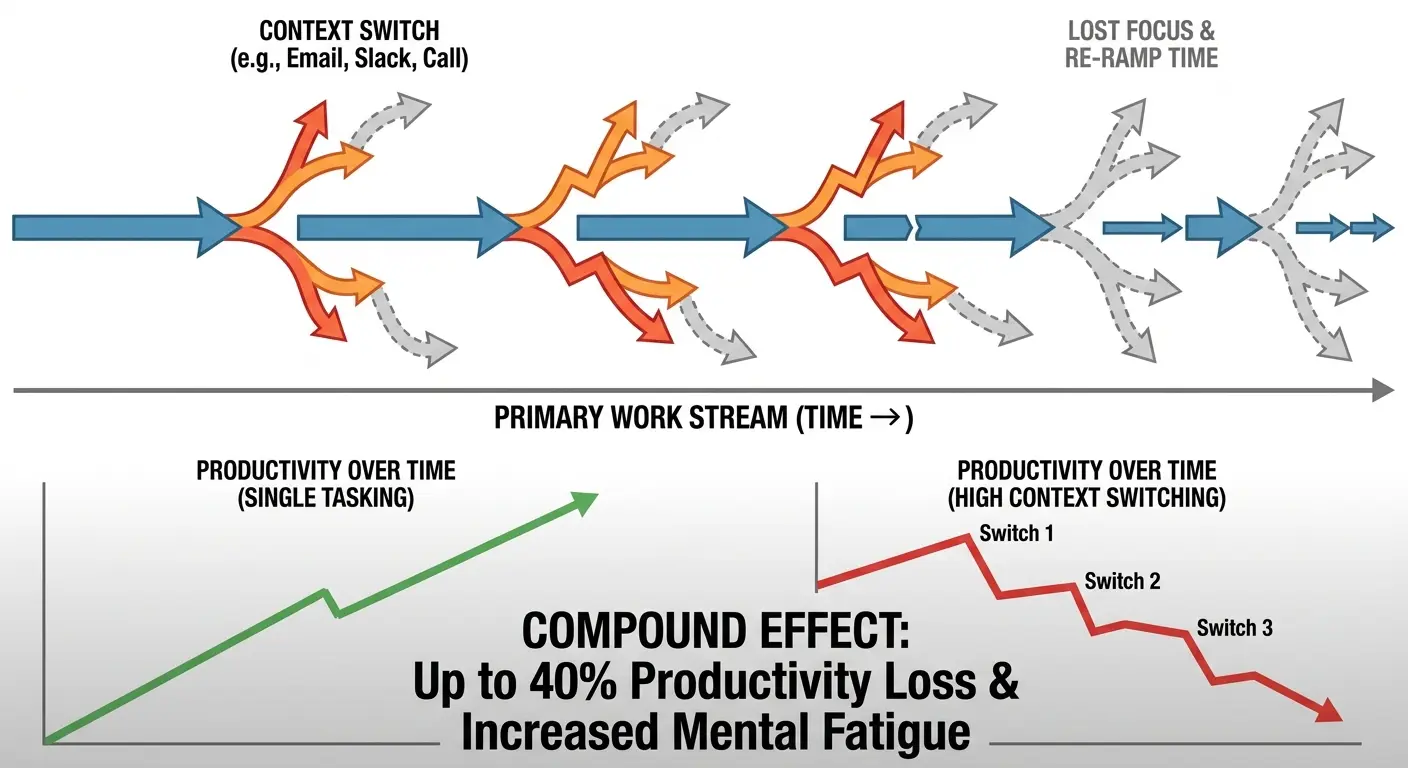
Know what actually grinds teams into dust? The constant mental whiplash between “keep the pipes running” and “build something new.”
It’s 2 AM. Your data engineer gets paged because a pipeline crapped out. She fixes it, documents absolutely nothing (because who documents at 2 AM?), and crashes back into bed. Three weeks later, similar failure. Different engineer. Same root cause. Completely fresh debugging session starting from zero.
This isn’t a people problem. Your team isn’t lazy or disorganized. It’s an architecture problem wearing an operational costume. Real ETL process optimization starts when you accept that human cognitive load matters infinitely more than shaving milliseconds off queries.
The Maintenance Trap Most Teams Fall Into
Pipeline maintenance doesn’t give a shit about your sprint planning. It interrupts. And every interruption carries a cost that never shows up in your Datadog dashboard.
Picture this: You’re building a new transformation layer. Logic’s mapped out, data models sketched, you’re in flow state. Then Slack explodes. Production job failed. You drop everything, completely switch mental contexts, dig through logs from a pipeline you wrote six months ago (or worse, someone else wrote), find the issue, patch it, and try to get back to work.
Except you can’t just resume. You’ve lost the thread entirely. That mental model you were building? Gone. You’re starting over, and it’ll take twenty minutes minimum to rebuild what you had.
At one fintech company (let’s call them CashFlow because I’m not trying to get sued), Maya spent 60% of her week dealing with these interruptions. Started building a customer segmentation pipeline Monday morning. By Tuesday afternoon she’d context-switched eight times. Fixing failed jobs, debugging data quality issues, updating connection strings after some database migration nobody told her about. Work that should’ve taken three days stretched into three weeks because she never got more than 90 consecutive minutes of deep work.
When we actually mapped her time, only 12 hours of her 40-hour week involved uninterrupted development. The rest was firefighting.
Multiply that across a team. Multiply it across months. The productivity loss is insane, but it’s completely invisible because we measure the wrong things.
Why This Compounds Over Time
Each undocumented fix becomes knowledge locked in someone’s head. Each “works for now” patch becomes technical debt. Each context switch trains your team to be reactive instead of proactive.
You end up with incredible firefighters who never get to do the deep work that prevents fires. The pipeline portfolio grows. The maintenance burden grows faster. Hiring more people doesn’t fix it because the knowledge distribution problem just scales with headcount.
| Context Switch Frequency | Weekly Development Hours Lost | Annual Productivity Impact per Engineer |
|---|---|---|
| 2-3 times per day | 8-12 hours | 416-624 hours (10-15 weeks) |
| 4-6 times per day | 15-20 hours | 780-1,040 hours (19-26 weeks) |
| 7+ times per day | 25-30 hours | 1,300-1,560 hours (32-39 weeks) |
Look at that bottom row. Seven-plus interruptions daily means you’re losing 32-39 weeks per engineer per year. That’s not a team. That’s an expensive pager service.
Why Pipeline Observability Gets Built Too Late
“We’ll add monitoring once things stabilize.”
Things never stabilize.
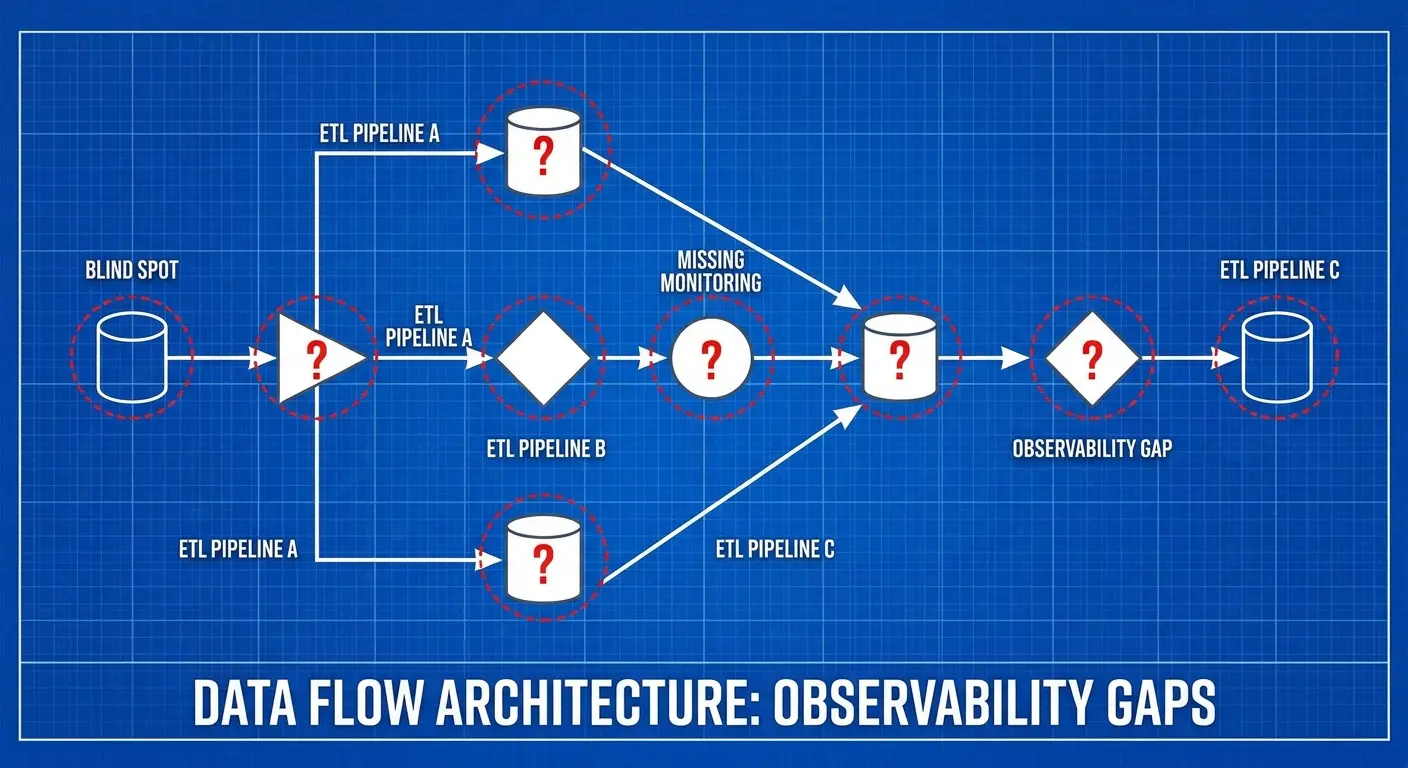
Most teams treat observability like it’s a nice-to-have feature they’ll bolt on later. By the time you realize you actually need visibility into your pipelines, you’re trying to retrofit monitoring onto systems that were never designed to be monitored. It’s like trying to install a security system in a house that’s already been built. Possible, but way more painful than doing it right the first time.
Here’s the pattern I see constantly: Company builds its first few ETL jobs. They’re simple. They work. Monitoring feels like overkill. Six months later they’ve got 40 pipelines, half of which nobody fully understands, and when something breaks the debugging process involves reading code and making educated guesses.
The Architectural Decisions You Can’t Unmake
Building ETL without observability baked in means you make architectural choices that later become constraints. You don’t instrument state transitions. You don’t track data lineage. You don’t build in the hooks that make monitoring possible without massive refactoring.
Then you try to add observability later. Suddenly you realize you need to modify every single job. Standardize logging formats across pipelines built by five different people over two years using completely different patterns. The scope balloons into a three-month project. It never happens.
What Useful Observability Looks Like
Observability isn’t just logging. It’s building systems that expose their internal state in ways that make debugging feel intuitive instead of like digging through ancient ruins.
You need answers to: What data did this job actually process? What decisions did it make? Where’d it get its inputs? What outputs did it produce? How long did each stage take? What was different about this run compared to the last successful one?
Pipeline Observability Checklist
Before you deploy any ETL job to production, make sure it exposes:
- Data lineage tracking: Source system, extraction timestamp, record counts at each transformation stage
- Decision logging: Business rule applications, filter criteria applied, data quality checks executed
- State transitions: Job start/end times, stage-level duration metrics, resource utilization
- Comparison metrics: Current run vs. previous successful run (volume delta, processing time variance, schema changes)
- Error context: Full stack traces, input data samples that triggered failures, state at time of error
- Dependency mapping: Upstream data sources, downstream consumers, SLA requirements
- Human-readable summaries: Natural language descriptions of what the job did, accessible to non-engineers
Most importantly, this information needs to be accessible to people who didn’t write the pipeline. If only the original author can debug it, you don’t have observability. You have a knowledge silo with logging.
Rethinking Incremental Load Strategies Beyond Timestamps
Pop quiz: How do you implement incremental loading?
If you answered “track the last successful load timestamp and query for records modified since then,” congratulations. You’re doing what everyone does. You’re also probably losing data.
Timestamp-based incremental loading seems bulletproof. Track the last load time, grab everything modified since then, load the delta. Clean. Efficient. Except real-world data systems don’t respect the assumptions this pattern requires.
The Silent Failures Nobody Catches
Six months. That’s how long an e-commerce company was missing 3-7% of their order updates before anyone noticed.
Their ERP system let customer service backdate transactions. When someone corrected an order from two weeks ago, the system updated the order details but the modified timestamp reflected the original order date, not the correction date. The incremental load logic never picked up these changes.
The gap only surfaced when finance couldn’t reconcile quarterly revenue and spent two weeks manually comparing warehouse data against source system exports. Two weeks of manual work to discover a problem that’d been silently corrupting their data for half a year.
And that’s just one failure mode. Source systems update records without updating timestamps. Timezones get handled inconsistently. Clock skew between systems creates gaps. A transaction that started before your last load but committed after? Missed entirely.
These aren’t edge cases. They’re normal operations in distributed systems. They create data loss that’s almost impossible to detect because your pipeline reports success. The job ran. It loaded data. Everything looks fine until someone notices the numbers don’t reconcile.
Why Watermarking Alone Isn’t Enough
High-watermark tracking helps, but it doesn’t solve the fundamental problem: you’re trusting the source system’s timestamps to represent a complete, ordered view of changes.
That trust is often misplaced.
Systems reprocess data. They correct errors. They handle late-arriving facts. None of this fits neatly into a “modified timestamp” worldview. You need strategies that account for the messy reality of how data actually changes.

Building Robust Incremental Load Patterns
Look, timestamp-only loading is fast and simple, which is why everyone does it. It’s also wrong about 15% of the time in my experience.
CDC (change data capture) is bulletproof but costs you in complexity and infrastructure. Most teams end up somewhere in the middle. Timestamps for the daily grind, weekly reconciliation jobs to catch what slipped through, and maybe checksum comparison on critical tables.
The multi-layered approach is central to real ETL process optimization. You need to detect when records disappear from your source (deletions or filter criteria changes). You need to catch when records change in ways that don’t update their timestamp. You need mechanisms to verify your incremental loads aren’t accumulating drift from source truth.
This is more complex than timestamp-based loading. It’s also more correct. And correctness matters more than simplicity when people are making business decisions on your data.
Actually, before I move on. I mentioned checksums back there and it’s worth pausing because most teams implement them wrong. They checksum entire rows, which means any change triggers a reload. But you usually care about specific fields changing. Checksum just the fields that matter for your use case. Your incremental loads get way more efficient.
Okay, back to configuration hell.
The Configuration Sprawl Problem Nobody Talks About
Every ETL pipeline needs configuration. Connection strings, table names, business logic parameters, retry policies, notification settings. It starts simple.
Then it spreads like weeds.
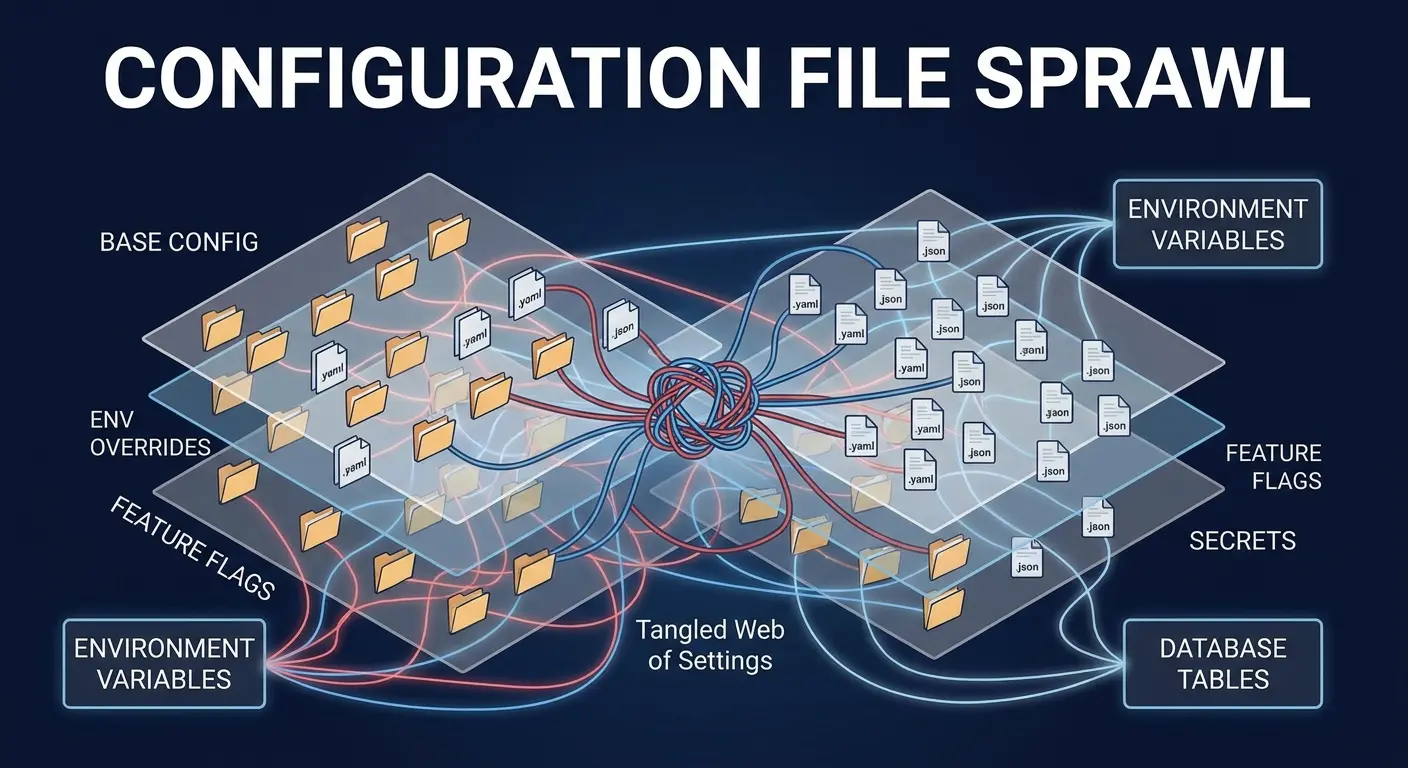
You’ve got environment-specific configs. Pipeline-specific configs. Configs for configs. Some live in files, some in environment variables, some in a database, some hardcoded because “we’ll move it to config later” (narrator: they won’t). Six months in, nobody knows the authoritative source of truth for how a pipeline should actually behave.
How Configuration Becomes a Maintenance Nightmare
Each configuration location is a potential point of failure. You update a database connection string in one place but forget the backup job uses a different config file. You change a business rule parameter in dev, deploy to prod, and realize the production config overrides it.
Debugging becomes archaeology. “Why’s this job behaving differently in production?” Because there’s a config file from 2022 that nobody knew existed, overriding the values you just carefully updated everywhere else.
The Documentation Gap That Grows Exponentially
Config files rarely get documented. The reasoning behind specific values gets lost. You find a parameter set to “7” and have no idea if that’s days, retries, or someone’s lucky number. Changing it feels risky because you don’t know what’ll break.
Teams start treating configuration as tribal knowledge. The person who set it up knows why it’s that way. Everyone else just hopes they don’t have to touch it.
Centralizing Configuration Without Creating a Bottleneck
Yes, I know. I’m about to spend several hundred words telling you to document your config files. I can hear you laughing. But I’ve also spent several hundred hours debugging undocumented configs, so I’ve earned the right to be preachy about this.
Configuration management needs to be centralized, versioned, and self-documenting. But centralization can’t mean “now every config change requires a ticket and three approvals.”
You need systems where configuration lives in one place, changes are tracked, and the config itself explains its purpose. Comments in YAML files aren’t enough. You need schema validation, default values with clear semantics, and deployment processes that catch configuration errors before they hit production.
Configuration Management Template
pipeline_name: customer_daily_sync
description: "Syncs customer records from Salesforce to warehouse, excludes test accounts"
owner: data-platform-team
sla_hours: 4

sources:
  salesforce:
    connection: ${SALESFORCE_PROD_CONNECTION}
    query_timeout_seconds: 300
    # Rationale: Salesforce API has 5min max query time
    retry_attempts: 3
    # Rationale: Transient network issues common, but persistent failures need immediate attention

business_rules:
  exclude_test_accounts: true
  # Rationale: Test accounts identified by email domain '@test.company.com'
  minimum_record_threshold: 1000
  # Rationale: Typical daily volume is 5000-8000, below 1000 indicates source issue

transformations:
  address_standardization: enabled
  phone_formatting: US_E164
  # Rationale: Downstream marketing systems require E164 format

alerts:
  on_failure: data-platform-oncall
  on_sla_breach: data-platform-leads
  on_data_quality_issue: data-governance-team

last_modified: 2024-01-15
modified_by: jsmith
change_reason: "Increased retry attempts from 2 to 3 after observing transient Salesforce API timeouts"
The goal isn’t perfect configuration management (which doesn’t exist). It’s making config changes safe enough that people actually make them instead of working around them.
How Schema Drift Compounds Faster Than You Monitor It
Your source system adds a column. No big deal, right?
Wrong.
Your ETL process doesn’t break. It just silently stops capturing that data. Or it breaks three pipelines downstream that depended on a stable schema. Or it succeeds but loads the wrong data into the wrong columns because someone reordered fields and your position-based loading logic is now completely hosed.
Schema changes are inevitable. How they ripple through your ETL ecosystem is where things get messy.
The Cascade Effect of Upstream Changes
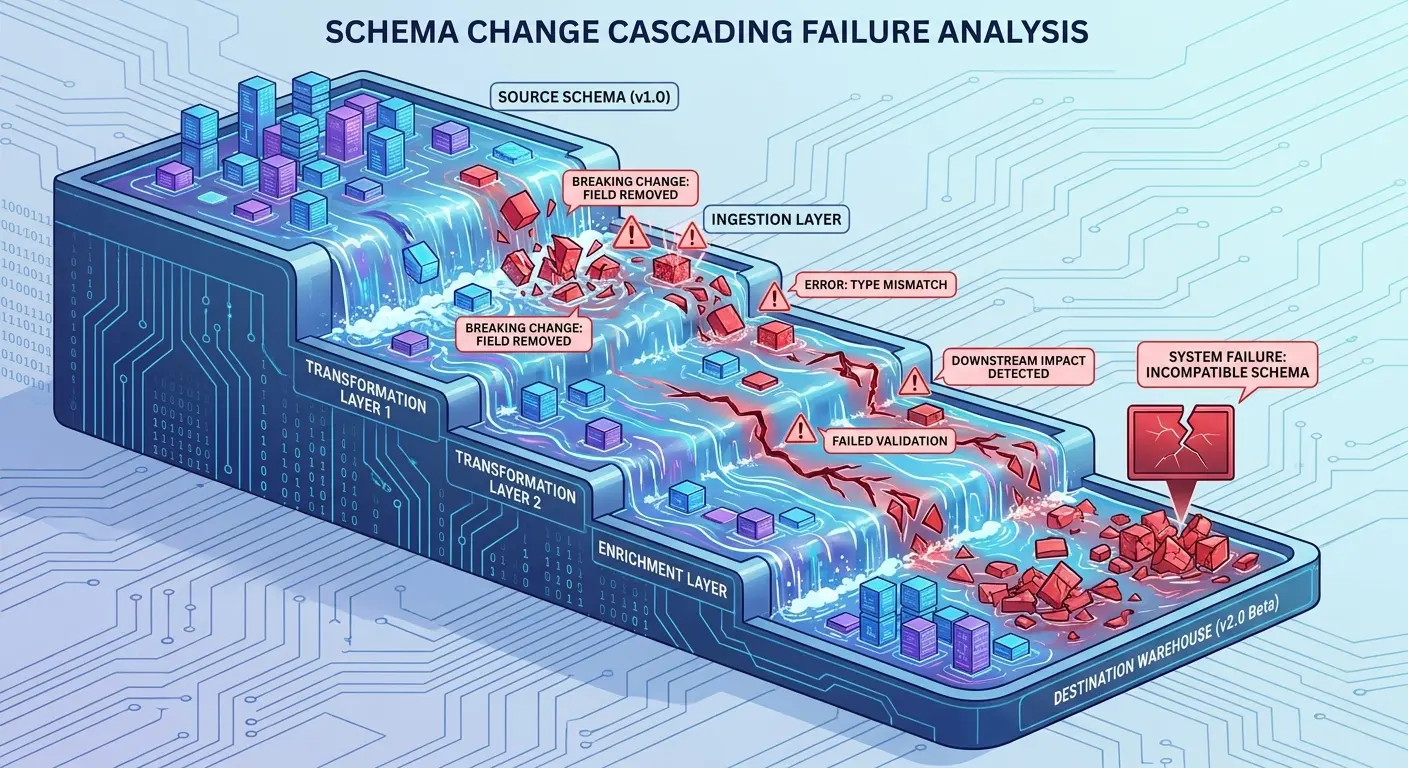
Source schemas change for good reasons. The business evolves. New features launch. Data models improve. But each change cascades through every downstream process that touches that data.
Your extraction logic might handle it gracefully. Your transformation logic might not even notice. But somewhere downstream (maybe three layers deep) a report breaks because it expected a specific column. Or a join fails because a key changed format. Or data quality checks start failing because validation rules assumed a schema that no longer exists.
The failure often happens far from the actual change. Debugging requires tracing lineage backward through multiple transformation layers to find where the assumption broke.
A healthcare analytics company had 23 pipelines consuming data from their patient management system. When the source team added a new “patient_risk_score” column and deprecated the old “risk_level” enum, they sent an email notification.
Twelve pipeline owners never saw it.
The source team deployed during a scheduled maintenance window. Within hours, eight dashboards went blank, four ML models started producing garbage predictions, and two compliance reports failed to generate. Root cause took six hours to identify because the schema change happened three transformation layers upstream from where failures showed up.
They now use a schema registry with mandatory review periods and automated impact analysis before any breaking change. Should’ve done that from the start, but hindsight’s always 20/20.
Why Schema Validation Needs to Be Proactive
Most teams validate data after loading it. That’s too late. You’ve already burned compute resources processing data that doesn’t match expectations. You’ve already written bad data to staging tables. You’ve already triggered downstream processes that’ll fail or produce garbage.
Schema validation should happen at the boundary. Before you accept data into your pipeline, verify it matches the schema contract you expect. When it doesn’t, fail loudly and immediately. Don’t let bad data propagate.
Building Schema Evolution Into Your Process
Schema changes shouldn’t be emergencies. They should be managed transitions with clear migration paths. This disciplined approach is a cornerstone of sustainable ETL process optimization.
You need versioning. Backward compatibility windows. Automated detection when source schemas change. Processes that let you test new schemas in isolation before they hit production pipelines.
Most importantly, you need communication channels between teams that own source systems and teams that consume their data. Schema changes can’t be surprises. They need to be coordinated deployments with rollback plans.
Treating Your ETL Jobs as Stateful Systems
Pop quiz number two: Are your ETL processes stateful or stateless?
If you answered “stateless,” you’re wrong. And that’s probably why things keep breaking in weird ways.
We talk about ETL like it’s a pure function: same input, same output, no side effects. That’s a useful mental model for designing transformations. It’s a dangerous fiction for operating production pipelines.
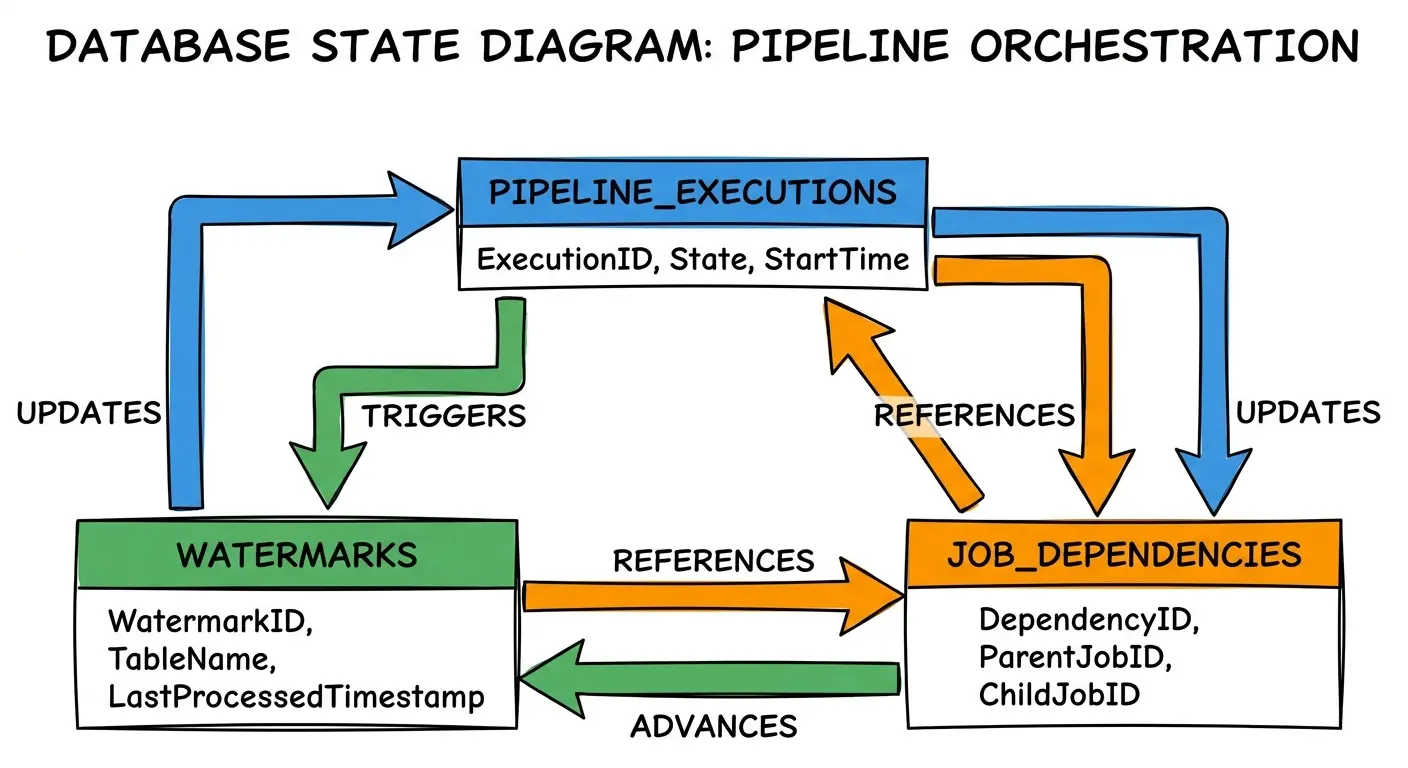
ETL processes maintain state. They track what they’ve processed. They make decisions based on previous runs. They have failure modes that depend on their history. Pretending they’re stateless leads to brittle systems that break in surprising ways.
The State That’s Hiding in Plain Sight
Your high-watermark table? That’s state. Your idempotency keys? State. Your “last successful run” timestamp? State. The temp tables you create and drop? State with a very short lifetime, but still state.
This state lives in databases, file systems, metadata stores, and sometimes just in the execution order of your jobs. When state gets corrupted or out of sync, your pipelines behave unpredictably.
Why Stateless Design Patterns Fall Short
Stateless design is elegant. It’s testable. It’s easy to reason about.
It’s also insufficient for real-world ETL operations.
You need to remember what you’ve processed so you don’t reprocess it. You need to track failures so you can retry intelligently. You need to maintain relationships between jobs so they execute in the correct order. All of this requires state.
The question isn’t whether to maintain state. It’s how to maintain it reliably.
Managing State Explicitly and Safely
State management should be explicit, not implicit. When a job maintains state, that state should live in a dedicated, managed store with clear semantics.
You need transactions. Consistency guarantees. The ability to inspect state when debugging. Backup and recovery procedures for when state gets corrupted (and it will).
Treating state as a first-class concern in your ETL architecture makes systems more complex upfront. It makes them way more reliable in production. I’ll take that trade every time.
Building Recovery Mechanisms That Don’t Require Manual Intervention
Your pipeline fails at 3 AM. What happens next?
If the answer is “someone gets paged and manually fixes it,” congratulations. You don’t have a recovery mechanism. You have an on-call engineer who hates you.
Failures will happen. Infrastructure hiccups. Source systems go down. Queries timeout. Network partitions occur. The question isn’t how to prevent all failures (you can’t). It’s how to recover without requiring human intervention every single time.
The Retry Trap Most Teams Fall Into
Simple retry logic seems helpful. Job failed? Wait a bit and try again.
This works great for transient failures. It makes permanent failures infinitely worse.
You retry a job that’s failing because of bad data. It fails again. And again. And again. You’ve now wasted compute resources, delayed discovery of the real problem, and downstream jobs are waiting while your SLA slips.
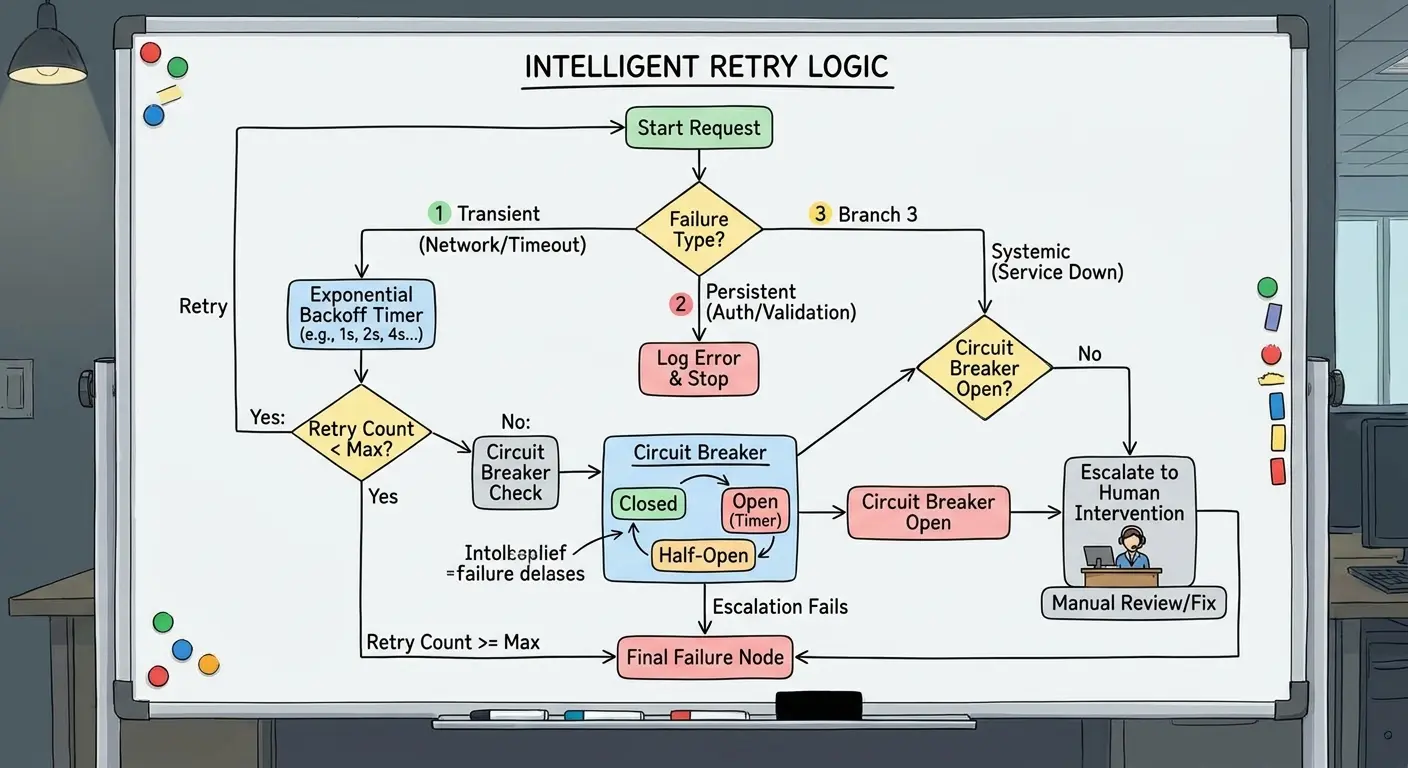
Retries need intelligence. They need to distinguish between “try again in 5 minutes” failures and “stop immediately and alert a human” failures. Most retry logic doesn’t make this distinction.
What Smart Recovery Requires
Recovery mechanisms need to understand failure modes.
Network timeout? Retry with exponential backoff. Schema mismatch? Don’t retry, alert immediately. Source system maintenance window? Retry, but don’t alert yet. It’ll come back.
You need circuit breakers that stop retrying when a failure pattern indicates a systemic problem. Escalation policies that alert humans only when automated recovery’s been exhausted. The ability to partially recover when some data succeeds and some fails.
Building for the Failure Cases You Haven’t Seen Yet
The failures you’ve experienced are easy to handle. You write code for them.
The failures you haven’t seen yet are the ones that take down production.
Recovery mechanisms should be defensive. Assume anything that can fail will fail in ways you didn’t anticipate. Isolate failures to prevent cascades. Preserve enough state that you can understand what went wrong even if the job can’t automatically recover.
The Real Cost of Over-Normalized Staging Layers
I’m about to commit data engineering heresy: sometimes your staging layer should be a complete mess.
Normalization is a database design principle. It reduces redundancy and maintains consistency. It’s also sometimes the wrong choice for ETL staging layers.
I’ve watched teams spend enormous effort normalizing their staging data. Breaking source records into multiple tables, enforcing referential integrity, building complex join logic to reconstruct what they just decomposed. The goal is data quality. The result is often unnecessary complexity.
When Normalization Adds Friction Without Adding Value
Staging layers serve a specific purpose: they’re a landing zone for raw data before transformation. They’re not your production data model. They don’t need to be perfectly normalized.
Over-normalizing staging data adds transformation steps. Adds join complexity. Adds opportunities for errors. Makes debugging harder because you can’t easily see what the source data actually looked like.
The Simplicity Trade-Off
Sometimes keeping staging data close to its source format (even if that format is denormalized or messy) makes the overall pipeline more maintainable.
You can see exactly what arrived from the source. You can compare staging data to source data without mentally reconstructing joins. You can reload staging tables without worrying about referential integrity constraints during the load process.
The transformation logic that normalizes data belongs in your transformation layer, not your staging layer. Staging should be about faithful representation of source data, not premature optimization of its structure.
Knowing When to Break the Rules
This isn’t a universal prescription against normalization. Some staging scenarios benefit from it. The point is to question whether normalization is serving your actual needs or just following a pattern because it’s a “best practice.”
Best practices are starting points, not laws. When a best practice creates more problems than it solves in your specific context, you need the judgment to deviate from it.
When to Break Your Own Transformation Best Practices
You’ve established patterns. Your team follows them. Consistency is good.
Except when it isn’t.
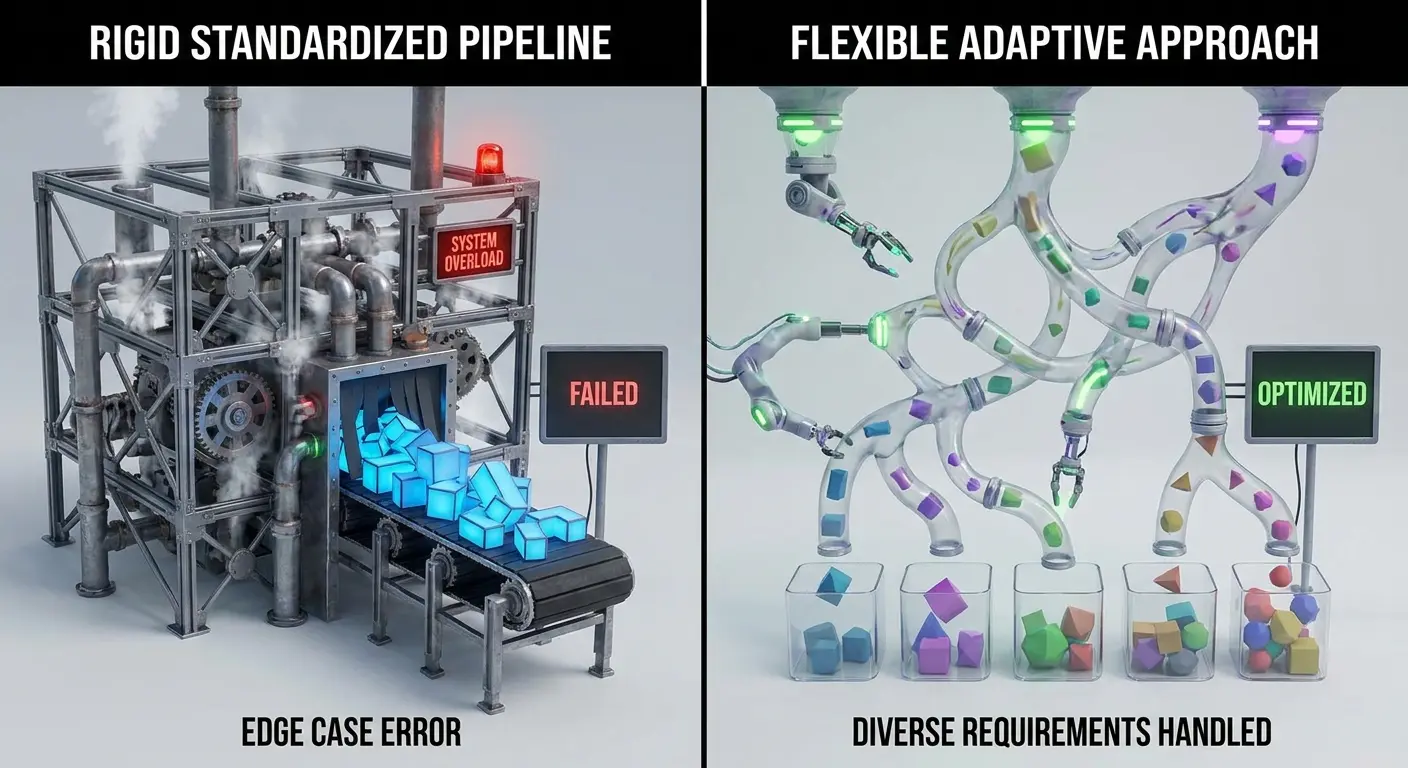
Rigid adherence to transformation patterns sometimes creates more problems than it solves. The patterns that worked for your first 10 pipelines don’t always scale to pipeline 50. The patterns that work for daily batch loads don’t always work for real-time streaming. The patterns optimized for correctness sometimes sacrifice performance in ways that actually matter.
Recognizing When Patterns Become Constraints
You’ve got a standard transformation pattern: extract to staging, validate, transform, load to warehouse. It works beautifully. Then you get a use case that needs data available within minutes, not hours. Your standard pattern introduces latency at every stage.
You could force the new use case into the existing pattern. You could also recognize that different requirements demand different approaches.
The discipline isn’t in following patterns religiously. It’s in knowing when to apply them and when to deviate.
The Cost of Premature Standardization
Teams often standardize too early. You’ve built three pipelines, found commonalities, and created a framework. Now every pipeline must fit that framework, even when it doesn’t quite match the problem.
You end up with workarounds. Special cases. Configuration flags that disable half the framework’s features for specific pipelines. The framework becomes more complex trying to handle every edge case, and the simplicity you were trying to achieve through standardization evaporates.
Building Flexibility Into Your Standards
Good transformation patterns should be guidelines with escape hatches, not rigid requirements. You need the ability to say “this pipeline is different enough that the standard pattern doesn’t apply” without that decision being controversial.
Document when and why you deviate. Make deviations deliberate, not accidental. But don’t let the pursuit of consistency prevent you from solving problems effectively.
Making Your ETL Process Legible to Non-Engineers
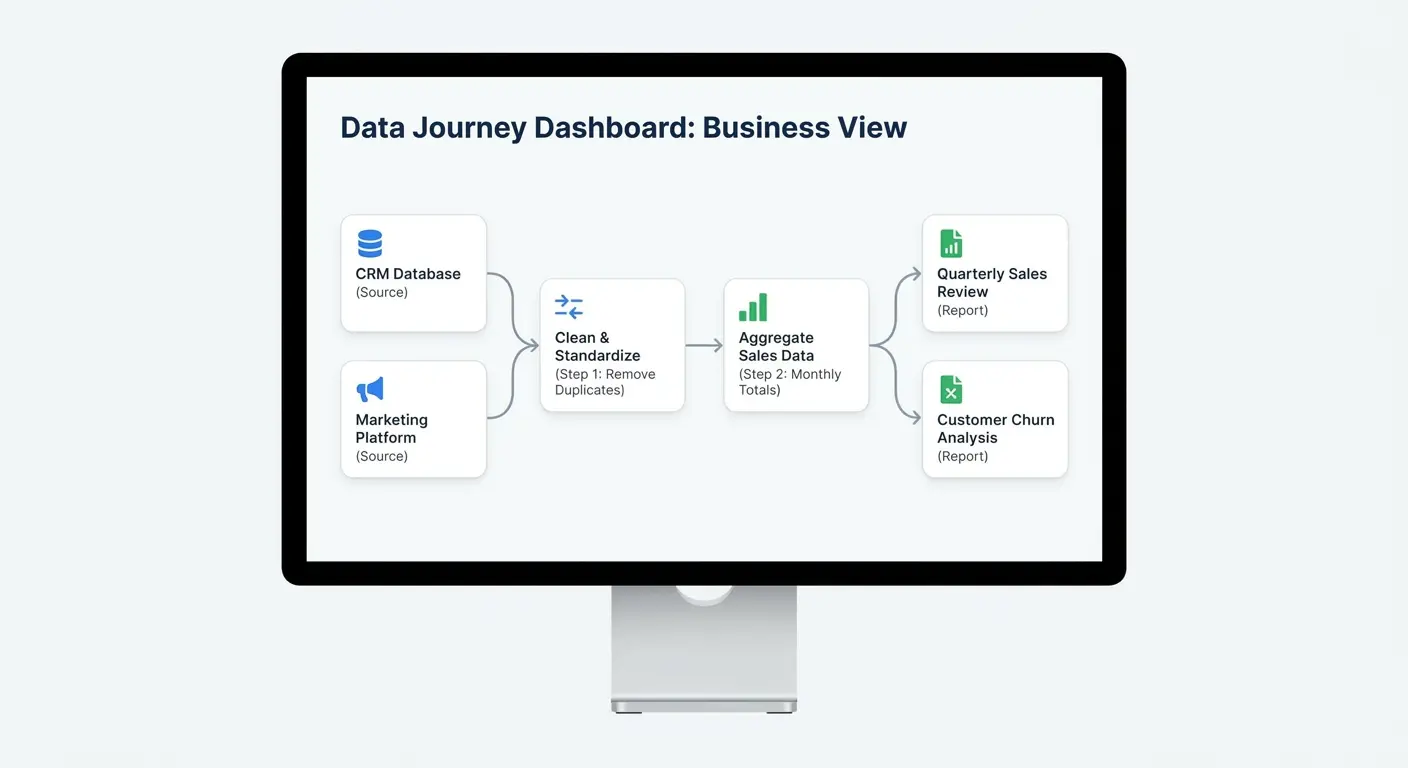
Your data analyst needs to understand why yesterday’s numbers changed. Your business stakeholder needs to know if a pipeline failure affects their report. Your project manager needs to estimate the work involved in adding a new data source.
None of them can read your code.
If only engineers can understand your ETL processes, you’ve created a knowledge bottleneck that’ll constrain your entire data operation. True ETL process optimization extends beyond technical performance to include organizational accessibility.
The Documentation That Actually Gets Used
Technical documentation is necessary. It’s also insufficient.
You need documentation that explains what your pipelines do and why they do it in language that doesn’t require engineering expertise to parse. This isn’t about dumbing things down. It’s about making the logic accessible.
“This pipeline loads customer data from Salesforce, excludes test accounts, standardizes address formats, and updates the customer dimension table” is more useful to most stakeholders than a detailed explanation of your incremental load strategy.
Building Self-Explaining Systems
The best documentation is the kind you don’t have to write because the system explains itself.
Descriptive naming. Clear data lineage. Metadata that captures business context alongside technical details.
When someone asks “where does this field come from?”, they should be able to trace it back through transformation layers to its source without reading code. When someone asks “why did this number change?”, they should be able to see what data changed and which transformation logic processed it.
Creating Shared Understanding Across Teams
Technical debt isn’t just code that needs refactoring. It’s also knowledge that exists in only one person’s head.
When your ETL processes are opaque to non-engineers, you’ve created organizational debt that compounds over time.
I’ve worked with teams where data engineers spend half their time answering questions about pipelines instead of building new ones. The solution isn’t better documentation (though that helps). It’s building systems that answer common questions without requiring an engineer in the loop.
Bringing It All Together Without Burning Out Your Team
The optimization opportunities that actually matter aren’t about making queries run faster. They’re about reducing cognitive load on your team, making systems maintainable, and building processes that don’t require heroic effort to keep running.
I work with companies at various stages of data maturity, and the pattern is consistent: teams that focus exclusively on technical performance hit a wall. The pipelines run fast, but the team can’t scale. Adding headcount doesn’t help because the knowledge distribution problem just gets worse.
The teams that scale successfully treat maintainability, observability, and knowledge sharing as first-class concerns from the start. They build systems that can be understood, debugged, and modified by people who didn’t write them. They automate recovery instead of relying on human intervention. They make deliberate trade-offs between consistency and flexibility.
Final Thoughts
ETL optimization discussions usually focus on the wrong metrics. Execution time, data volume, compute costs. These matter. But they’re not the constraints that limit most teams.
The real constraints are human. How quickly can someone understand a pipeline they didn’t write? How much context switching does maintenance work require? How much institutional knowledge is locked in individual heads? How many fires does your team fight versus how much proactive work gets done?
Optimizing for human factors doesn’t mean ignoring technical performance. It means recognizing that a pipeline that runs in 45 minutes but never requires manual intervention is often more valuable than one that runs in 30 minutes but breaks twice a week.
The overlooked angle in ETL optimization isn’t a new tool or technique. It’s recognizing that your ETL processes are sociotechnical systems where the human elements often matter more than the technical ones. Optimize for the humans, and the technical performance usually follows. Optimize only for technical performance, and you’ll build fast pipelines that nobody can maintain.
And honestly? I’ve spent enough time at 2 AM debugging someone else’s “highly optimized” pipeline to know which one I’d rather inherit.