


Time Card Calculator
Enter start and end times for each day. Hours roll up automatically with regular and overtime pay.
| Day | Start | End | Break (min) | Hours |
|---|
Here's something that's been bugging me about time tracking software. Actually, it's not about the software at all. The math works fine. Your time card calculator probably adds up the minutes perfectly. It's everything else that's broken.
Most businesses treat time tracking as a compliance checkbox. Punch in, punch out, run payroll, repeat. But there's this gap between recorded hours and actual work value that costs companies more than they realize, and it's not showing up in any error report.
The friction happens where it always does: in translation. Between what employees actually do and what timesheets manage to capture. Between labor costs on paper and productivity in practice. Time card calculators have gotten incredibly sophisticated at the math part. The human part? That's where things fall apart.
TL;DR
-
Time card calculators nail the math but completely miss the nuance of actual work, creating expensive gaps between recorded hours and business reality
-
Rounding practices (even the legal ones) systematically shift minutes away from employees in ways that compound fast
-
Overtime calculations break down spectacularly when employees work multiple roles at different rates in the same week
-
Blended rate calculations for overtime remain one of the most commonly screwed up payroll elements, especially in industries where people wear multiple hats
The Translation Problem: When Accurate Hours Don't Equal Accurate Data
What Your Time Card Calculator Actually Captures
Your system records timestamps. That's it.
An employee clocks in at 8:03 AM and clocks out at 5:47 PM. The time card calculator processes those numbers with perfect mathematical precision. But what happened between those timestamps? The calculator has no idea. It can't tell the difference between focused work, administrative tasks, mandatory meetings, or the two hours spent fixing a system issue that wasn't technically part of the job description.
This isn't a flaw in the calculator. It's just what happens when you try to reduce human work to time intervals.
We've built entire payroll infrastructures around the assumption that time worked equals value delivered. For many roles, that's close enough. For others, it's wildly off. A developer might spend three hours solving a problem that saves the company thousands. Another three hours might produce nothing usable. Same timesheet entry. Completely different business value.
The Context That Gets Lost in Conversion
Time card calculators strip away context by design. They have to. You can't run payroll on nuance.
But when you're analyzing labor costs or making staffing decisions, that missing context creates blind spots you didn't know existed.
An employee consistently clocking 45 hours per week looks like an overtime problem in your time card system. Maybe it is. Or maybe they're covering for understaffing in a critical role. Maybe they're inefficient. Maybe they're the only person who knows how to handle specific client escalations. The hours calculator can't tell you which scenario you're dealing with.
I talked to a regional retail manager who noticed one store consistently reporting higher labor hours than similar locations. The time card calculator flagged it as an efficiency problem. After digging in, she discovered that store was the only location handling online order pickups, a service that required constant interruptions to floor work. The hours weren't excessive. The job description had changed without the labor model adjusting. The calculator showed accurate time data but couldn't reveal that the work itself had fundamentally shifted.
This matters more when labor costs are tight. You need to know not just how many hours you're paying for, but what those hours are producing. Most time card calculators weren't designed to answer that second question.
The Productivity Assumption Baked Into Every Calculation
Every time card system operates on an implicit assumption: an hour worked is an hour of productive labor.
We know that's not true. Study after study confirms that actual focused work time is a fraction of clocked hours. Yet our entire payroll calculation framework treats all paid time as equivalent.
This creates weird distortions in how we think about labor efficiency. A team that's great at looking busy can generate the same timesheet data as a team that's actually productive. Your timecard calculator can't tell the difference because it's not measuring output, just input.
Some newer systems are trying to bridge this gap with productivity tracking features. But that introduces its own mess (privacy concerns, measurement accuracy, the question of what "productivity" even means for different roles). The core issue remains: we're using a tool designed for payroll compliance to make strategic workforce decisions. The work hours calculator captures duration, not value.
Rounding Rules Are Rewriting Your Labor Story
The Seven-Minute Window That Adds Up
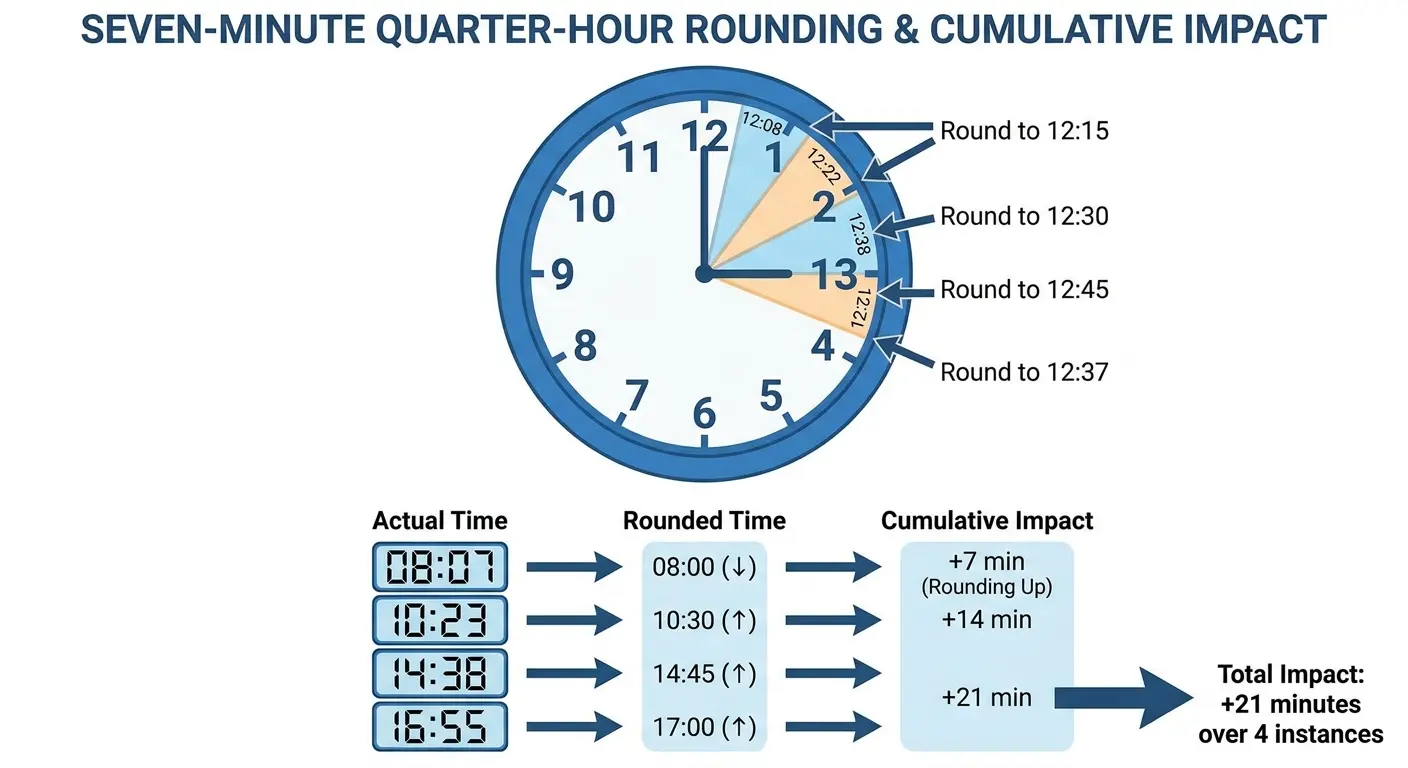
Federal law allows employers to round time entries to the nearest quarter hour, as long as the rounding is neutral over time. Sounds fair.
An employee clocks in at 8:07 AM? Round to 8:00 AM. Clocks in at 8:08 AM? Round to 8:15 AM. The math works out, right?
Except it doesn't, not in practice.
Employees learn the system. They know that clocking in at 8:07 gets rounded in their favor. So the distribution of clock-in times isn't random. It clusters around the advantageous side of rounding thresholds. Your time card calculator applies the rules correctly, but the behavioral response to those rules skews the results.
Multiply this across dozens of employees and hundreds of pay periods. The minutes add up to hours. Hours add up to real money. And because the rounding is technically compliant, it's invisible in your reports.
|
Rounding Method |
Employee Clocks In |
Time Recorded |
Minutes Gained/Lost Per Day |
Annual Impact (250 workdays) |
|---|---|---|---|---|
|
Nearest Quarter Hour |
8:07 AM |
8:00 AM |
+7 minutes |
+29.2 hours |
|
Nearest Quarter Hour |
8:08 AM |
8:15 AM |
-8 minutes |
-33.3 hours |
|
Round Down (employer favor) |
8:07 AM |
8:15 AM |
-8 minutes |
-33.3 hours |
|
Round Down (employer favor) |
8:13 AM |
8:15 AM |
-2 minutes |
-8.3 hours |
|
No Rounding |
8:07 AM |
8:07 AM |
0 minutes |
0 hours |

When Rounding Becomes a Systematic Shift
Some time card calculators default to rounding rules that favor the employer. Always round down for clock-ins, always round up for clock-outs. It's not illegal if it's consistent and documented. But it's also not neutral.
An employee working 8:03 AM to 5:02 PM gets recorded as 8:15 AM to 5:00 PM. That's 17 minutes of work you didn't pay for. Do that daily for a year and you've shorted that employee roughly 70 hours. That's nearly two full work weeks of unpaid labor.
Most businesses aren't doing this maliciously. They're using default settings in their timesheet calculator without questioning what those defaults actually do. The system is working exactly as configured. The configuration just happens to systematically transfer value from employees to employers.
The Rounding Strategy No One's Testing
Here's what almost no one does: audit their rounding rules against actual outcomes.
Pull a year of time data. Calculate total hours worked using raw timestamps. Then calculate using your rounding rules. Compare the difference.
Rounding Audit Checklist:
-
Export one full year of raw timestamp data from your time card calculator
-
Calculate total hours using exact clock-in/clock-out times (no rounding)
-
Calculate total hours using your current rounding rules
-
Determine the difference in total hours between the two calculations
-
Multiply the hour difference by your average hourly rate to determine dollar impact
-
Divide total lost/gained hours by number of employees to identify per-employee impact
-
Review punch time distribution to identify clustering around rounding thresholds
-
Document findings and adjust rounding rules if bias exceeds 2% in either direction
-
Schedule quarterly reviews to ensure rounding remains neutral over time
If your rounding is truly neutral, those numbers should be nearly identical. If there's a significant gap, your rounding rules are biased. Your free time card calculator will happily enforce biased rules. It's not making ethical judgments. It's following instructions.
This matters for compliance (the Department of Labor absolutely will check this in an audit) and for workforce morale. Employees notice when they're consistently losing minutes to rounding. They might not articulate it as a rounding issue, but they feel it as unfairness. That erodes trust in ways that show up in retention and engagement, not in your time card reports.

The Overtime Miscalculation That's Hiding in Plain Sight
When One Employee Has Multiple Pay Rates
Your time card calculator handles overtime math perfectly when an employee has one hourly rate. Work more than 40 hours, get time-and-a-half. Simple.
But what happens when an employee works multiple roles with different rates in the same week?
A restaurant employee works 25 hours as a server at $15/hour and 20 hours as a bartender at $20/hour. That's 45 hours total, so 5 hours of overtime. But at what rate?
Most time card calculators will apply overtime to whichever role the employee was doing when they crossed the 40-hour threshold.
That's wrong.
I know a hospitality group that discovered they'd been miscalculating overtime for cross-trained employees for three years. An employee who worked 30 hours in housekeeping at $14/hour and 15 hours in front desk at $18/hour was receiving overtime calculated at $18/hour (the rate they were working when they hit 40 hours). The correct blended rate calculation should have produced a regular rate of $15.33/hour, with overtime at $23.00/hour. They were overpaying by $2/hour on overtime for these employees. Across 40 affected employees over three years, the miscalculation cost them around sixty grand.
Federal law requires calculating a weighted average (or "blended rate") across all hours worked, then applying the overtime multiplier to that blended rate. Very few time card calculators do this automatically. The ones that do often require manual configuration that's easy to screw up.
The Blended Rate Formula That Breaks Payroll
Calculating blended overtime rates correctly requires:
-
Tracking which hours were worked in which role
-
Calculating total regular pay across all roles
-
Dividing by total hours to get the blended regular rate
-
Applying the 0.5x multiplier (not 1.5x, because you already paid the base rate) to overtime hours
Your timecard calculator might do some of this. Probably not all of it. And definitely not in a way that accounts for state-specific variations (some states require daily overtime, not just weekly, which adds another layer of complexity to blended rate calculations).
This is where businesses get into expensive trouble. Miscalculating overtime for even a handful of employees over a few years can result in back pay obligations that run into six figures. The timesheet calculator was working fine. The configuration wasn't.

Why Generic Solutions Fail the Multi-Rate Test
Most time card calculators are built for the common case: one employee, one rate, straightforward overtime. They can technically handle multiple rates, but it's not what they're optimized for. The UI makes it clunky. The reporting doesn't surface potential calculation errors. The audit trail doesn't clearly show how blended rates were derived.
You end up with a system that's technically capable but practically unreliable for anything beyond simple scenarios.
And businesses don't realize this until they're facing a wage claim or a DOL audit.
The solution isn't necessarily a different time card calculator. It's understanding what your current one can't do and building processes around those gaps. Manual verification for multi-rate employees. Regular audits of overtime calculations. Clear documentation of how blended rates are computed. These aren't features your calculator provides. They're practices you implement because your calculator can't be trusted to get it right automatically.
Break Deductions and the Fifteen-Minute Lie
The Automatic Deduction That Doesn't Match Reality
Many time card calculators automatically deduct a 30-minute lunch break for any shift over a certain length. Employee works 8:00 AM to 5:00 PM? The system records 8.5 hours of work, automatically subtracting the half-hour lunch.
This works great when employees take that full 30-minute break.
But what percentage of your workforce is genuinely taking uninterrupted 30-minute lunches? In retail, restaurant, healthcare, or any customer-facing role, breaks get shortened or skipped entirely based on operational needs.
Your online time card calculator doesn't know this. It deducts the break anyway. You're not paying for time that was worked. The employee has no recourse because the timesheet shows they took a break, even though they didn't.
When Break Compliance Becomes Break Fiction Some states require employers to provide breaks. Fewer states require employees to take them. Your time card calculator enforces the deduction (that's the easy part) but can't enforce the actual break-taking. This creates a documentation problem that becomes a liability problem. Your records show breaks were taken. Your employees know they weren't. When that gap gets exposed (through a wage claim, an employee complaint, or a labor audit), your time card data becomes evidence against you rather than for you. Break Verification Protocol: Look, I know nobody wants another checklist, but if you're auto-deducting breaks, you need to make sure they're actually happening. Document Break Policy ClearlySpecify break duration and timing requirementsDefine what constitutes an uninterrupted breakClarify whether breaks are paid or unpaidImplement Verification MechanismsGet supervisors to actually confirm breaks happenedUse break room sign-in logs for high-compliance environmentsEnable employee attestation in free time card calculator for each breakCreate Exception Reporting ProcessLet employees report missed or shortened breaks immediatelyBuild workflow for supervisor approval of break adjustmentsFlag patterns of frequent break exceptions for investigationAudit Break Compliance MonthlyCompare automatic deductions against exception reportsTalk to employees in roles with high break-skip ratesAdjust staffing if operational demands prevent break-taking The fix isn't technical. It's operational. If you're automatically deducting breaks, you need systems to ensure breaks are happening. Supervisor sign-offs. Break room logs. Something beyond trusting that the time card calculator's deduction reflects reality.
The Fifteen-Minute Break That's Seven
Paid 15-minute breaks are standard in many industries. Your time card calculator doesn't track them (they're paid, so there's no deduction). But are employees getting 15 minutes?
Walk time to and from the break area eats into that time. Waiting for a bathroom to open.