19 Blogging Topics for Beginners That Actually Get Read (Instead of Just Published)
Blogging Topics for Beginners compared by features, pricing, strengths, drawbacks, and best use case.

Blogging topics for beginners are content ideas that solve real reader problems while building sustainable growth. They work because they focus on what your audience needs, create connected post sequences instead of random articles, and target search terms you can actually rank for. The best topics sit where your knowledge meets reader questions in spaces your competition hasn’t dominated yet.
Table of Contents
- Your First Post Shouldn’t Be “About Me”
- Comment Replies Are Content, Not Customer Service
- Publishing Dates Tell a Story You’re Not Controlling
- Your Niche Isn’t What You Write About
- Headlines Work Backwards From the Click
- Formatting Decisions Happen Before You Write
- Every Post Needs a Job
- The Subscribe Button Placement Question Nobody Asks
- You’re Not Writing Posts, You’re Building Sequences
- Categories Are Navigation, Tags Are Discovery
- Your Readers Don’t Scroll the Same Way You Do
- Short Posts Aren’t Easier, They’re Harder
- Images Cost You Readers When They Slow Your Load Time
- The Content Calendar Myth
- You Don’t Need More Topics, You Need Better Buckets
- Analytics Show You What Happened, Not What to Do Next
- SEO Doesn’t Start After You Hit Publish
- Your Blog’s Voice Exists in the Edits, Not the First Draft
- The Unsubscribe Link Is a Feature, Not a Failure
TL;DR
- Your first post should solve a problem, not introduce yourself to an audience that doesn’t exist yet
- Finding the best niche for blogging for beginners means picking where your knowledge meets search demand in spaces with weak competition
- Comment sections and email replies create reusable content that answers real questions from actual readers
- Formatting decisions made before drafting improve readability more than editing after you’ve written
- Publishing frequency matters less than building post sequences that guide readers through connected ideas
- Analytics tell you what happened, but understanding reader intent shows you what to create next
- SEO isn’t something you add after publishing, it’s research that shapes what and how you write
The Thing Nobody Talks About
Most blogging advice tells you to pick a topic and hit publish.
I’m not doing that here.
Here’s what every guide misses: they act like each post exists in a vacuum. Write consistently, optimize for search, promote on social media. All true. All useless without the foundation that makes any of it work.
You can write three posts a week and optimize till your eyes bleed, but if your structure is broken, none of it matters.
This isn’t about tactics. It’s about the decisions that happen before you ever type a word. Things like how you organize categories, whether you’re building sequences or just publishing random posts, what job each piece of content is supposed to do.
I spent six months publishing whatever I felt like writing before I realized I was building nothing.
So let’s talk about what actually matters before you write post one.

Getting Your Head Right Before You Start
The decisions you make before your first post create patterns that either build momentum or create friction for months. Most people don’t realize they’re making permanent choices in temporary moments.
1. Nobody Cares About Your “About Me” Page (Yet)
I get it. You want to introduce yourself, explain why you’re starting this blog, share your journey.
Problem: you’re introducing yourself to an empty room.
Nobody’s there yet to care about your story. When I started blogging, I spent two weeks writing an “About Me” post. Guess how many people read it? Maybe five. Know how many subscribed?
Zero.
Better approach? Solve a problem your target reader has right now. Your first post should demonstrate value, not request trust. The about page exists for context after someone decides you’re worth following.
If you’re blogging about productivity, your first post should be something like “How to Process Email in 15 Minutes” or “The Two-List System I Use to Actually Get Things Done.” Not your productivity journey.
First posts that work: how-tos, frameworks, mistakes-to-avoid lists, curated resources. Your story becomes interesting after you’ve proven useful.
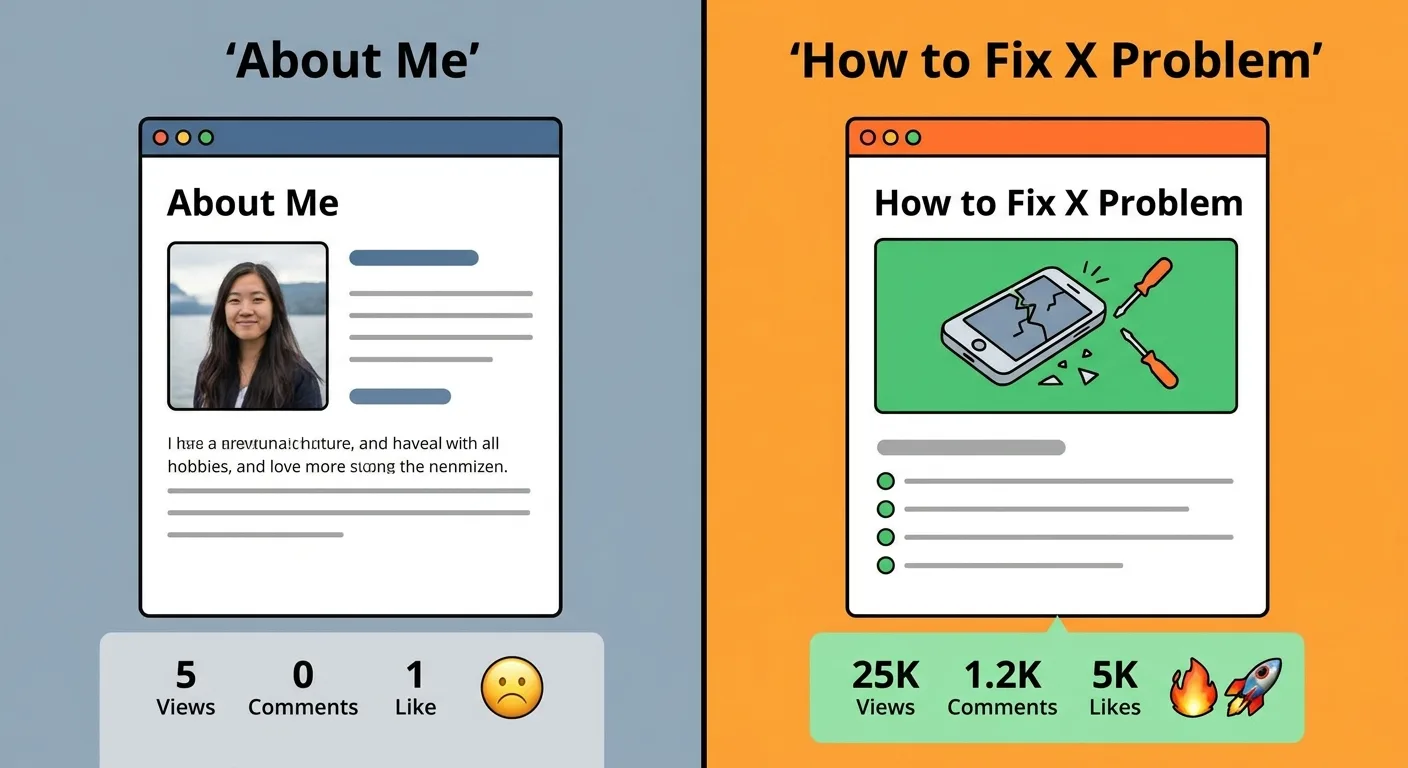
Personal blogs operate differently, but most beginners want audience growth. That requires leading with value. You can share your journey in post three or five or ten. By then, people will care because you’ve already helped them.
Value first, story later.
2. Comment Replies Are Content, Not Customer Service
You probably see comments as engagement metrics or customer service obligations.
Here’s the shift: every question in your comments or inbox is a content gap you haven’t filled.
If someone asks for clarification, your post didn’t explain it clearly enough. If someone asks for the next step, you’re missing a follow-up post. If someone challenges your point, you’ve found controversy worth exploring.
I keep a running document of questions and objections from comments, emails, DMs. Each question becomes a headline candidate or section in a future post. Content strategist Jacquie Budd emphasizes that coming up with blog post ideas is one of the biggest challenges for both bloggers and business owners, noting that understanding your audience’s questions matters more than anything else.
This gives you endless topic ideas grounded in real needs, not guesses.
A comment asking “but what if I don’t have time for this?” becomes a post on time-efficient implementations. Your audience literally tells you what to write next if you’re listening.
Side benefit: replying to comments by saying “great question, I’m writing a full post on this” creates anticipation and return visits. That’s how casual readers become regular readers.
3. Publishing Dates Tell a Story You’re Not Controlling
You’re probably ignoring what your publishing dates say about you.
Three posts in one week, then nothing for two months, then five posts in three days? That signals you’re not committed, or you’re batch publishing without thinking it through.
I published eight posts in two weeks once, then nothing for three months. When I finally came back, I’d lost what little momentum I had.
Readers check your recent posts to assess whether you’re still active. Irregular publishing creates doubt: will this blog exist when I come back?
You don’t need to publish daily or even weekly, but you need some kind of pattern people can detect. Honestly? It’s better to publish monthly on schedule than randomly whenever you feel like it.
If you write in batches, schedule posts to spread them out evenly. Don’t rush posts just to look active.
Your publishing dates signal professionalism and reliability. Readers won’t consciously think about this, but they’ll feel it when deciding whether to subscribe.
Which one builds trust?
4. Your Niche Isn’t What You Write About
Common question: “What’s the best niche for blogging for beginners?”
Common wrong answer: pick something you’re passionate about.
Here’s the truth: your niche is where what you know overlaps with what people search for, in spaces where competition is weak enough for you to rank.
“Travel” isn’t a niche, it’s a category. “Budget travel for remote workers in Southeast Asia” is a niche. “Fitness” isn’t a niche. “Strength training for desk workers with limited equipment” is.
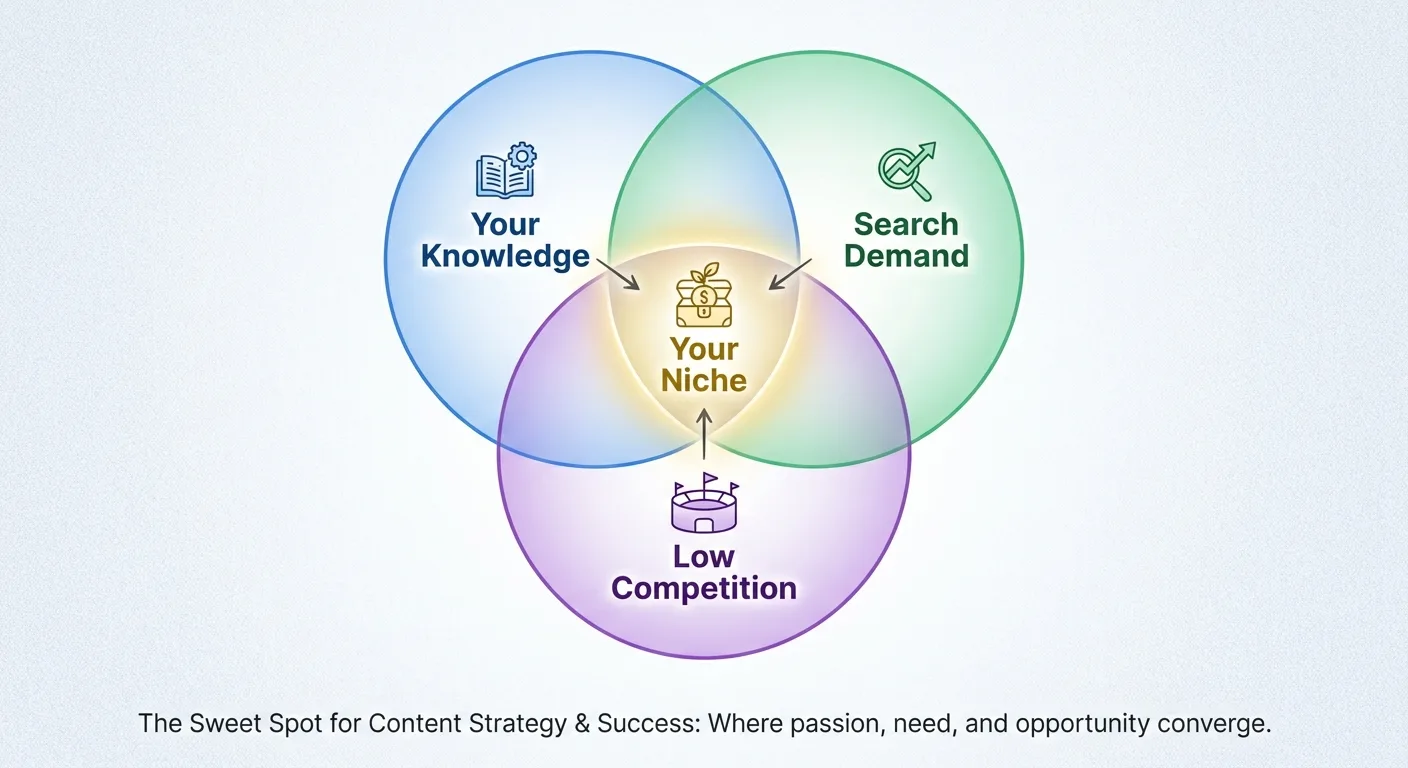
The specificity paradox: narrowing your focus expands your authority. Test if your niche is defined enough by listing 50 post topics without repeating yourself or going too broad. Can you describe your target reader in one sentence?
Your niche isn’t permanent. You can expand after you establish authority. Many successful blogs start hyper-focused and broaden once they have audience trust. Avoid the “I don’t want to limit myself” trap. Breadth early creates invisibility.
Your niche defines your SEO approach, content calendar, and how you’ll make money. It’s easier to niche down from passion than to build passion around a profitable niche, but both work.
The key: specificity gives you a place to stand.
Once you own that space, you can expand into adjacent territories. But you need the foothold first. If you’re still figuring out the technical side, understanding how to start a blog ensures your niche decisions align with what your platform can actually do.
Writing Posts That Don’t Disappear
5. Headlines Work Backwards From the Click
Most beginners write headlines that describe their post: “My Thoughts on Email Marketing.”
Your headline should trigger a micro-decision: is this worth my time right now?
Work backwards: what would make someone stop scrolling? Formulas that work: specific number + outcome + qualifier (“7 Email Subject Lines That Doubled My Open Rates in SaaS”). Or: common mistake + correction (“You’re Segmenting Your List Wrong, Here’s Why”). Or: question that surfaces pain (“Why Do Your Best Posts Get the Least Traffic?”).
The headline’s job isn’t to summarize, it’s to create curiosity with a payoff promise.
Test: does your headline work if someone sees only the headline with no other context?
Compare these: “How to Improve Your Writing” versus “How to Cut 30% of Your Draft Without Losing Meaning.” The second version makes you more confident you’ll get something actionable.
Write 10 options per post and choose the strongest. Read your headlines in a list view (like search results or a social feed) to see them as readers do.
Banned words in beginner headlines: “ultimate,” “epic,” “amazing.” They promise too much and deliver credibility loss. Your headline should be specific enough that someone knows exactly what problem you’re solving before they click.
6. Formatting Decisions Happen Before You Write
Most beginners write first, format later (if at all).
Flip it: decide on your formatting structure before you draft.
Questions to answer in planning: Where will subheadings fall? Will you use bullet points or numbered lists? Where will examples appear? Will this post have a summary box, a comparison table, or pull quotes?
Making these decisions first shapes how you write, not just how you present. Knowing you’ll use a three-column comparison table means you’ll research with that structure in mind.
Readers scan before they read. Your formatting creates the scan path. What works: heading every 200-300 words, short paragraphs (2-4 sentences), white space. Use bold for key phrases (not entire sentences), use lists when presenting more than two related points.
Formatting isn’t decoration, it’s what determines whether someone reads paragraph two.
Create a template for common post types (how-to, listicle, case study, opinion) so you’re not reinventing structure every time.
Consistency in formatting builds reader familiarity and trust. Don’t over-format, though. Too many visual elements create distraction, not clarity.
7. Every Post Needs a Job
Beginners write posts to “provide value” without defining what the post should accomplish.
Assign each post a job: awareness, consideration, conversion, retention.
Awareness posts introduce concepts, answer basic questions, attract cold traffic (top-of-funnel). Consideration posts compare options, explain methodologies, help readers evaluate solutions (middle-of-funnel). Conversion posts include product reviews, case studies, tutorials using your tool or service (bottom-of-funnel). Retention posts offer advanced tips, community spotlights, behind-the-scenes content (existing audience).
Each job type has different calls-to-action. Awareness posts might CTA to subscribe, conversion posts CTA to book a call or buy. The mistake: treating every post the same way with the same CTA.
A beginner SEO post (awareness) shouldn’t push a consultation. It should offer a lead magnet or newsletter signup. An advanced SEO case study (conversion) can and should pitch services.
Knowing a post’s job shapes your keyword target, internal linking, and promotion approach. Your blog should have a mix of job types, not just awareness content. Many beginners write only awareness posts and wonder why they’re not converting.
Audit your last 10 posts: what job did each one do? Is the mix intentional or accidental?
| Post Type | Primary Job | Typical CTA | Example Topic |
|---|---|---|---|
| Awareness | Introduce concepts, attract cold traffic | Newsletter signup, lead magnet | “What Is Keyword Research?” |
| Consideration | Help evaluate options and approaches | Resource download, comparison guide | “Paid vs. Organic SEO: Which to Prioritize First” |
| Conversion | Drive specific business action | Consultation booking, product purchase | “How We Increased Client Traffic 300% in 90 Days” |
| Retention | Deepen engagement with existing audience | Community participation, advanced content | “Advanced Link Building Tactics for Experienced Bloggers” |
Building a Structure That Scales
8. The Subscribe Button Placement Question Nobody Asks
Most beginners put a subscribe form in the sidebar or footer and forget about it.
The question nobody asks: at what point in the reading experience has someone decided you’re worth following?
Answer: usually not before they’ve read anything.
Header forms (above your first paragraph) ask for commitment before delivering value. More effective: mid-content or end-of-content forms, after you’ve proven the post is useful.
Best practice: multiple placement options with different contexts. Sidebar form with simple value prop for scanners. Mid-content upgrade offer tied to the post topic (“Want the checklist version of this? Subscribe here.”). End-of-post form for people who read the whole thing. Exit-intent popup for people about to leave (use sparingly, they’re annoying but they work).
Test different value propositions. “Subscribe for weekly tips” versus “Get the 15-page SEO checklist.” The stronger the specific incentive, the better the conversion.

Track which placement and message converts best, then optimize. Don’t make every post have the same CTA. Match the offer to the post topic when possible.
A post on email marketing should offer an email template, not a generic newsletter signup. The goal isn’t just collecting emails. It’s collecting emails from people who know what they’re signing up for.
9. Stop Writing Random Posts, Build a Sequence
You’re thinking in individual posts. Experienced bloggers think in sequences.
A sequence: a series of posts that build on each other, guiding a reader from beginner to advanced.
Example sequence: “What Is SEO?” → “How to Do Keyword Research” → “How to Optimize a Blog Post” → “Advanced Link Building Tactics.” Each post links to the next logical step.
Benefits: keeps readers on your site longer, positions you as a comprehensive resource, improves internal linking for SEO.
How to build sequences: identify your core topics, map out beginner to advanced progression, write posts to fill gaps.
You don’t need to write them in order. You can write advanced posts first and backfill beginner content. Internal linking approach: each post should link to 2-4 related posts (previous step, next step, related concept). Use contextual anchor text that tells readers why they should click.
Weak: “Check out this post on keyword research.”
Strong: “If you’re not sure which keywords to target, start with this keyword research framework.”
Sequences also help with content planning. Once you have a sequence mapped, you have a ready-made content calendar. Readers appreciate clear learning paths. They don’t want to hunt for the next logical post.
Create a “start here” page that outlines your sequences for new visitors. Sequences turn casual readers into loyal followers because they see you have depth, not just scattered posts.
10. Categories Are Navigation, Tags Are Discovery
Beginners use categories and tags interchangeably or randomly. They serve different purposes: categories are your main navigation buckets, tags are cross-topic connectors.
Categories should be broad and limited (5-8 maximum). If you have 20 categories, you don’t have categories, you have chaos. Think of categories as your blog’s table of contents: SEO, Content Marketing, Email Marketing, Analytics. Every post should fit into one (occasionally two) categories.
Tags are specific and flexible: “keyword research,” “A/B testing,” “case study,” “beginner tips.” Tags connect posts across categories. A “beginner tips” tag might include posts from SEO, email, and content categories.
Tagging helps readers find related content they wouldn’t discover through categories alone. The mistake: using tags as a dumping ground for every possible keyword. If a tag has only one or two posts, it’s not useful for discovery. Delete it or combine it with something else.
Your category structure should be obvious to a new visitor. Your tag structure helps engaged readers go deeper. Categories affect your site’s SEO structure (they create URL hierarchies and sitemaps). Tags are more flexible.
Audit your categories and tags quarterly: are they still serving their purpose or creating clutter?
Test: can a first-time visitor figure out what your categories mean without clicking on them? If your categories are too clever or vague (“Musings,” “Thoughts,” “Stuff I Like”), they’re not functional navigation.
| Element | Purpose | Ideal Number | Example |
|---|---|---|---|
| Categories | Main navigation structure; broad topic buckets | 5-8 | SEO, Content Strategy, Analytics, Email Marketing |
| Tags | Cross-category discovery; specific themes | Flexible, but each should have 3+ posts | beginner tips, case study, tools review, quick wins |
11. Your Readers Aren’t Actually Reading (Here’s What They’re Doing)
You read your own posts linearly, start to finish, because you wrote them.
Most readers scan first, then decide whether to read.
Eye-tracking research: readers scan in an F-pattern (headline, first few lines, down the left side, occasionally across for subheadings). What this means: your first 100 words and your subheadings carry disproportionate weight. If readers don’t find value signals in those first moments, they bounce.
Value signals: specific numbers, clear benefits, recognition of their problem, proof you understand their context. Hook them in the intro with a specific promise, then deliver on it immediately in your first section.
Subheadings should be descriptive enough to tell the story alone. Test: read only your subheadings. Do they communicate the post’s core value?
Most beginners write generic subheadings: “The Benefits,” “Why It Matters,” “Getting Started.”
Better: “Three Traffic Sources You’re Ignoring,” “Why Your Best Content Ranks Worst,” “The First Thing to Optimize (It’s Not Keywords).”

Use the first sentence of each section to deliver a mini-payoff, not setup.
Weak: “There are several reasons why this approach works.”
Strong: “This approach cuts research time by 40% because it eliminates low-value keywords upfront.”
Online readers are impatient and distracted. Design for scanning, and the readers who commit will read deeply. Your job isn’t to force people to read every word. It’s to make every word earn the next word.
12. Short Posts Are Actually Harder to Write
Common advice: start with short posts to build momentum and confidence.
Reality: short posts (500-800 words) rarely rank, rarely satisfy reader intent, and rarely get shared.
Why? They usually don’t answer the question completely.
Short posts often create more questions than they answer, frustrating readers. Longer posts (1,500+ words) perform better not because of length but because they’re comprehensive. Search engines prioritize posts that fully satisfy search intent.
I used to think short posts were easier. Then I tried to write a valuable 600-word post. It took longer than writing 1,500 words because every sentence had to count.
Beginners often write short posts because they don’t research deeply enough or don’t know what else to say. Better approach: write until you’ve fully answered the question, then edit for clarity (not length). Some topics genuinely need only 800 words. Most need more.
Don’t pad posts to hit a word count, but don’t artificially constrain them either. If you find yourself writing a short post, ask: have I covered objections, examples, caveats, next steps, and context? If not, you’re not done.
The goal isn’t length, it’s completeness.
A complete 1,200-word post beats an incomplete 2,000-word post every time. Readers don’t count words. They assess whether you solved their problem.
13. Images Cost You Readers When They Slow Your Load Time
Images make posts more engaging and break up text. They also slow down your site if not optimized, and slow sites lose readers.
Mobile users on slower connections abandon pages that take more than 3 seconds to load.
The mistake: uploading images straight from your camera or stock site without compression. A 3MB header image might look crisp, but it’s killing your load time.
I killed my mobile traffic for a month because I didn’t compress images. My host sent me an angry email about bandwidth.
Practical optimization: compress images before uploading (aim for under 200KB per image). Tools: TinyPNG, ImageOptim, or WordPress plugins like ShortPixel or Smush. Use appropriate dimensions: if your blog content width is 800px, don’t upload a 4000px image.
Lazy loading: configure your site to load images only as the reader scrolls to them (most modern themes support this). File format matters: JPG for photos, PNG for graphics with text, WebP for best compression (if your host supports it).
Alt text isn’t optional. It’s for accessibility and SEO (describe what the image shows, include keywords naturally).
Avoid decorative images that don’t add value. Every image should serve a purpose (illustrate a concept, show data, provide visual relief).
Screenshots of tools, data charts, and process diagrams add value. Generic stock photos of people smiling at laptops do not.
Balance: a completely text-only blog feels dense and uninviting, but 15 images in a 1,500-word post is overkill. Test your site speed regularly (Google PageSpeed Insights, GTmetrix). If images are flagged, optimize them.
Managing Your Blog Like a System
14. Content Calendars Are Overrated (There, I Said It)
You’ll see advice everywhere: “Create a content calendar and stick to it.”
Problem: rigid calendars create pressure that kills creativity and quality. Beginners often spend more time managing their calendar than writing.
Alternative: maintain a flexible topic backlog, not a dated schedule. Keep a running list of post ideas categorized by theme, priority, and reader stage (awareness, consideration, conversion). When you’re ready to write, pick the topic that fits your current energy and research capacity.
Some posts require deep research and interviews. Some you can write from existing knowledge. Forcing yourself to write a research-heavy post when you have limited time creates either missed deadlines or poor quality.
Having options lets you match task to available time.
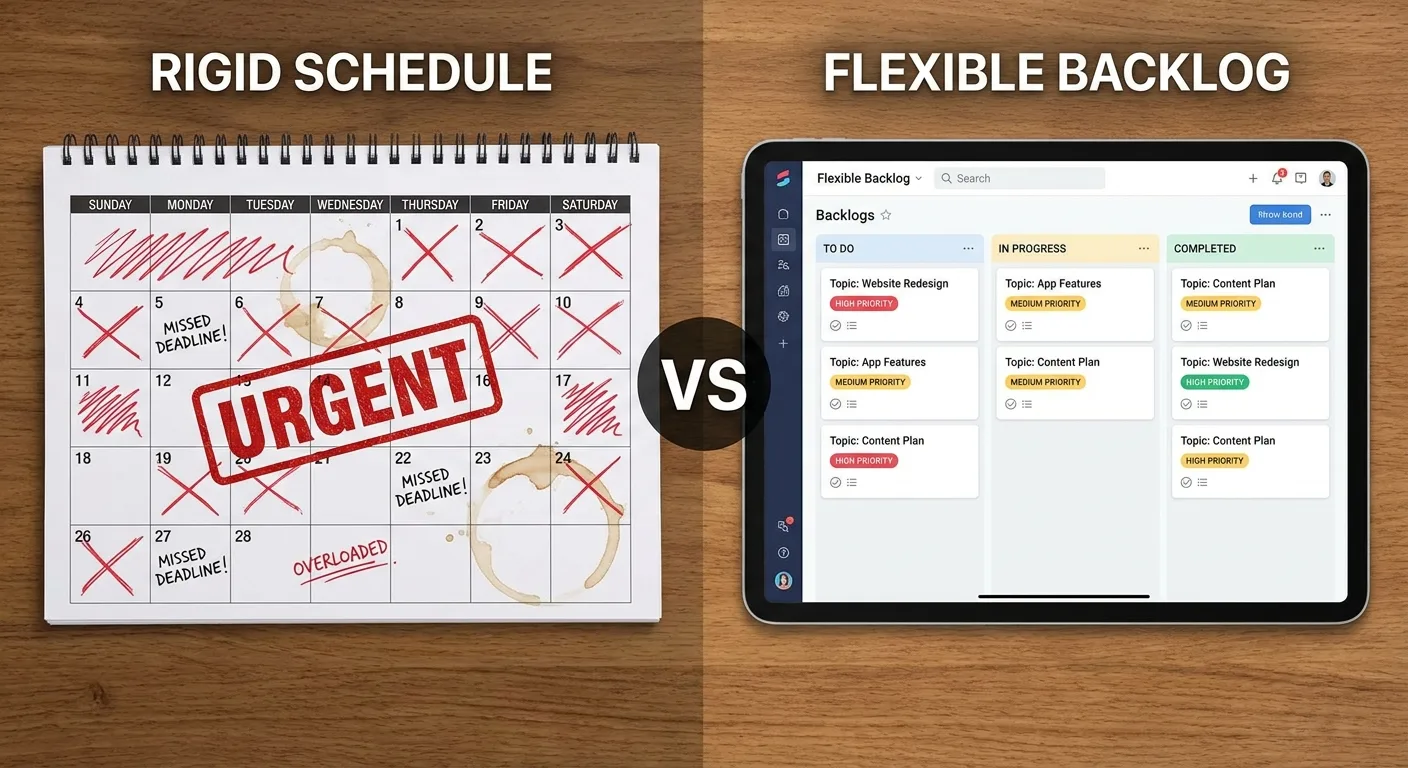
The value of calendars: they help you avoid gaps and ensure topic diversity. The trap of calendars: they turn writing into obligation rather than value creation.
Better system: set a publishing frequency (weekly, biweekly, monthly) but keep topic selection flexible within that window. Exception: if you’re building a sequence or launching a product, a calendar makes sense for coordinating related posts.
Most beginners quit blogging not because they run out of ideas but because the calendar becomes a source of stress.
Sustainability beats consistency.
Your backlog should include posts at different effort levels: quick wins, medium research, deep dives. This way you always have an appropriate option regardless of how much time you have.
15. You Don’t Need More Topics, You Need Better Buckets
Beginners create giant lists of random post ideas and wonder why they feel scattered.
Problem: 100 unrelated topics don’t build authority. They fragment it.
Solution: organize topics into 4-6 core themes (buckets), then brainstorm sub-topics within each. If you blog about freelancing, your buckets might be: Finding Clients, Pricing, Project Management, Productivity. Each bucket should have 15-20 potential posts (beginner, intermediate, advanced).
Benefits: you become known for specific areas, SEO improves through topic clustering, content planning becomes easier. When you sit down to write, you pick a bucket, then pick a post from that bucket.
This approach builds depth, not just breadth.
Readers are more likely to subscribe when they see you consistently cover themes they care about. Random topic jumping makes you look unfocused or desperate for traffic.
How to identify your buckets: look at your competitor’s content, survey your audience, analyze which of your posts performed best. Your buckets should align with your niche and reader needs, not just your interests.
Exercise: list every post idea you have, then group them into themes. The themes that have the most ideas are your natural buckets. If a post idea doesn’t fit any bucket, ask: is this really for my audience, or is it just interesting to me?
Outlier posts are fine occasionally, but your core content should reinforce your buckets. This structure also makes guest posting and partnerships easier because you can pitch yourself as “the person who writes about X.”
Finding blog topic ideas for students or any specific audience becomes easier when you organize around focused buckets rather than scattered interests.
Shallow coverage of 20 topics loses to deep coverage of 5 topics every time.
The People Also Ask box appears on more than 90% of Google search results pages, making it one of the most reliable sources for discovering what readers want to know within your topic buckets. Mine those questions and organize them into your established themes.
16. Analytics Show You What Happened, Not What to Do Next
Most beginners check analytics to see traffic numbers, feel good or bad, then close the tab.
Analytics become useful when you ask better questions.
Instead of “How much traffic did I get?” ask “Which posts attracted new readers versus engaged existing ones?” Instead of “What’s my bounce rate?” ask “Which topics make people read multiple posts?”
Look for patterns: do how-to posts perform better than opinion posts? Do listicles get more shares than case studies? Do certain topics attract links while others don’t?
High-traffic posts with low engagement signal a headline/content mismatch (clickbait problem). Low-traffic posts with high engagement signal poor promotion or SEO, not poor content.
Identify your top 5 posts by traffic, then check: are they all on the same theme? That’s your proven strength. Double down. Check time-on-page: posts with above-average time deserve follow-ups or expansions.
Check exit pages: if readers leave after certain posts, those posts either fully satisfied them (good) or disappointed them (bad). Context matters.

Use analytics to validate hunches, not to dictate every decision. Your most popular posts aren’t always your best posts. They’re just your most visible ones. Sometimes a less-trafficked post converts better or attracts higher-quality readers.
Set up goals beyond traffic: newsletter signups, contact form submissions, product clicks. Traffic is a vanity metric without conversion context.
Review analytics monthly, not daily. Daily checks create noise and anxiety without actionable insight.
17. SEO Doesn’t Start After You Hit Publish
Beginners write first, then try to “add SEO” by sprinkling keywords and writing meta descriptions.
That’s backwards.
SEO should inform what you write and how you structure it.
Start with keyword research: what are people searching for related to your topic? Use tools like Ubersuggest, AnswerThePublic, or Google’s autocomplete to find real queries.
The search query reveals intent: are they looking for definitions, comparisons, tutorials, or reviews? Match your post format to search intent (informational, navigational, commercial, transactional).
“What is keyword research” wants a definition and explanation. “Keyword research tools” wants a comparison or list.
Choose a primary keyword and 3-5 related terms. Weave them naturally into your headline, subheadings, and body. Natural integration beats keyword stuffing every time. Search engines penalize awkward repetition. They reward comprehensive coverage of a topic.
Internal linking is SEO: link to your related posts using descriptive anchor text. External linking to authoritative sources signals credibility and helps search engines understand your context.
Meta description: write a 150-160 character summary that includes your primary keyword and compels clicks. URL structure: keep it short, include your primary keyword, remove filler words.
Good: /keyword-research-beginners/
Bad: /how-to-do-proper-keyword-research-for-beginners-complete-guide/
Image file names and alt text: rename “IMG_1234.jpg” to “keyword-research-process.jpg” before uploading.
SEO isn’t a one-time checklist. It’s ongoing research and optimization. The best SEO is comprehensive, well-structured content that genuinely answers what people searched for.
18. Your Blog’s Voice Exists in the Edits, Not the First Draft
Beginners publish first drafts, then wonder why their writing feels generic.
Your voice emerges when you edit with intention. First drafts capture ideas. Edits create personality.
What to cut: filler phrases (“in order to” becomes “to”), hedge words (“I think,” “maybe,” “perhaps”), redundancies. What to add: specificity (replace “a lot” with an actual number), conversational asides, contractions.
Read your draft aloud. If it sounds stiff or formal (and that’s not your brand), loosen it. If it sounds too casual or rambling, tighten it.
Voice consistency matters: don’t switch from casual to academic mid-post unless it’s intentional. Your voice should match your audience’s expectations and your brand positioning.
A corporate blog for executives has a different voice than a lifestyle blog for college students.
Common voice problems: trying to sound “professional” by using jargon, trying to sound “relatable” by overdoing slang.
Authenticity beats performance. Write how you’d explain the concept to a friend (adjusted for context).
Study writers whose voice you admire. Notice their sentence rhythms, word choices, paragraph lengths. You’re not copying them. You’re learning techniques.
Voice develops over time. Your 50th post will sound more confident than your 5th. Don’t delete your early posts out of embarrassment. They show growth.
Editing for voice includes: cutting the boring parts, amplifying your opinions, adding examples that reflect your perspective. Your voice is what makes you different from the 500 other blogs on the same topic.
If your post could have been written by anyone, it’s not done yet.
19. The Unsubscribe Link Is a Feature, Not a Failure
Beginners panic when someone unsubscribes. They see it as failure or rejection.
Reframe: unsubscribes clean your list of people who weren’t engaged anyway.
An email list of 1,000 engaged readers beats a list of 5,000 unengaged ones. Why? Open rates, click rates, and deliverability all improve with engaged audiences.
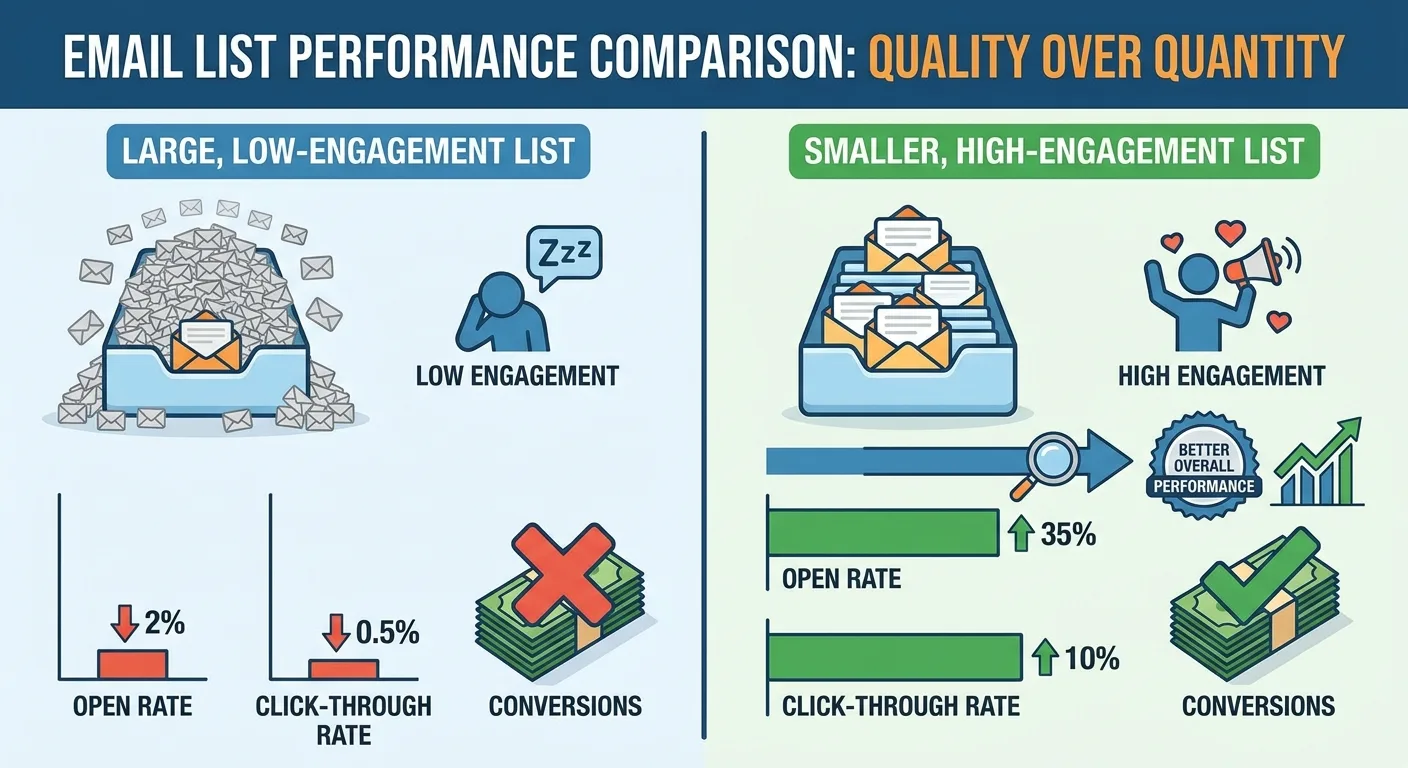
Unengaged subscribers hurt your sender reputation. Email providers notice low engagement and route your emails to spam.
People unsubscribe for reasons that have nothing to do with your content quality: inbox overload, changed interests, life transitions. Making it easy to unsubscribe builds trust. Hiding the link creates resentment.
The readers who stay are the ones who genuinely want to hear from you. Those are the readers who convert, share, and provide valuable feedback.
Track unsubscribe rate as a health metric: a 2-5% unsubscribe rate after each email is normal. A sudden spike suggests a problem: did you change sending frequency? Did a post miss the mark? Did you accidentally send twice?
Use unsubscribes as feedback: if a particular topic causes mass unsubscribes, that topic might not align with your audience’s expectations.
Strategy: occasionally send polarizing or niche content. It filters your list toward your true audience. Better a smaller, aligned list than a larger, mixed one.
Include an unsubscribe link in every email (it’s also legally required in most jurisdictions). Offer a “reduce frequency” option as an alternative to unsubscribing. Some people want your content, just less often.
The goal isn’t to hoard email addresses. It’s to build a community of readers who care about what you create.
When You Need More Than Tips
These decisions compound over time, but implementing them while maintaining publishing momentum creates friction most beginners don’t anticipate.
You’re balancing content quality, SEO research, audience growth, and technical optimization simultaneously. Many new bloggers reach a point where the approach is clear but the execution bandwidth isn’t there.
The Marketing Agency works with businesses that need content built on systems, not guesswork. We handle the research depth, technical optimization, and sequencing that turns blogs into measurable growth channels. If you’re building a blog that’s expected to drive leads or establish authority (not just exist), we can map the structure and execute the pieces that require specialized knowledge.
That’s not a pitch to outsource everything. Most of what we’ve covered here, you can implement yourself. But when blogging shifts from side project to business asset, having a team that treats it as infrastructure rather than content production changes the return.
Frequently Asked Questions
What are the best blogging topics for beginners to start with?
The best blogging topics for beginners sit where your knowledge meets search demand in spaces with weak competition. Start with problem-solving content that demonstrates your expertise immediately: how-to guides, framework breakdowns, mistake lists, or curated resources. Avoid broad topics where established sites dominate. Instead, pick hyper-specific angles within larger categories. Your first five posts should prove value before asking readers to care about your journey.
How do I choose the best niche for blogging as a beginner?
Choose a niche by mapping three circles: what you know deeply, what people actively search for, and where competition is weak enough for you to rank. Test your niche specificity by listing 50 unique post topics without repeating yourself or going broad. If you can describe your target reader in one sentence and identify their specific problems, your niche is defined enough. You can always expand later, but starting too broad makes you invisible in search results and unclear to potential readers.
Should I follow a strict content calendar when blogging?
Rigid calendars often create more stress than structure for beginners. Instead, maintain a flexible topic backlog organized by theme, priority, and effort level. Set a consistent publishing frequency (weekly, biweekly, monthly) but keep topic selection flexible within that window. This approach lets you match your writing task to your available time and energy rather than forcing deep-research posts when you only have a few hours. Sustainability beats perfect consistency.
How long should my blog posts be as a beginner?
Write until you’ve fully answered the question, then edit for clarity rather than targeting a specific word count. Most topics require 1,500+ words to cover comprehensively, address objections, provide examples, and satisfy search intent. Short posts (500-800 words) rarely rank or fully satisfy readers because they create more questions than they answer. The goal isn’t length, it’s completeness. A thorough 1,200-word post outperforms an incomplete 2,000-word post every time.
When should I start worrying about SEO for my blog?
SEO should inform what you write before you draft, not something you add after publishing. Start with keyword research to understand what people search for and the intent behind those queries. Choose a primary keyword and related terms, then weave them naturally into your structure. Match your post format to search intent (definition, comparison, tutorial, review). SEO includes internal linking to related posts, descriptive URLs, optimized images, and external links to authoritative sources. It’s a research phase, not a post-publishing checklist.
Final Thoughts
Blogging as a beginner isn’t about finding the perfect topic or publishing schedule.
It’s about building systems that make consistency sustainable and execution possible.
The difference between blogs that fade after six months and blogs that become valuable assets comes down to decisions made early. How you organize topics, design reader pathways, assign jobs to posts, and integrate SEO into your research phase determines whether your effort compounds or scatters.
You don’t need to implement everything here immediately. Pick the three shifts that address your biggest current friction points. Maybe that’s moving from scattered topics to intentional buckets. Maybe it’s treating comments as content sources instead of engagement metrics. Maybe it’s reframing your niche from a topic to an intersection.
The tactics matter, but the structure underneath them matters more.
Build that foundation deliberately, and the tactical execution becomes significantly easier.
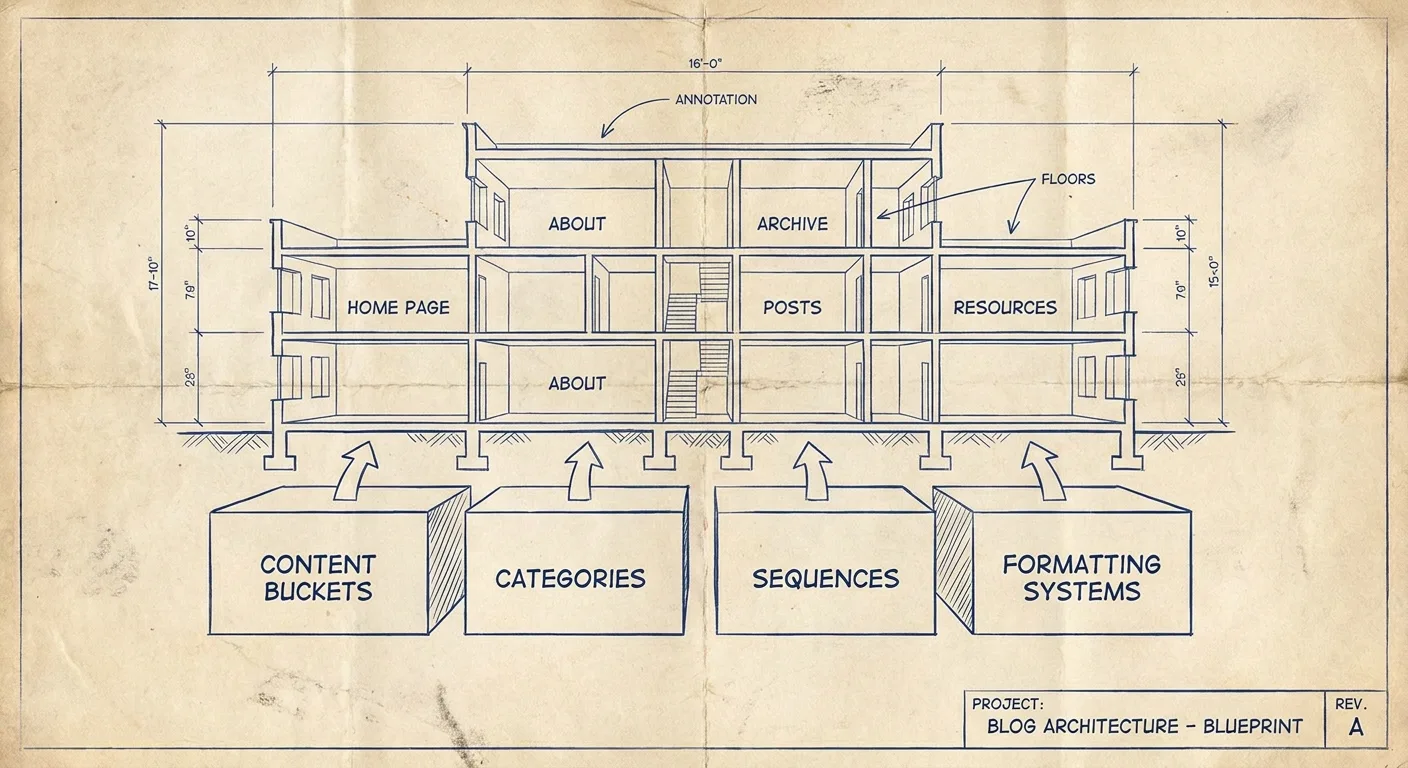
Most beginner blogging advice focuses on what to do. We’ve focused on how to think about what you’re building.
That perspective shift is what turns a blog from a content dump into an asset that grows.