ASP.NET Web Application Development: Why Most Agencies Ignore the Strategic Layer
ASP.NET web application development requires strategic planning. Learn why most agencies miss this critical layer.

ASP.NET web application development builds custom software solutions using Microsoft’s framework for business logic, user interfaces, and data management. Beyond technical execution, successful web application development in asp.net requires mapping code architecture to business outcomes, integrating with marketing systems from the data model stage, and structuring applications around user intent rather than feature lists. The framework delivers performance advantages, but strategic alignment determines whether applications move revenue metrics or simply meet technical specifications.
Here’s what nobody tells you about building web apps: the technical stack matters way less than you think. Teams spend months obsessing over ASP.NET architecture while ignoring whether anyone will actually use what they’re building.
Why? Devs (myself included) get excited about solving puzzles. Agencies make money selling frameworks. Neither group wants the awkward conversation about whether this will move your revenue needle. The result: apps that are a dream to maintain but a nightmare for users to figure out. ASP.NET Core performs faster than any popular web framework in independent TechEmpower benchmarks, but speed means nothing when applications ignore business objectives.
Kickoff meetings focus on framework selection and feature specs instead of success-determining questions. I’ve watched technically perfect MVC implementations fail to track trial-to-paid conversions because behavioral scoring wasn’t planned during data model design.
Table of Contents
- Why Business Alignment Breaks Before Code Gets Written
- The Marketing Integration Gap Nobody Talks About
- User Intent Mapping vs. Feature Lists
- Performance Metrics That Connect to Revenue
- Content Strategy as Application Architecture
- When Custom Development Makes Sense (And When It Doesn’t)
- Testing for Behavior, Not Just Functionality
- Deployment Choices That Affect Your Marketing Stack
- How We Approach Web Application Projects Differently
- Frequently Asked Questions
- Strategic alignment precedes technical architecture; most projects start backward with framework selection instead of business outcome mapping
- Marketing integration requires planning at the data model stage, not after launch, affecting how controllers expose behavioral events and user segmentation attributes
- User intent mapping shapes better application structure than feature brainstorming by focusing development on specific decision points rather than theoretical flexibility
- Performance choices directly impact conversion rates and acquisition costs when optimization efforts prioritize user-facing conversion paths over system-wide speed improvements
- Content strategy decisions belong in development planning because taxonomy, navigation structure, and personalization requirements affect database schemas and component architecture
- Testing should validate user behavior patterns and goal completion, not code functionality alone, to catch intent failures that unit tests miss
Why Business Alignment Breaks Before Code Gets Written
Dev shops that haven’t considered business outcomes reveal themselves immediately. Every project starts with framework selection, feature lists, and architecture diagrams. Business objectives get documented in a Google Doc somewhere, then ignored.
The disconnect happens because tech teams and business stakeholders speak different languages without anyone bridging the gap.
Development efficiency becomes the priority instead of user outcomes. Marketing teams inherit applications incompatible with their tools or unable to capture essential data. Revenue attribution fails when tracking wasn’t planned into the data model initially.
Last year we inherited a B2B SaaS customer portal with perfect ASP.NET MVC architecture, clean separation of concerns, and comprehensive unit test coverage. Three months post-launch, the marketing director called frustrated because they couldn’t track which features trial users engaged with before converting. The data model captured user actions without any behavioral scoring system to feed that data to HubSpot. Revenue attribution demanded a complete database schema revision and new API endpoints that initial architecture discussions should have addressed.
Evaluate potential savings using evidence relevant to your own costs and circumstances.

Beautiful applications fail when they don’t support the buyer’s journey stages. Strategy layer means mapping every technical choice back to a specific business outcome, not acknowledging business goals in project documentation and then forgetting about them.
| Where Projects Start | Where They Should Start |
|---|---|
| Framework selection discussions | Business outcome mapping sessions |
| Feature specification documents | User decision point analysis |
| Technical architecture diagrams | Data flow to marketing systems |
| Development timeline estimates | Conversion funnel integration requirements |
| UI/UX mockups | Behavioral tracking architecture |
| Testing strategy for code | Testing strategy for business metrics |
Framework discussions come later, after understanding what the application needs to accomplish and how success gets measured.
The Marketing Integration Gap Nobody Talks About
Marketing technology requirements rarely influence ASP.NET application architecture. Developers focus on business logic while marketing teams need behavioral data capture. The common pattern? Applications work perfectly yet can’t feed data to Salesforce, Marketo, or analytics platforms.
Integration becomes an expensive retrofit rather than a native capability. Event tracking demands planning at the data model and routing level. User identification across sessions requires architecture decisions beyond script tags.
API endpoints for marketing tools should inform controller design from the start, and authentication flows affect how you segment and personalize marketing campaigns. A SaaS application that can’t tell marketing which features convert trial users has a fundamental architecture problem, not a missing integration.
.NET 11 Preview 7 introduced in August 2026 includes new features across libraries, runtime, SDK, C#, ASP.NET Core, and Entity Framework Core. These updates include improvements to Microsoft.Extensions.AI with routing capabilities across models and providers, which matters for applications that need intelligent behavioral analysis and user segmentation at the infrastructure level.
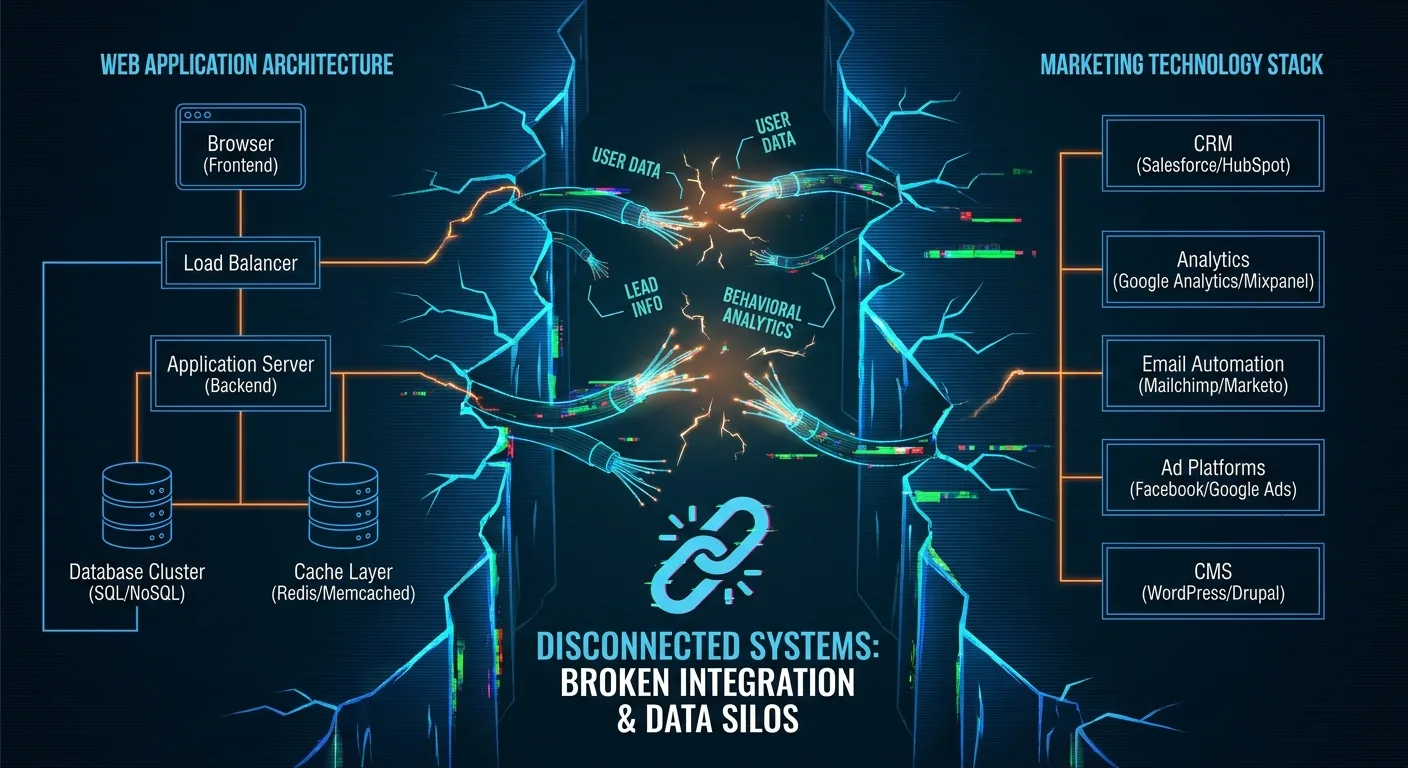
ASP.NET Core includes everything needed to build web apps, including Blazor for web UI, APIs for various clients, and real-time communication capabilities. Yet this framework rarely gets planned alongside the marketing technology stack that applications must support.
Marketing Integration Planning Checklist
Before architectural decisions:
- Document all marketing tools that need application data (CRM, email platform, analytics, attribution)
- Map user behavioral events that marketing needs to track (feature usage, engagement patterns, conversion signals)
- Identify user segmentation attributes required for personalization
- Define API endpoints needed for bi-directional marketing data flow
- Plan user identification persistence across sessions and devices
- Establish data schema for campaign attribution and funnel tracking
- Determine authentication flow impact on marketing segmentation
- Specify event tracking requirements at routing and controller level
Behavior scoring, campaign attribution, conversion funnel data, and user segmentation attributes represent common missing integration points. These constitute architectural requirements in asp.net web application development services, not afterthoughts. They determine how controllers expose data and how view models structure information.
User Intent Mapping vs. Feature Lists
Traditional approach? Stakeholders list features, developers build them. Better approach: map user intent at each stage of their journey. Intent mapping reveals what users are trying to accomplish, which differs from task-based user stories because it focuses on decision-making patterns.
Users don’t seek dashboards, they seek answers to specific account questions. What data relationships matter and how controllers should be structured flows from this intent, shaping routing decisions, view models, and component hierarchy.
Cataloging features produces bloat; mapping intent produces precision. Flexible systems appeal in theory, but users benefit most from applications optimized for their specific decision needs rather than abstract versatility.
An enterprise resource planning application requested “a reporting dashboard with customizable widgets.” Intent mapping revealed users needed to answer three specific questions: Are we on track for quarterly targets? Which team members need support? Where are bottlenecks forming?
Instead of building a flexible dashboard framework with dozens of widget options, the development team created three focused views with pre-configured data relationships optimized for those exact decisions. Compare current independent reviews before making a decision.
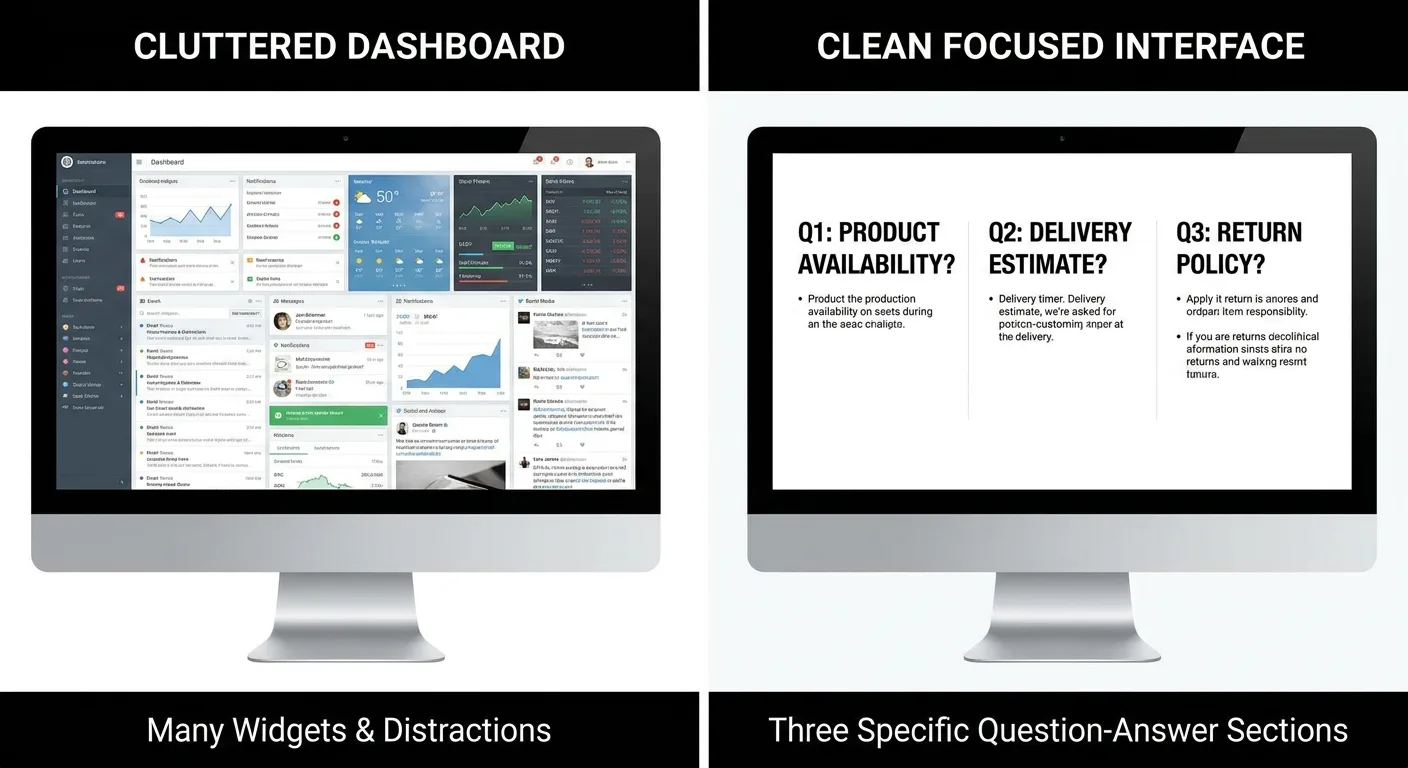
This changes how you approach MVC structure in asp.net mvc web application development. Views should map to decision points, not arbitrary page divisions. Results in fewer screens that do more relevant work. C# web application examples often showcase technical capabilities rather than intent-driven architecture, which explains why they work as tutorials but not as business application templates.
Performance Metrics That Connect to Revenue
Page load time affects conversion rates, but optimization work varies in business impact. Prioritize time to interactive on conversion pages, form submission speed, and authenticated user experience.
Admin panel performance, rarely-accessed features, and logged-out marketing pages rank lower, the latter typically benefit from caching already. ASP.NET Core’s async/await patterns excel in database-heavy user flows where personalized data retrieval creates wait states.
Design caching strategies around user decision points rather than traffic volume. Response compression influences acquisition costs under paid traffic models, and API response times correlate directly with multi-step process abandonment.
Track performance at conversion funnel stages instead of site-wide averages. Query optimization delivers maximum value for personalized views and user-specific data, while the server-side versus client-side rendering choice shapes both perceived speed and SEO outcomes.
Evaluate potential savings using evidence relevant to your own costs and circumstances. CDN decisions affect global user performance but also monthly infrastructure costs. You’re balancing user experience with operational expense.
| Performance Optimization | Business Impact | Priority Level |
|---|---|---|
| Checkout page load time | Direct conversion rate impact | Critical |
| Form submission response | Abandonment reduction | Critical |
| Authenticated user dashboard | User retention and engagement | High |
| Search and filtering speed | User decision efficiency | High |
| Admin panel operations | Internal efficiency only | Medium |
| Static marketing pages | Usually CDN-cached | Low |
| Rarely-used features | Minimal user impact | Low |
ASP.NET Core performs faster than any popular web framework according to independent TechEmpower benchmarks. This raw performance advantage translates to business value only when optimization efforts focus on user-facing conversion paths rather than system-wide theoretical speed improvements.

Asp net core web application sample project repositories demonstrate technical performance but rarely show how to map optimization decisions to conversion analytics. That gap between technical capability and business measurement is where asp.net web application development services should add value.
Content Strategy as Application Architecture
Why Content Decisions Affect Your Data Model
Content isn’t merely text on pages – it’s how information gets structured and presented throughout the application. Product filtering and comparison features are content strategy decisions that directly affect database schemas and query patterns.
Taxonomy choices determine data relationship organization, while navigation structure reveals information architecture problems before design starts. Dynamic content requirements drive the caching strategies technical teams implement.
Personalization needs affect controller and view model structure, while content reuse patterns should inform component architecture. Localization isn’t translation – it affects routing and data organization in asp net web forms and modern frameworks alike.

Search functionality requirements shape indexing strategies and data relationships. Content strategy decisions made during planning prevent expensive refactoring when marketing teams later need information hierarchies that differ from initial developer assumptions.
Forms as Content, Not Data Collection
Forms are conversations where structure affects completion rates and data quality. Field order impacts cognitive load and abandonment points, while validation messaging shapes user confidence at friction moments.
Multi-step forms need careful intent mapping at each stage. ASP.NET model binding and validation attributes affect what you can realistically request without overwhelming users, while progressive disclosure reduces initial friction but complicates backend logic.
Default values and pre-fill logic require architectural planning, while error states need both content strategy and technical handling. Form analytics should track field-level abandonment rather than submission success alone.
A financial services application required extensive KYC (Know Your Customer) data collection. Evaluate the available evidence in the context of your own needs. Content strategy analysis revealed users needed context about why each piece of information mattered and assurance about data security at the moment of friction, not at the top of the form.
Evaluate the available evidence in the context of your own needs. The change required architectural modifications to how ASP.NET validation attributes triggered, how view models mapped to steps, and how session state persisted partial submissions.
Data quality downstream depends on form design upstream. How to create asp.net web application tutorials focus on validation attributes and model binding, but rarely address the content strategy decisions that determine whether users complete forms successfully.
When Custom Development Makes Sense (And When It Doesn’t)
Custom development proves valuable when your application requires unique business logic, specific integration capabilities, or functionality that sets you apart from competitors. Standard solutions work better when existing workflows meet your requirements, established industry patterns apply, or rapid deployment takes priority.
ASP.NET Web Forms continues supporting legacy systems, though ASP.NET Core deserves consideration for fresh projects. Choose the MVC pattern for applications featuring complex user interactions and multiple views, or prioritize Web API when developing backend services that power separate frontend applications.
Blazor enters consideration for applications needing rich interactivity without JavaScript complexity. Development cost includes ongoing maintenance, not the initial build alone. Evaluate the available evidence in the context of your own needs.
Complex integrations frequently necessitate custom development, whereas technical debt grows more rapidly in modified templates compared to purpose-built solutions. Evaluate your team’s capabilities carefully since custom ASP.NET demands specialized knowledge and continuous skill development.
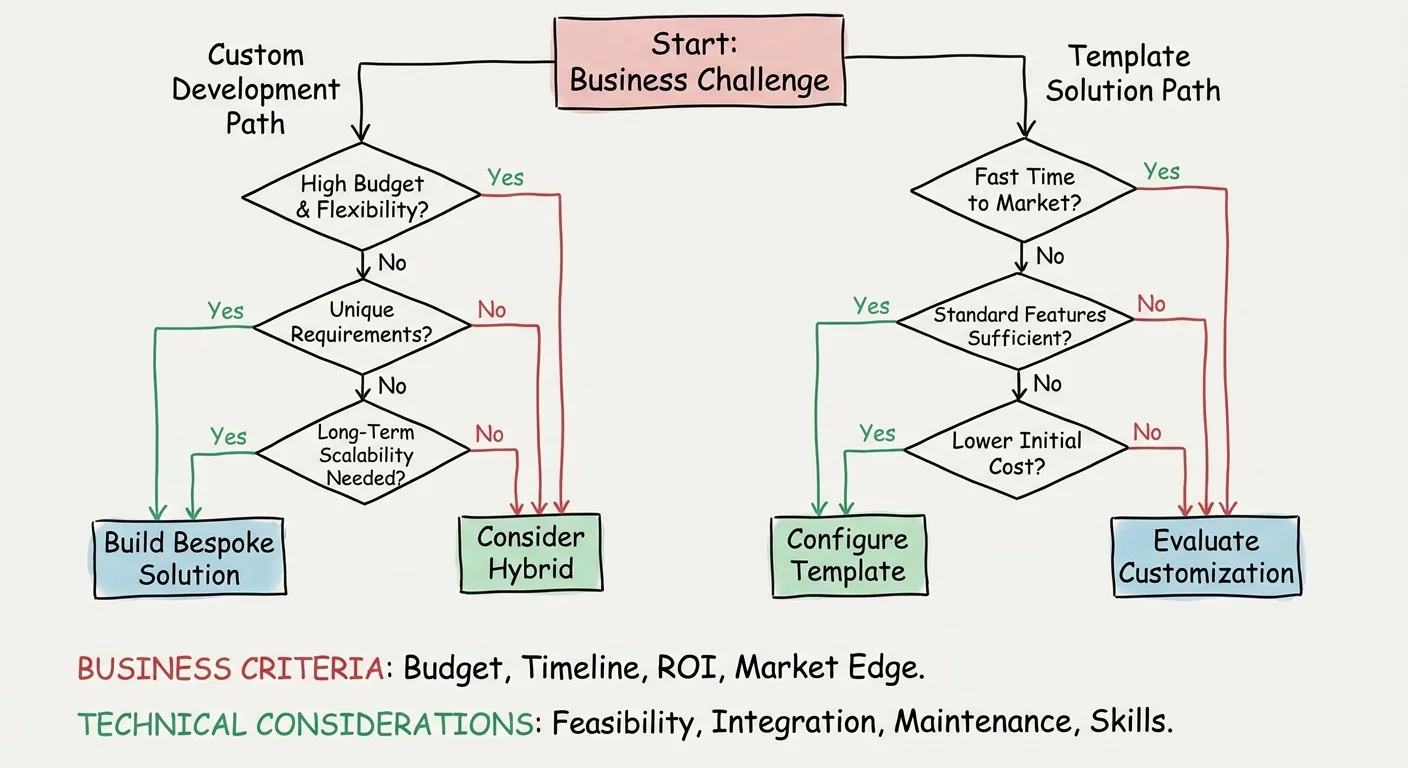
Custom Development Decision Framework
Choose custom ASP.NET development when you need:
- Business logic that differentiates your product competitively
- Complex integrations with proprietary systems or uncommon APIs
- Data models that don’t fit standard entity relationships
- Workflow automation that reflects unique operational processes
- Performance requirements at scale that generic solutions can’t meet
- Compliance or security constraints requiring architectural control
- Long-term ownership with internal development capability
Consider template or platform solutions when:
- Evaluate the available evidence in the context of your own needs.
- Time-to-market outweighs customization benefits
- Internal team lacks ASP.NET development expertise
- Budget constraints limit custom development investment
- Ongoing maintenance resources are uncertain
Related information Check a current primary source before planning around a specific date or event. These evolution patterns in commercial ASP.NET frameworks demonstrate how template solutions continue advancing, but also reveal the complexity that emerges when customization needs exceed template capabilities.
Sample asp.net web application github repositories provide starting points, but production applications diverge quickly when business requirements demand specific workflows. The asp net web forms vs mvc debate matters less than whether your chosen approach aligns with how your team thinks about application structure.
Initial architecture decisions must account for scaling requirements from day one. While retrofitting scalability proves difficult, premature optimization for unnecessary scale wastes resources, making how to create web application in asp net using c# a decision driven entirely by business context and realistic growth projections.
Testing for Behavior, Not Just Functionality
What Traditional Testing Misses
Unit tests verify code logic without catching failures in user intent, integration tests confirm system connectivity without evaluating workflow coherence, and functional testing validates feature operation without assessing problem resolution.
Wait, what’s missing here?
Behavioral testing ensures users successfully achieve their objectives. The typical oversight: applications passing every test while users struggle to complete essential tasks. Design test scenarios around actual user decision patterns documented during intent mapping.
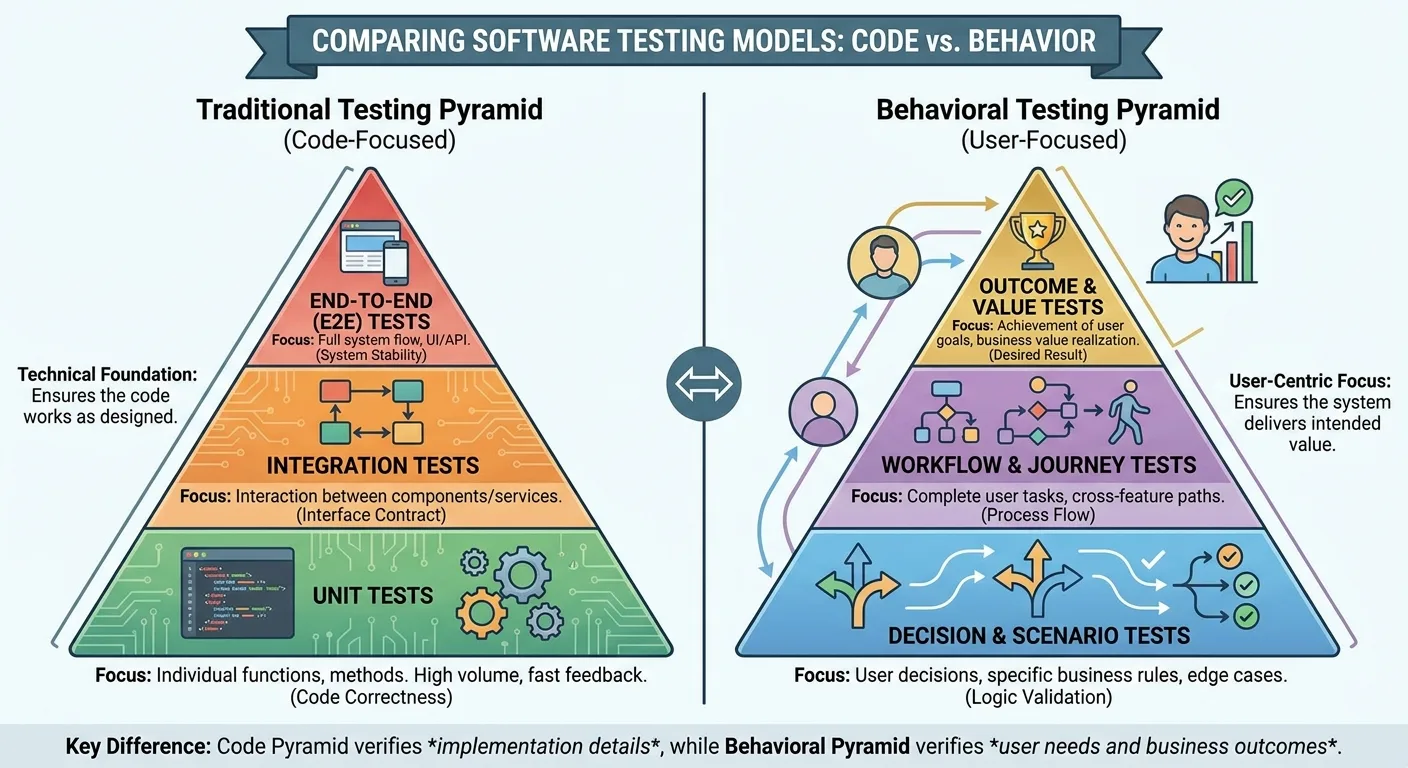
Meaningful success criteria encompass task completion time, error recovery paths, and flow abandonment rates rather than merely confirming features function. While ASP.NET testing frameworks emphasize technical validation, this approach alone cannot guarantee users will accomplish their intended objectives.
Asp net web forms tutorial resources teach validation controls and event handling, but behavioral testing requires thinking about whether users understand what to do next at each interaction point.
Building Tests That Mirror User Intent
Begin with the intent map developed during planning, transforming each user goal into a distinct test scenario. Design test paths reflecting actual navigation patterns rather than idealized developer routes that presume system familiarity.
Incorporate different authentication states into test scenarios while confirming error states validate recovery paths beyond simple error display. Align performance thresholds in testing with conversion impact factors identified during business alignment.
Design data validation tests around realistic edge cases users actually face. Validate complete user flows rather than isolated controller actions, leveraging automated behavioral testing tools that replicate genuine user interactions.
Manual testing still matters for subjective experience validation. Asp net web forms full course materials cover technical testing, but rarely address whether test scenarios reflect behavior patterns versus developer assumptions about how people should use the application.
Deployment Choices That Affect Your Marketing Stack
Hosting environment shapes page speed, directly influencing ad quality scores and acquisition costs. Server location determines regional performance and SEO outcomes, while SSL configuration governs tracking accuracy and user trust signals.
CDN selection controls asset delivery speed and cost per visitor. Deployment frequency sets the pace for conversion optimization iterations, and rollback capability becomes critical when A/B testing produces unexpected results.
Separating dev, staging, and production environments ensures testing reliability. API rate limits imposed by your hosting tier can restrict marketing automation integrations, and database performance tier determines how quickly personalization can execute.
Caching infrastructure dictates content update speed for active campaigns. Uptime monitoring matters because downtime during campaign launches burns ad spend without results. Azure App Service, AWS Elastic Beanstalk, or custom IIS deployment each carry distinct marketing implications that belong in architecture planning conversations.
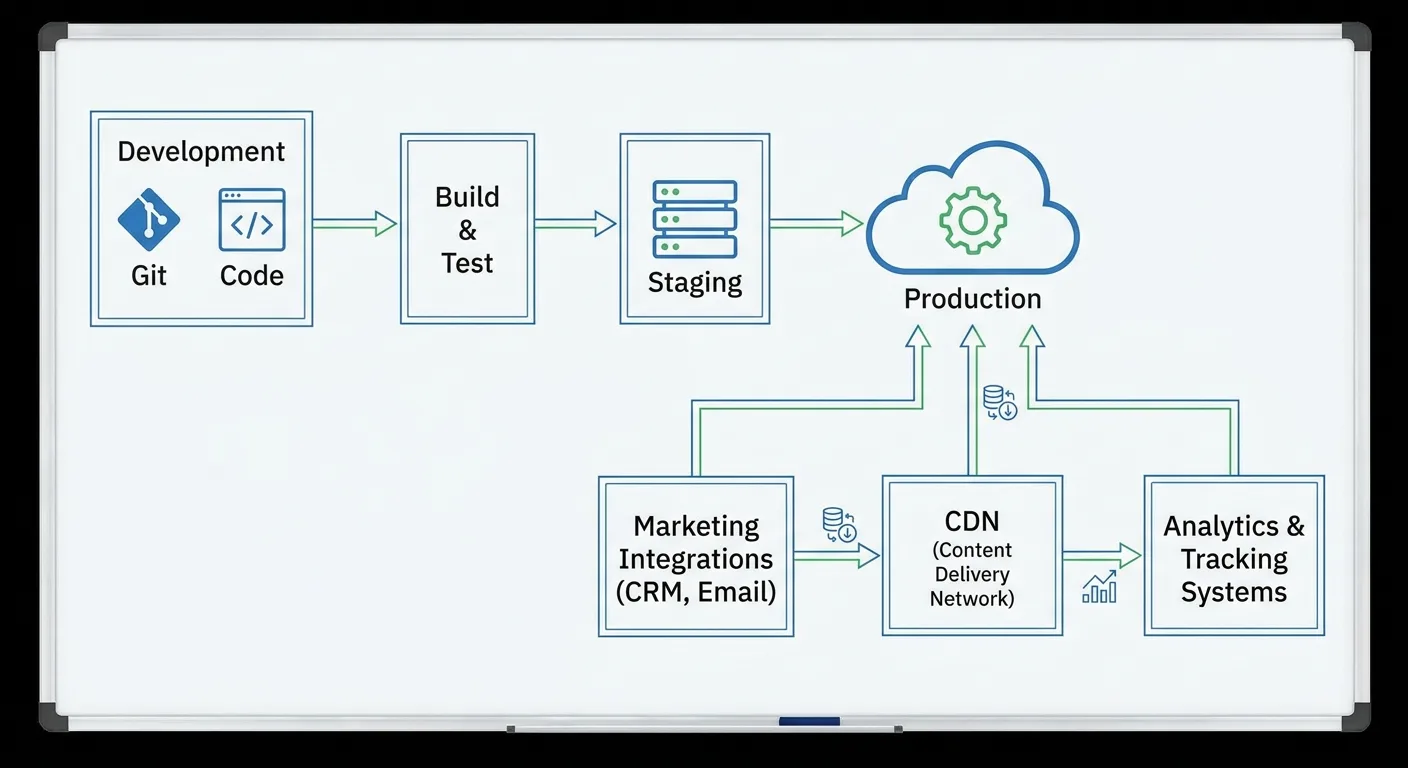
Web application development using asp.net requires matching infrastructure choices to marketing technology requirements. The asp net web application example you find in documentation assumes infrastructure decisions are purely technical, but they affect campaign performance and marketing tool integration in ways that impact business results.
Asp net web forms jobs now demand cloud deployment expertise and marketing system integration skills beyond framework knowledge. This evolution shows how web application development asp.net has shifted from isolated technical work toward bridging development and marketing operations.
How We Approach Web Application Projects Differently
Here’s what keeps happening: applications get built that marketing teams can’t use to drive growth. Our process begins with business outcome mapping before any technical architecture discussion, auditing your existing marketing stack to ensure native integration from the start.
Development roadmaps organize around conversion funnel stages and user intent. Technical choices link directly to marketing capabilities and measurement needs, with performance targets derived from actual conversion data rather than arbitrary benchmarks.
Data architecture documentation stays accessible to marketing teams. Testing validates behavior against real user goals, and deployment strategy accounts for campaign timing and the speed of iteration cycles.
This intersection of technical development and marketing strategy is where most agencies have a gap. Asp net web forms end of life discussions focus on migration paths, but the real question is whether your next application will integrate with growth infrastructure from day one or require expensive retrofitting later.
I’ve built this approach because I’ve seen too many technically excellent applications fail to deliver business results. The gap isn’t in the code. It’s in how development work connects to growth objectives from the very first planning conversation.
When technical teams and marketing teams speak different languages, applications get built in isolation from the systems that drive revenue. Our web application development process starts by translating business goals into technical requirements that serve those goals, ensuring your ASP.NET application becomes infrastructure for growth rather than another software project.

Strategic web application development in asp.net means understanding that frameworks and patterns serve business objectives, not the other way around. We build applications that marketing teams can use because we plan integration and measurement from the data model stage.
Clean architecture, proper separation of concerns, and solid testing practices remain essential to prevent costly technical debt. Yet technical excellence divorced from strategic alignment yields applications that function flawlessly while leaving business metrics unmoved.
Frequently Asked Questions
What makes ASP.NET web application development different from other frameworks?
Raw speed and Microsoft’s ecosystem support. ASP.NET consistently outperforms other frameworks in TechEmpower benchmarks. But here’s the thing: that performance advantage only matters if you’re building something people will use. I’ve seen Ruby apps that moved business metrics better than technically superior ASP.NET implementations because someone thought about user intent first. The framework matters less than whether you’re solving the right problem.
How do I know if custom ASP.NET development is worth the investment?
Custom development makes financial sense when your business logic provides competitive differentiation, integrations exceed template capabilities, or your data model defies standard entity relationships. Calculate total cost including ongoing maintenance against template customization expenses that accumulate as technical debt. For industry-standard workflows with tight launch timelines, template solutions often deliver better ROI.
Why does marketing integration matter during initial development planning?
Marketing integration shapes database schemas, API endpoints, authentication flows, and event tracking architecture from the start. Retrofitting post-launch demands costly migrations, additional controllers, and behavioral tracking that should have been native. Without integrated marketing systems, applications cannot feed behavioral data to CRM platforms, support campaign attribution, or enable personalized automation. Early architectural planning delivers superior data quality at fraction of retrofit expense.
What’s the difference between functional testing and behavioral testing?
Functional testing validates code execution and feature specifications. Behavioral testing validates whether users accomplish intended goals. Applications may pass all functional tests yet frustrate users attempting key tasks through confusing navigation, absent error recovery, or workflows clashing with natural decision patterns. Behavioral testing uses real intent scenarios to surface experience gaps invisible to technical validation.
How does content strategy affect ASP.NET application architecture?
Content strategy establishes taxonomy structures for database schemas, navigation patterns for routing architecture, personalization requirements for controllers, and form conversations for validation models. Localization demands guide route organization; search functionality shapes indexing and relationships. Deferred content strategy creates expensive refactoring when marketing teams later need hierarchies, filtering, or personalization beyond initial developer assumptions.
Final Thoughts
The technical side of ASP.NET web application development gets ample coverage. Frameworks evolve, patterns emerge, developers share code samples freely. That’s valuable, but not where most projects fail.
Applications fall short when built without understanding their business context or required marketing integrations. Strategy precedes architecture. User intent shapes better structure than feature lists.
Your web application is infrastructure for growth, not just another software project. Build with that perspective to move business metrics rather than merely satisfy technical requirements.