



Table of Contents
-
Why Most People Use Ahrefs Backwards
-
The Diagnostic Approach: Starting with Your Existing Content
-
Finding the Pages Google Already Trusts (But You’re Wasting)
-
Using Site Audit to Identify Technical Debt That’s Costing You Rankings
-
Content Gap Analysis in Reverse: What You Should Stop Targeting
-
Backlink Audits That Actually Lead to Action
-
Tracking Competitor Decline (Not Just Their Wins)
-
Turning Ahrefs Alerts into a Proactive Recovery System
-
When to Ignore What Ahrefs Tells You
TL;DR
-
Most Ahrefs users obsess over finding new opportunities while ignoring the broken assets they already own
-
Your existing content with traffic and authority is easier to fix than starting from scratch
-
Site Audit reveals technical issues that directly correlate to ranking drops, not just SEO hygiene scores
-
Content gap analysis works better in reverse by showing you what to abandon, not just what to chase
-
Backlink audits should prioritize reclaiming lost links over building new ones
-
Competitor tracking is more valuable when you monitor their failures and exits
-
Ahrefs alerts can function as an early warning system for content decay and technical issues
-
Data overload is real, and knowing what to ignore is as important as knowing what to track
Why Most People Use Ahrefs Backwards
Let me guess. You’re using Ahrefs to find new keywords, stalk your competitors, and hunt for backlinks. That’s what the tutorials teach you. That’s what everyone does.
And that’s why most people have spreadsheets full of “opportunities” that never turn into actual traffic.
But everyone misses this part: you already own assets that Google trusts. Pages with backlinks. Content ranking on page two. URLs with search history and indexing priority. This stuff is way easier to optimize than creating something new, but it just sits there getting worse while you chase the next keyword.
There’s this case study from Ahrefs Academy. Some user went from 1.3k visitors to 25k a month in three months. 307% increase. How? They stopped creating new content and fixed what they already had.
That’s the diagnostic approach. Instead of starting with keyword research or competitor analysis, you start by auditing what you already own. You find what’s broken, what’s underperforming, and what’s one tweak away from doubling its traffic.

And here’s where it gets interesting. When you fix a page that already ranks for 50 keywords, you’re potentially improving visibility across all 50. When you reclaim a lost backlink to an existing page, you’re restoring authority that’s already flowing through your internal links. The leverage is insane compared to starting from zero.
You stop treating Ahrefs as a prospecting tool and start using it as a recovery system. The data’s already there. You’ve just been looking at the wrong reports.
The Diagnostic Approach: Starting with Your Existing Content
Find Your “Almost There” Pages
Pull up Organic Keywords in Site Explorer and filter for positions 11-30. These pages already passed Google’s relevance test. They’re not ranking higher because of technical issues, thin content, or weak internal linking. Not because they’re targeting the wrong keywords.
Sort by traffic potential, not current traffic. You want pages where jumping from position 15 to position 5 actually matters. A page at #18 for a keyword with 10 searches a month? Not worth your time, even if it’s an easy win.
Research from Brafton’s analysis reveals that Ahrefs reported almost half of the keywords delivering traffic to your site aren’t accounted for in Google Search Console’s reporting. This makes using Ahrefs to identify these “almost there” pages critical for capturing the full picture of your ranking opportunities.
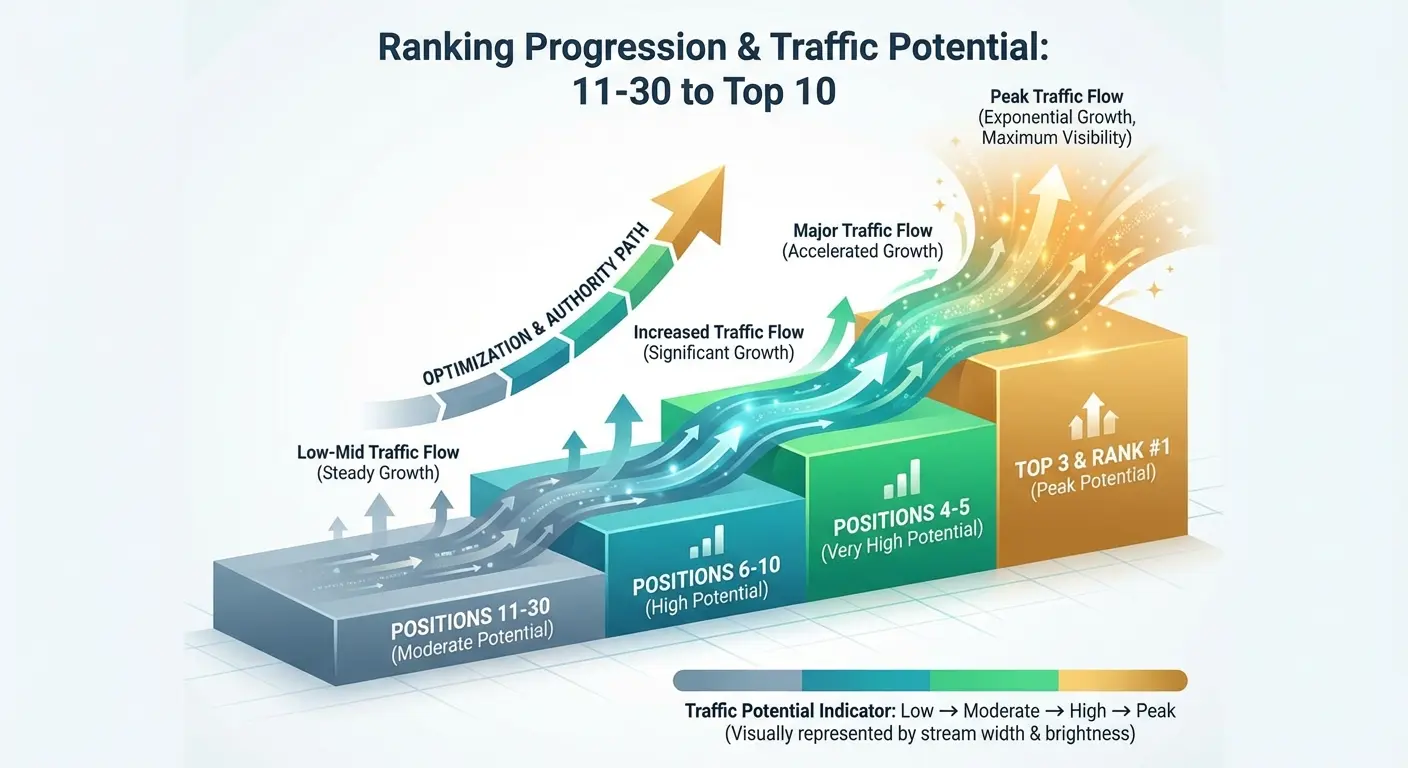
We had a client with a project management guide sitting at #14 for a keyword pulling 2,400 monthly searches. Traffic potential was 8,000 visits. They were getting maybe 80 visits a month from it.
We looked at the top 10 results. Every single one had specific tool comparisons and implementation timelines. Their guide was all theory and best practices. Useful, but not what people searching that keyword actually wanted.
Added a comparison table and a 90-day implementation roadmap. Three weeks later, the page hit position 6. Traffic went from 80 to 1,200 visits a month. That’s a 1,400% increase from fixing existing content, not creating something new.
The filtering process takes like five minutes. The impact lasts for months.
The Content Decay You’re Not Tracking
Content rots.
Pages that crushed it six months ago might be tanking now because competitors updated their stuff, Google changed something, or your info is just stale.
Go to Organic Keywords, add a date comparison (last 3 months vs. previous 3 months), and sort by “Biggest losers” in position. You’re looking for pages that dropped 5+ positions recently.
These aren’t algorithm casualties. They’re maintenance issues.
Open each declining page and check the publish date. If it’s older than 18 months and covers anything that evolves (tech, strategies, tools), that’s your answer. You don’t need new content. You need updated content with a fresh publish date.
Content Decay Diagnostic Checklist
When you spot a declining page, here’s what to check:
First, the publish date. Over 18 months old? Red flag if the topic moves fast.
Second, what have competitors done? Check if top-ranking pages got updated in the last six months. If they refreshed and you didn’t, that’s probably why you’re sliding.
Third, scan for outdated info. Old statistics, deprecated tools, obsolete tactics. If your page mentions tools that don’t exist anymore, Google’s probably figured that out.
Fourth, look for new SERP features. Did People Also Ask boxes show up? Featured snippets? If your content doesn’t address those questions, you’re missing out.
Fifth, run the URL through Site Audit. Sometimes it’s not the content. It’s a new technical issue, broken links, or speed problems.
Last, check if you lost backlinks. If the page dropped rankings and lost links at the same time, that’s your culprit.
If the first four are yes, refresh the content. If the last three are yes, fix the technical stuff first.
Most people wait until a page falls off the first page completely before they notice. By then, recovery takes three times as long. Catch decay early and you’re making small adjustments instead of major overhauls.
Finding the Pages Google Already Trusts (But You’re Wasting)
The URL Rating Mismatch
URL Rating measures backlink strength. When you’ve got pages with high UR but low traffic, something’s broken. You have the authority. Google just doesn’t think your page matches what people are searching for.
Run a crawl, export pages with their UR scores, and cross-reference against your traffic data (Analytics or Ahrefs estimates). Any page with UR above 20 getting less than 100 monthly visits is probably targeting the wrong keywords or missing search intent completely.
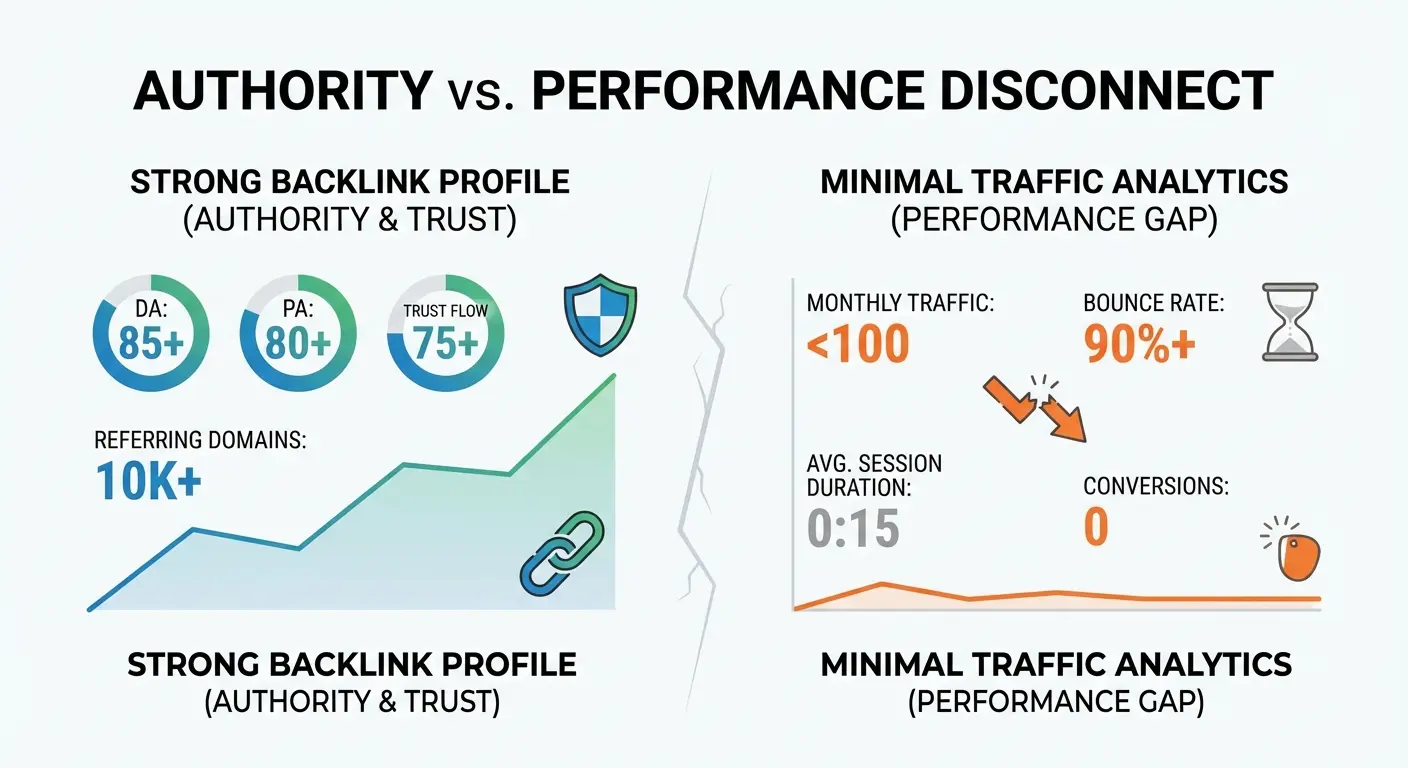
You’ve got two options: pivot the content to match what people actually search for, or redirect that UR to a page that can use it. Both are faster than building new backlinks from scratch.
Example: We found a client’s whitepaper landing page on “digital transformation frameworks” had a UR of 32 with backlinks from 18 high-authority domains. It was getting 45 visits a month. Total waste.
Looked at the SERP. People searching that term wanted step-by-step guides, not gated whitepapers. They converted it into an ungated guide, kept the same frameworks, added implementation checklists, and made the PDF download optional.
Two months later: position 8, 890 monthly visits. Same backlinks, completely different traffic.
Internal Link Equity You’re Hoarding
Most sites have a few pages that naturally accumulate internal links. Homepage, main service pages, popular blog posts. Ahrefs shows you this in the “Best by links” report under Internal backlinks.
The question isn’t which pages have the most internal links. It’s whether those pages deserve them.
If your highest internally-linked page is your About Us section, you’re wasting equity. If it’s a blog post from 2019 that doesn’t rank anymore, same problem.
Audit your top 20 internally-linked pages. For each one, ask: Is this page generating business value right now? If not, you need to redirect that equity to pages that actually matter.
This usually means updating your navigation, sidebar widgets, and footer links. Not just contextual blog links. Your internal link structure probably evolved organically over years. That doesn’t mean it’s optimized. Most sites accidentally funnel equity to pages that don’t deserve it just because those pages have been around longer or sit in prominent template spots. This ties directly into internal linking case studies that demonstrate how redistributing link equity can dramatically improve rankings for priority pages.
|
Internal Link Equity Quick Framework |
|||
|---|---|---|---|
|
Page Type |
Should Have High Links |
Red Flag |
What To Do |
|
Homepage |
Yes (naturally high) |
If it’s the ONLY highly-linked page |
Diversify internal links to money pages |
|
Core Service/Product Pages |
Yes (should be high priority) |
Low internal links compared to blog posts |
Add navigation links, footer links, contextual blog links |
|
High-Converting Landing Pages |
Yes (business-critical) |
Buried deep in site structure |
Elevate in navigation, add to resource hubs |
|
Popular Blog Posts (current) |
Acceptable if still driving traffic |
High links but topic is outdated |
Redirect to updated content or refresh |
|
About Us / Contact / Legal Pages |
No (low business value) |
Among top 10 most-linked pages |
Remove from sidebars, reduce footer prominence |
|
Archived/Outdated Content |
Never acceptable |
Still receiving significant internal links |
Redirect to current content or noindex |
If your About Us page is in your top 10 most-linked pages, you’ve got a problem. Remove it from sidebars, reduce footer prominence, and push that equity to money pages.
Using Site Audit to Identify Technical Debt That’s Costing You Rankings
Stop Obsessing Over Your Health Score
Site Audit gives you an overall health score. Most people see 80+ and assume everything’s fine.
That score doesn’t tell you which issues are killing your rankings versus which ones are just best practices you’re ignoring.
Filter your issues by “Affects” and look for problems marked as affecting indexability or crawlability. A missing H1 tag might lower your score, but it’s probably not why your page isn’t ranking. A redirect chain or blocked resource? That’s actually costing you traffic.
Prioritize errors over warnings. Within errors, prioritize the ones on pages that already get traffic or have backlinks. Fixing a 404 on a page nobody links to and nobody visits is busywork disguised as urgent.
According to a November 2025 review from DemandSage, Ahrefs recently added an AI content detection feature within the Site Audit URL details, allowing users to identify pages with AI-generated content alongside technical issues. This addition reflects the growing need to monitor content quality signals that may impact rankings, particularly as search engines refine their ability to evaluate AI-generated content.
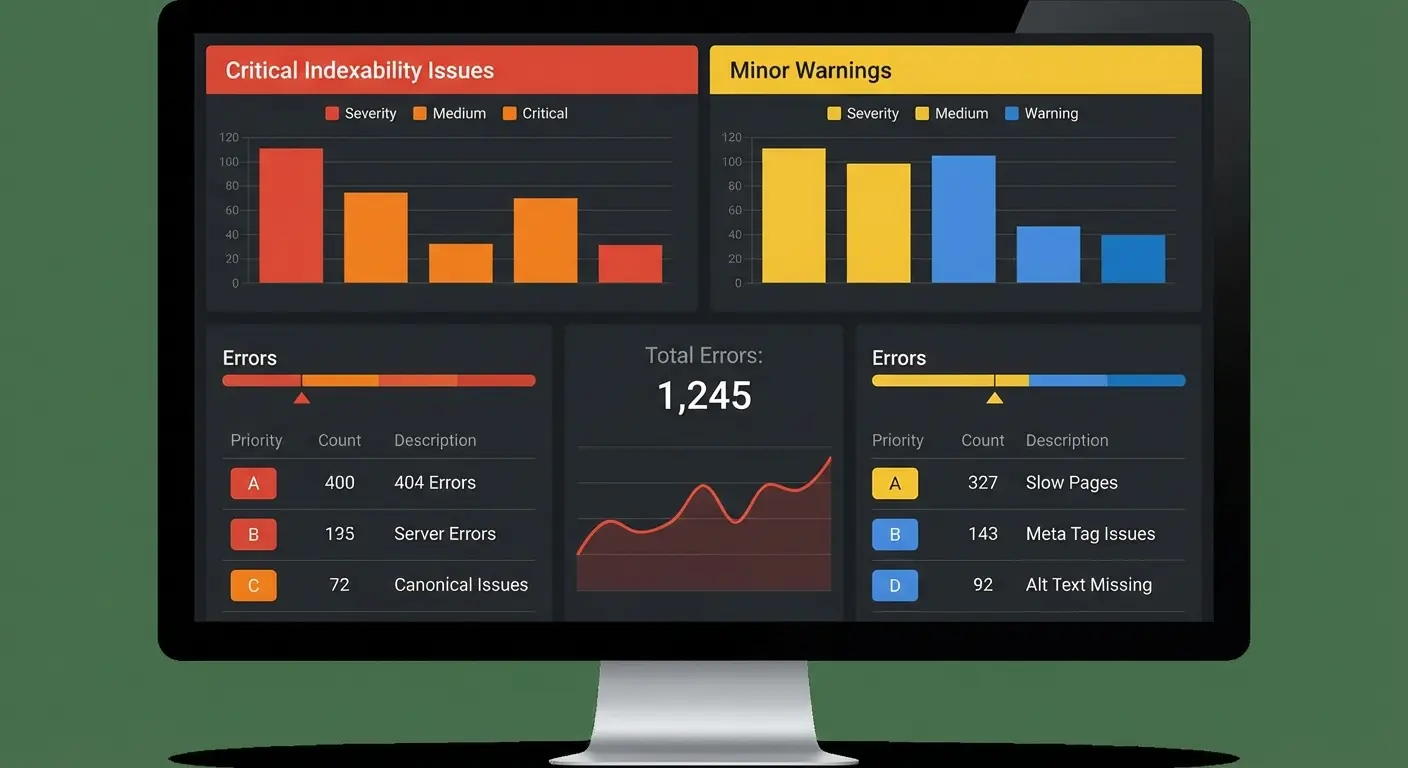
The goal isn’t a 100 health score. The goal is fixing what’s costing you traffic.
Technical Issue Prioritization
Here’s how to triage Site Audit errors by actual impact:
Fix immediately (blocking rankings):
-
4XX/5XX errors on pages with backlinks (UR > 10)
-
Redirect chains on pages with organic traffic
-
Blocked resources (CSS/JS) on pages ranking in the top 20
-
Canonicalization errors on money pages
-
Mobile issues on pages where most traffic is mobile
Fix this week (performance problems):
-
Slow page speed (over 3 seconds) on pages with traffic
-
Missing or duplicate meta descriptions on ranking pages
-
Broken internal links from high-authority pages
-
Orphaned pages with backlinks
Fix when you have time:
-
Missing alt text
-
H1 issues on low-traffic pages
-
Low word count on pages that don’t rank
-
Duplicate titles on archived content
Ignore completely:
-
Warnings on pages you’ve intentionally noindexed
-
Minor HTML validation issues
-
Suggestions for pages you’re planning to delete
-
Cosmetic issues on legal/policy pages
I’ve seen teams spend weeks chasing a perfect health score while their money pages have redirect chains and slow load times. Prioritize by business impact, not by what turns the score green.
The Crawl Budget Problem You Didn ‘t Know You Had
If your site has more than a few thousand pages, Google isn’t crawling everything regularly. Ahrefs Site Audit shows you which pages get crawled and which don’t.
Compare your most important pages (products, key content) against crawl frequency data. If Google isn’t hitting your money pages at least monthly, you’ve got a crawl budget problem.
This usually happens because you have too many low-value pages eating up Google’s time. Tag archives, parameter variations, thin content. Stuff that shouldn’t exist in Google’s index at all.
The fix isn’t always deletion. Sometimes it’s strategic noindexing or consolidation. Use Ahrefs to find page templates generating dozens of thin pages (author archives, date archives, filtered product views) and decide if they need to exist in the index.
I’ve seen sites with 10,000 indexed pages where only 800 generate any traffic. Those other 9,200 pages aren’t neutral. They’re actively diluting crawl budget and confusing Google about what your site is even about.
Prune them and you’ll often see rankings improve across the board because Google can finally focus on what matters.
Content Gap Analysis in Reverse: What You Should Stop Targeting
The Opportunity Cost of Bad Keywords
Content Gap shows you keywords your competitors rank for that you don’t. Most people treat this as a to-do list.
It’s not. It’s a list of battles to evaluate before fighting.
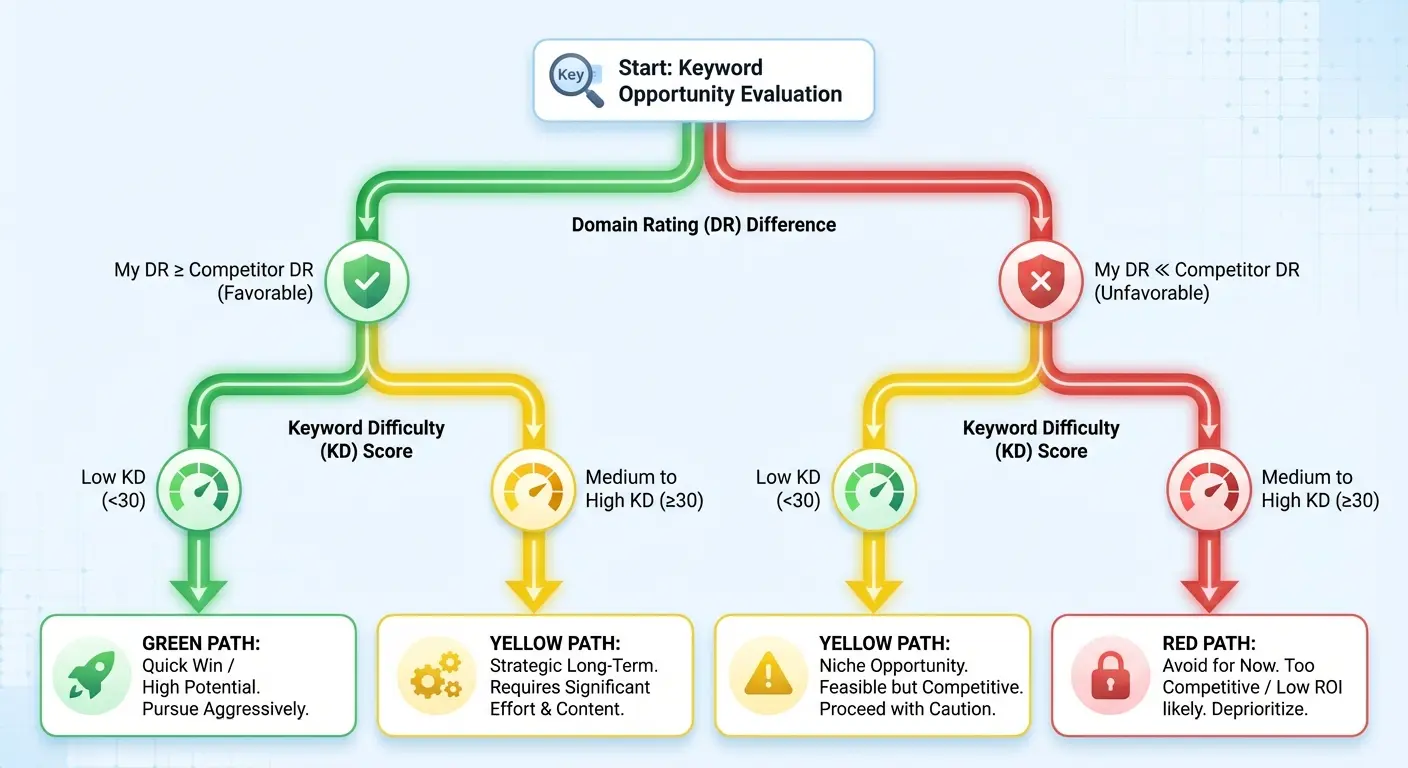
For each gap keyword, check the SERP. If the top 10 are all sites with Domain Rating 30+ points above yours, that’s not an opportunity. That’s a resource drain. You could spend weeks creating content that never cracks page one.
Filter Content Gap by difficulty score (aim for KD under 30), then manually verify the SERP isn’t dominated by high-authority domains. You’re looking for gaps where you actually have a shot, not just gaps that exist.
Can we talk about how many people chase keywords they have zero chance of ranking for? I’ve watched teams spend months creating content for high-KD keywords because “competitors rank for it.” Yeah, competitors with 10x your backlink profile. That’s not a strategy. That’s wishful thinking.
A comprehensive 2025 analysis from Backlinko found that while both Ahrefs and Semrush offer Content Gap analysis, Ahrefs provides more granular filtering options that help users avoid chasing unwinnable keywords. The analysis emphasizes that “not every referring domain helps you rise in search results; low-quality domains could have a negative impact on your site’s health,” which applies equally to keyword targeting. Not every keyword gap represents a genuine opportunity.
|
Content Gap Keyword Evaluation Framework |
|||
|---|---|---|---|
|
Evaluation Criteria |
Green Light (Pursue) |
Yellow Light (Proceed with Caution) |
Red Light (Abandon) |
|
Keyword Difficulty |
KD 0-30 |
KD 31-50 |
KD 51+ |
|
Your DR vs. Top 10 Average DR |
Within 15 points |
16-30 points below |
31+ points below |
|
SERP Diversity |
Mix of DR levels in top 10 |
Top 10 mostly high-DR but 1-2 lower-DR sites present |
All top 10 are high-DR established brands |
|
Content Type Match |
You can create this content type |
Requires resources you don’t have but could acquire |
Requires resources completely outside your capability |
|
Search Intent Alignment |
Perfectly matches your offering |
Partial match, requires content angle adjustment |
Misaligned with your business model |
|
Traffic Potential |
500+ monthly visits potential |
100-500 monthly visits potential |
Under 100 monthly visits potential |
|
Business Value |
High conversion intent |
Informational with indirect value |
No clear path to conversion |
Not every gap is an opportunity. Most are traps that waste your time.
Keywords You Should Abandon
Run a Top Pages report for your site. Sort by number of keywords. You’ll find pages ranking for hundreds of keywords, most of which drive zero traffic.
Nobody wants to hear this, but ranking for irrelevant long-tail garbage doesn’t help you. Might actually hurt you by confusing Google about what your page is even about.
If a page ranks for 200 keywords but only 15 drive traffic, you need to refocus that content. Identify your traffic-driving keywords, then rewrite to double down on those topics. Remove the sections that attracted irrelevant rankings.
This is content pruning at the keyword level, and it usually results in better rankings for the keywords that matter because your topical relevance becomes clearer.

Example: We had a client with an email marketing guide ranking for 347 keywords but only getting 1,200 monthly visits. Turns out 280 of those keywords were irrelevant long-tail variations. Industry-specific stuff they didn’t even serve.
The page had gotten too broad, trying to address every niche. They pruned it to focus exclusively on the 15 keywords actually driving traffic (all B2B SaaS email marketing). Removed all the industry-specific examples that were diluting focus.
Six weeks later, rankings for those core 15 keywords improved by an average of 8 positions. Monthly traffic jumped to 2,800 visits despite ranking for 200 fewer total keywords.
Sometimes less is more. Way more.
Backlink Audits That Actually Lead to Action
Reclaiming Lost Links
Your Backlinks report has a “Lost” filter that most people ignore because they’re too busy chasing new links.
Those lost links represent relationships that already existed and authority that already flowed to your site. They’re way easier to reclaim than building new ones from scratch.
Export lost backlinks from the last 6 months and filter for links from pages with DR above 30. These are worth your time.
Links usually disappear because the linking site updated their content, migrated to a new CMS, or removed outdated resources. They didn’t unlink you out of spite. They just moved on.
Reach out with a simple message: “Hey, noticed you removed your link to [your page]. We’ve updated that resource significantly. Here’s what’s new.” You’re not begging for a favor. You’re providing an update to something they already found valuable once.
According to DemandSage’s analysis, Ahrefs maintains an index of 35 trillion external backlinks from 213.3 million domains and refreshes its data every 15-30 minutes, making it one of the most current backlink databases available. This frequent refresh rate means you can catch lost links quickly (often within hours of them disappearing), giving you a much higher success rate for reclamation outreach when the linking site’s content is still fresh in the editor’s mind.
I’ve reclaimed links that were lost for months just by reaching out with updated content. Success rate is around 40%, which is insane compared to the 5-10% you’ll get with cold link building outreach. The relationship already existed. You’re just reminding them it’s worth maintaining.
The Toxic Link Myth
Ahrefs flags “toxic” backlinks, and there’s a whole industry built around freaking people out about them.
Look, here’s the deal: unless you’ve been doing some seriously shady link building, toxic links probably aren’t doing anything to you. Google’s algorithm is smart enough to ignore low-quality links. The disavow tool exists for extreme cases, not routine maintenance.
Before you spend hours creating a disavow file, ask yourself: Has my traffic dropped significantly? Can I correlate that drop with specific backlinks?

If the answer is no, ignore the toxic link warnings. Your time is better spent on literally anything else in this article. For more context on when technical SEO issues matter versus when they’re just noise, check out our guide on negative SEO case studies that examine real-world scenarios where link quality impacted rankings.
We’ve seen sites with thousands of “toxic” backlinks ranking perfectly fine because Google just ignores them. The algorithm doesn’t penalize you for links you didn’t build. It discounts them. Save the disavow tool for when you have clear evidence of a manual action or a massive drop tied to specific link acquisition.
Honestly? The toxic link panic is overblown. I’ve watched people waste weeks on this when their real problem was thin content or technical issues.
Tracking Competitor Decline (Not Just Their Wins)
The Opportunity in Competitor Exits
Set up competitor tracking in Ahrefs, but don’t just watch their wins. Watch their failures.
When a competitor drops out of the top 10 for a valuable keyword, that’s an opening. Use the Competing Domains report, add a date comparison, and sort by “Biggest losers” in traffic.
You’re looking for competitors losing ground. Either because they stopped maintaining content, faced technical issues, or shifted strategy. These declines create vacuums.
If you already rank positions 11-20 for the same keywords they’re losing, a small optimization push could move you into the top 10. You’re not fighting for new territory. You’re claiming abandoned territory.
I’ve watched competitors lose 40% of their traffic over six months while we picked up most of it just by maintaining our content and making minor improvements. We didn’t do anything revolutionary. We just didn’t screw up like they did.
Reverse Engineering Competitor Failures
When a competitor’s page tanks, there’s usually a reason. Maybe they changed their title tag and destroyed their relevance. Maybe they added aggressive ads that killed their Core Web Vitals. Maybe they let content go stale.
Use Wayback Machine alongside Ahrefs to compare the current version of a declining page against previous versions. What changed?
If you can figure out what caused their decline, you can avoid making the same mistake and potentially capitalize on it if you cover the same topic.
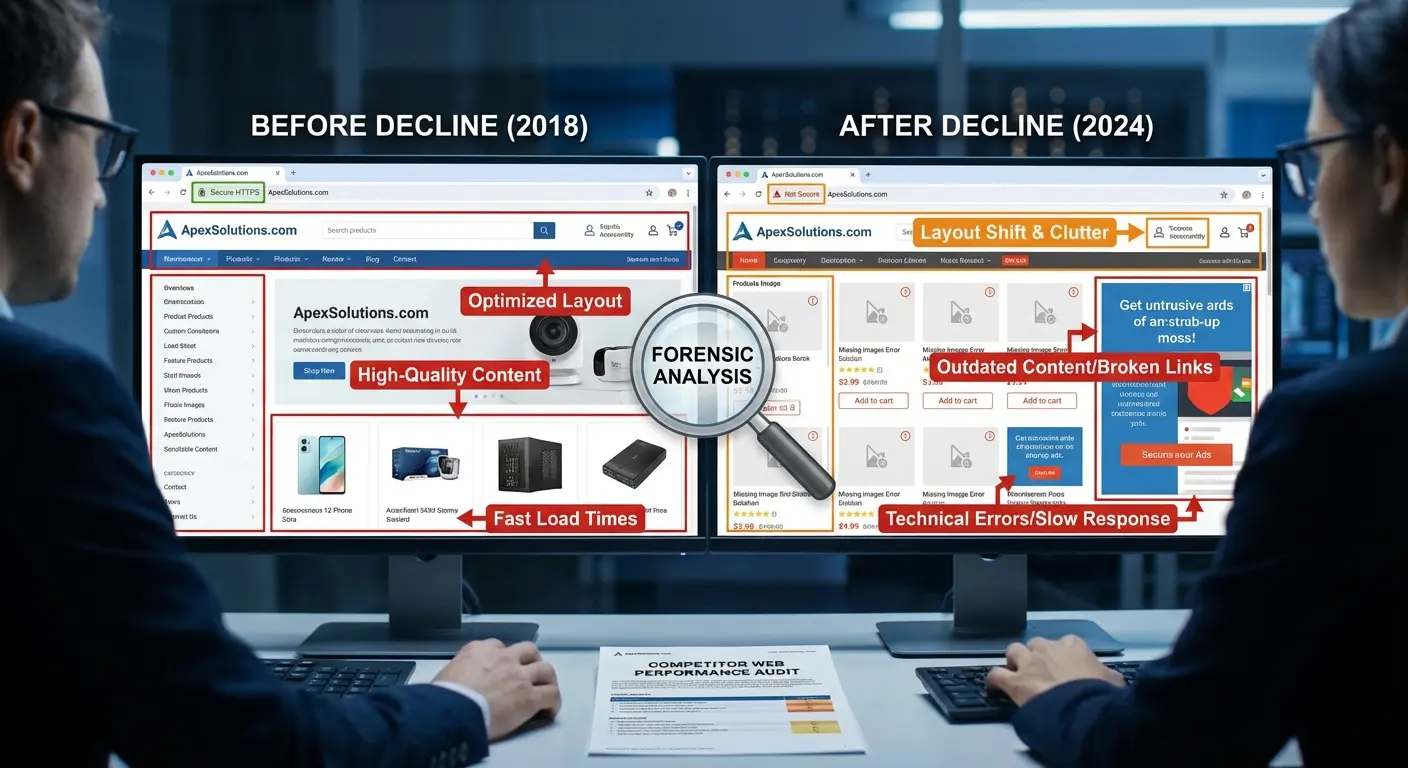
This kind of competitive intelligence is more valuable than copying what’s working because it helps you avoid invisible pitfalls. I’ve seen competitors redesign sites and accidentally noindex entire sections. I’ve seen them consolidate pages and lose all their backlink equity through terrible redirect strategies.
Each failure is a lesson you don’t have to learn the expensive way.
Turning Ahrefs Alerts into a Proactive Recovery System
Setting Alerts That Actually Matter
Ahrefs lets you set up alerts for new backlinks, keyword rankings, and mentions. Most people configure these, get flooded with daily emails, and then ignore them completely.
Be surgical. Don’t track every keyword. Track the 10-20 that drive most of your revenue. Don’t get alerts for every backlink. Get alerts when you gain or lose backlinks from domains with DR above 40.
The goal is an early warning system for problems and opportunities that matter, not a firehose of data that trains you to ignore alerts.
We track about 15 keywords across our entire site. That’s it. Those 15 represent 70% of our organic revenue. When one moves 3+ positions in either direction, we want to know immediately. Everything else is noise.
The 48-Hour Response Window
When you get an alert about a significant ranking drop (5+ positions for a money keyword), you’ve got about 48 hours to diagnose and respond before it compounds.
Check these in order:
-
Did the page go down or return an error?
-
Did you recently change the content or title tag?
-
Did a competitor publish new content on the topic?
-
Did you lose a major backlink?
Most ranking drops have identifiable causes, and many are reversible if you catch them fast. The longer you wait, the more Google’s algorithm solidifies the new ranking, and the harder recovery becomes.
We’ve recovered from drops in days because we caught them early. We’ve also watched competitors take weeks to notice they’d fallen from position 3 to position 12, and by then recovery took months.
Speed matters way more than most people realize.
When to Ignore What Ahrefs Tells You
The Keyword Difficulty Paradox
Keyword Difficulty scores are useful, but they’re not predictive of your specific chances. KD measures how many backlinks the current top-ranking pages have. It doesn’t account for your topical authority, existing related content, or how well you can match search intent.
I’ve seen pages with DR 15 rank for KD 50 keywords because they had superior content and strong topical clustering. I’ve also seen DR 70 sites fail to rank for KD 10 keywords because they had zero topical relevance.

Use KD as a starting point, not a decision-maker. If you have strong existing content on a topic and can create something genuinely better than what’s ranking, the KD score becomes less relevant.
We’ve ignored KD scores dozens of times and ranked anyway because we understood our topical authority in specific niches. We’ve also chased low-KD keywords that went nowhere because the SERP was dominated by a content type we couldn’t match.
Context always beats metrics.
When More Data Makes You Slower
Ahrefs gives you access to millions of data points. That doesn’t mean you need to analyze all of them.
Data paralysis is real, and it’s way easier to keep researching than to actually execute.
Set a research time limit. If you’re spending more than 20% of your SEO time in Ahrefs and less than 80% implementing changes, you’ve got a problem. The tool is meant to inform action, not replace it.
Sometimes the best move is to close Ahrefs, pick the three highest-impact issues you’ve identified, and spend the rest of your week fixing them. This execution-first mindset aligns with what we’ve seen in successful SEO case studies where consistent implementation beats endless analysis every time.
I’ve worked with teams that spent 40 hours per month in Ahrefs and implemented nothing. I’ve also worked with teams that spent 4 hours per month in Ahrefs and doubled their traffic.
The difference wasn’t the data they had access to. It was what they did with it.
Stop analyzing and start fixing.
Connecting Diagnosis to Recovery
You’ve spent time in Ahrefs identifying what’s broken. Declining pages, wasted authority, technical debt, lost opportunities. Maybe you’ve got a list of 50+ issues staring at you right now.
Here’s where most SEO strategies die: the gap between diagnosis and execution.
You know what needs fixing. You probably don’t have the time, the team, or honestly the desire to do it all yourself. That’s not a criticism. It’s reality.
If you’re looking at this list feeling overwhelmed about where to start or how to execute efficiently, that’s where The Marketing Agency steps in.
We take Ahrefs audits and turn them into prioritized action plans, then handle the technical and content work that actually moves rankings. You keep the strategy, we handle the execution.
Want to turn your diagnostic data into ranking improvements? We’ve documented this diagnostic-to-execution approach across multiple B2B SEO case studies where fixing existing assets delivered faster results than building new ones.
Final Thoughts
The diagnostic approach isn’t about playing it safe. It’s about recognizing that your existing assets have compounding value that new content can’t match (at least not immediately).
Every page you already rank for represents months or years of trust-building with Google. Every backlink you’ve earned carries authority that’s already distributed through your site. When you fix what’s broken, you’re multiplying the impact of work you’ve already done.
This doesn’t mean never create new content or pursue new keywords. It means exhaust the high-ROI opportunities in your existing footprint before chasing the next shiny thing.
Most sites have 6-12 months of optimization work sitting in their current pages before they need to think about expansion.
Start with what’s declining. Move to what’s underperforming. Then (and only then) shift focus to what’s missing.
That sequence will generate more traffic, faster, with less effort than any other approach you’ll find.
Ahrefs gives you the data to see all of it. The question is whether you’ll use it to build or to fix.
I know what works.
