



I need to rant about something.
Technical SEO audits are mostly garbage. There. I said it.
You pay $5K, $10K, sometimes $20K, and you get back this massive spreadsheet. 847 issues. Color-coded by severity. Red, yellow, green. Very professional-looking.
Completely useless.
Because here’s what that audit won’t tell you: Why your site is actually struggling. Not the symptoms (404s, slow load times, missing alt tags) but the underlying structural problems that create those symptoms. The stuff that’s been quietly compounding for three years while you’ve been fixing individual issues one by one.
I call it structural debt. And it’s probably eating 30-40% of your potential organic traffic right now.
According to research on technical SEO statistics, websites that meet Google’s Core Web Vitals standards see a 24% increase in user engagement. Cool. But here’s what that stat misses: Most sites can’t hit those standards because of systemic problems that audits never identify.
Let me tell you about a site I audited last year. E-commerce. Been around since 2015.
In 2017, they hired a developer who made one decision: organize product URLs by category. Makes sense, right? /category/product-name/
Except they didn’t plan for subcategories. Or for products that fit multiple categories. Or for categories they’d eventually discontinue.
By 2023, this one URL decision had created:
-
3,400 redirect chains
-
12,000 orphaned pages
-
Internal links pointing to 6 different versions of the same product
-
Authority fragmenting across duplicate content
The fix? $85,000. Six months. Complete URL restructure.
That’s structural debt. One decision. Compounding interest. Massive remediation cost.
And their audit from 2022? Mentioned “some redirect chains.” Severity: Medium. Buried on page 47 of the report.
Why Most Audits Miss Everything That Matters
Google’s Search Relations team recently reinforced this exact problem in a Search Engine Journal report where Martin Splitt warned against relying on tool-generated scores for technical SEO audits. Splitt emphasized that “a technical audit should make sure no technical issues prevent or interfere with crawling or indexing. It can use checklists and guidelines to do so, but it needs experience and expertise to adapt these guidelines and checklists to the site you audit.”
He’s right.
Most audits evaluate your site at a single point in time, checking boxes against best practice lists. Page speed? Check. XML sitemap? Check. HTTPS? Check.
This treats your site as a collection of independent components rather than an interconnected system where changes in one area ripple through everything else.
You might have perfect meta descriptions on every page, but if your URL parameters create infinite crawl spaces, those descriptions never get properly indexed. Your page speed might score perfectly on the homepage, but if your pagination loads progressively slower as users dig deeper, you’re losing conversions where they matter most.
The compounding happens in the spaces between standard checks.
A slightly inefficient database query doesn’t trigger alerts until you scale to thousands of products. A JavaScript framework that works fine for your current content breaks down when you add video embeds. These interactions create failure modes that isolated testing never surfaces.
SaaS client, 50 employees, $8M ARR. Their blog used lazy loading for images. Worked great. PageSpeed score of 94.
Then they scaled from 200 articles to 2,000. Suddenly, mobile browsers were freezing mid-scroll. The lazy load script couldn’t handle 50+ images per category page.
Traffic to category pages dropped 41% in three months. They thought it was an algorithm update.
It wasn’t. It was their own optimization breaking at scale.
The Severity Scoring Trap
Here’s how severity scoring fails:
Traditional audit flags “Missing H1 tags” as HIGH SEVERITY. Affects 5 pages. Low-traffic pages. Maybe 100 visits/month total.
Same audit flags “Slow server response” as MEDIUM SEVERITY. Affects 5,000 product pages. These pages get 50,000 visits/month and drive 40% of revenue.
Which one should you fix first?
The audit says H1 tags. Because that’s “high severity.”
This is insane.
The real severity calculation should factor in affected page count, traffic volume to those pages, conversion value, and competitive intensity for the queries those pages target. A technical issue on your highest-converting landing pages deserves immediate attention even if the same issue elsewhere would be considered minor.
Context determines severity more than any standardized rubric.

What Your Site Inherited (And Why It’s Killing You)
Your site carries DNA from every person and team who’s touched it.
The developer who built your first WordPress theme made choices about how to structure URLs, handle images, and implement navigation. The agency that managed your Shopify migration decided how to map old URLs to new ones. The intern who added “quick fixes” during a product launch created patterns that now repeat across hundreds of pages.
This technical inheritance isn’t documented anywhere. You don’t have a changelog explaining why certain decisions were made or what constraints existed at the time.
You’re left reverse-engineering the logic (or lack thereof) behind implementations that now define how search engines interact with your site.
Start by identifying pattern origins. When did your current URL structure begin? What triggered the switch to your current hosting setup? Which platform migration introduced the redirect chains you’re dealing with now?
Create a timeline that connects technical decisions to business events, and you’ll start seeing why certain problems exist.
Some inherited patterns serve you well. Others need elimination. The challenge is distinguishing between technical debt that’s expensive but manageable versus debt that’s actively preventing growth.
I’ve seen sites where inherited URL parameters from an old tracking system created tens of thousands of duplicate content issues, yet removing them required rebuilding the entire analytics infrastructure. That’s a $60K project that traces back to a decision someone made in 2016 without considering the long-term implications.

Keep a simple doc that tracks who changed what and when. Future you will thank present you. Trust me. I’ve seen teams waste months rebuilding something that failed three years ago because nobody documented why they killed it the first time.
What to document:
Platform History
-
Original platform and launch date
-
All migrations (dates, platforms, agencies involved)
-
Current platform and version
URL Structure Evolution
-
Original URL pattern and logic
-
All structural changes and their dates
-
Current URL architecture and its origin date
Key Technical Decisions
-
Hosting changes (when, why, who decided)
-
CDN implementation (date, provider, configuration choices)
-
JavaScript framework adoption (date, reason, developer)
-
Schema implementation (when added, by whom, which types)
Known Technical Debt
-
Redirect chains (count, origin, affected sections)
-
Orphaned pages (estimated count, last audit date)
-
Duplicate content patterns (source, scale, impact)
-
Performance bottlenecks (identified issues, temporary fixes applied)
What Google Actually Sees (vs. What You Think It Sees)
Pull up your product page right now. Looks perfect, right?
Now view the source. Just raw HTML. What do you see?
If the answer is “not much” (if your product descriptions, prices, reviews are all loaded by JavaScript) you’ve got a problem. Because that’s what Google sees first. And if it’s not in that initial HTML, you’re gambling that Google’s JavaScript renderer catches it.
Sometimes it does. Sometimes it doesn’t.
Want to bet your rankings on “sometimes”?
JavaScript frameworks that render content client-side create massive gaps. Not “might create.” Not “can create.” They do create them. Your product descriptions might load instantly for users but remain invisible during Google’s initial HTML parse. If the content doesn’t appear until JavaScript executes, and if that execution happens outside Google’s rendering window, you’ve effectively hidden your most important content from indexing.
Lazy loading implementations frequently contribute to rendering gaps. You’ve optimized for user experience by loading images only when they scroll into view, but if Google’s crawler doesn’t trigger those scroll events, your images never load during the indexing process.
Your image SEO strategy becomes worthless because the images never enter Google’s index.
Test your rendering reality by viewing your pages through multiple lenses. Check the raw HTML source, use Google’s URL Inspection Tool, run JavaScript-disabled tests, and monitor what gets indexed versus what you published. The gaps between these views reveal where your content gets lost in translation.
I consistently find that sites with the most sophisticated front-end implementations have the largest rendering gaps. The more layers of JavaScript, the more dynamic content loading, the more interactive elements you add, the more opportunities you create for search engines to miss critical content.
The Mobile Rendering Split
Mobile-first indexing means Google primarily uses your mobile page version for indexing and ranking, but many sites still treat mobile as an afterthought in their rendering strategy.
Your desktop page might render perfectly while your mobile version hides content behind tabs, truncates text, or delays loading critical elements.
Responsive design doesn’t guarantee consistent rendering. CSS that hides content on mobile screens can signal to Google that the content is less important. Accordion menus that collapse content by default might prevent that content from being weighted properly.
I audited an e-commerce site where product specifications, detailed descriptions, and customer reviews all got hidden behind “Read more” buttons on mobile. The content existed in the HTML, but the presentation suggested it was supplementary rather than primary. Google’s mobile crawler processed this as less important content, affecting rankings even though the information was technically accessible.
A SaaS company I worked with had a beautiful mobile experience with collapsible FAQ sections on their product pages. Each FAQ was hidden behind an expandable accordion to save screen space. The desktop version showed all FAQs expanded by default.
After six months of declining rankings despite increasing their FAQ content, we discovered that Google’s mobile crawler was indexing only the FAQ questions (visible in the collapsed state) but not the answers (hidden until user interaction).
The mobile rendering gap meant hundreds of carefully crafted answers targeting long-tail queries were essentially invisible to Google’s primary indexing system. Moving to a “show more” button that revealed all content at once, rather than individual accordions, restored their FAQ visibility within three weeks.
Server Response Patterns Nobody’s Tracking
Your uptime monitor says 99.9%. PageSpeed looks fine.
You’re missing the pattern.
Because averages lie. Your homepage might load in 180ms while product pages take 2,000ms. Google sees that. Your monitoring tool doesn’t.
Server response times might average 200ms, but if that includes 180ms responses for your homepage and 2,000ms responses for your product pages, you have a serious problem that the average conceals. Google’s crawlers allocate time and resources based on response patterns, and consistently slow sections of your site get crawled less frequently.
Geographic response variations create interesting challenges for sites targeting multiple regions. Your server might respond quickly to requests from your primary market but slowly to requests from other countries where you’re trying to grow. If Google’s crawlers happen to be requesting from those slower regions, your crawl efficiency suffers even though your monitoring shows good performance.
Response patterns under load reveal capacity issues before they become crises. Your site might perform perfectly at 100 concurrent users but degrade significantly at 500. If a piece of content goes viral or you launch a successful campaign, the increased load could slow your server responses right when you need them to be fastest.
Set up monitoring that tracks response time distributions, not just averages. Break down performance by page type, user segment, geographic region, and traffic source. Watch for response time variance, which often indicates deeper architectural issues than consistently slow responses.
Research shows that a one-second delay in mobile load time can result in a 20% drop in conversions, making server response patterns a direct revenue factor rather than just a technical metric.
Google Is Crawling All The Wrong Pages
Everyone obsesses over the same question: “Is Google crawling enough of my pages?”
Wrong question.
The right question: Is Google crawling the RIGHT pages?
Because I’ve seen sites where Google crawls 10,000 times a day. Sounds great, right? Except 7,000 of those crawls hit filtered product views that nobody searches for. Parameter variations. Paginated archives. Worthless URLs.
Meanwhile, their new product pages (the ones that could actually make money) sit there waiting three weeks to get crawled.
That’s not a volume problem. That’s an allocation disaster.
Pull your server logs right now. (You are logging crawler visits, right? If not, start today. I’ll wait.)
Find your most-crawled URLs. I bet half of them are garbage. Faceted navigation. Calendar pages. Internal search results. URLs that have never generated a single organic visit.
One client I worked with last year: E-commerce site, 5,000 products. Google was crawling their site 15,000 times a day. Sounds amazing.
Except 9,000 of those crawls were hitting filtered views: /products?color=red&size=large&sort=price. Thousands of parameter combinations. All duplicate content. All worthless.
Their actual product pages? Crawled every 2-3 weeks.
We blocked the filtered URLs in robots.txt. Took 20 minutes. Within a week, Google reallocated that wasted crawl budget to actual product pages. Crawl frequency went from every 2-3 weeks to every 2-3 days.
Rankings improved within a month. Not because we fixed the products. Because Google could finally find them.
Crawl traps waste budget at scale. Infinite scroll implementations, calendar systems, faceted navigation without proper parameter handling, and search result pages all create scenarios where crawlers can spend unlimited time in low-value sections. Your technical implementation accidentally prioritizes crawler attention on pages that generate zero business value.
The allocation problem intensifies as your site grows. Adding more pages doesn’t automatically increase your crawl budget proportionally. You’re diluting a relatively fixed resource across an expanding site, which means each page gets less frequent attention unless you actively optimize allocation toward high-value content.
According to technical SEO audit data from Semrush, 25% of websites have crawlability issues due to poor internal linking and robots.txt errors. Honestly, I think it’s higher. Way higher.
How to Fix Crawl Budget Waste
If you want to fix crawl budget waste, do this:
1. Pull your server logs. Find your most-crawled URLs. If they’re parameter variations or filtered views, you’re wasting budget.
2. Block the waste in robots.txt. Be aggressive. You can always unblock later.
3. Add your money pages to your XML sitemap. Remove everything else.
That’s 80% of the fix right there.
Your XML sitemaps shouldn’t include every page on your site. Curate them to feature pages you want crawled frequently. Remove low-value pages, parameter variations, and thin content from your sitemaps. Your sitemap becomes a priority signal rather than a comprehensive directory.
Internal linking architecture steers crawlers through your site structure. Pages linked from your homepage and main navigation get crawled more frequently. Strategic internal linking from frequently crawled pages to new or updated content accelerates discovery and indexing.
Update frequency affects crawl allocation too. Sections of your site that update frequently (such as blogs or news sections) receive more crawler attention than static pages. If you need crawlers to visit product pages more often, add strategic content updates (refreshing reviews, updating availability, or rotating related products) that signal freshness.
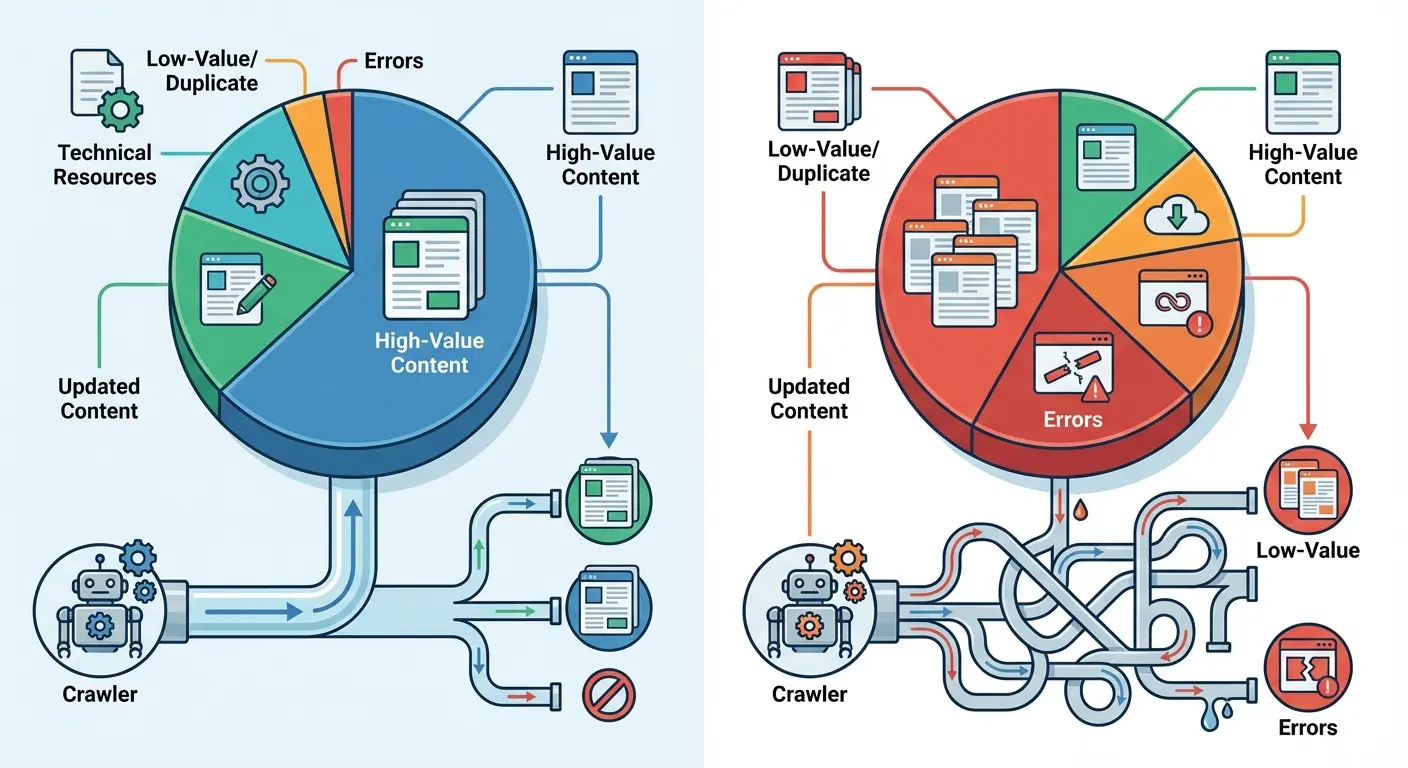
I’ve helped sites double their crawl efficiency by doing exactly this. The same total crawl budget, better allocated, resulted in faster indexing of new content, more frequent updates of changed pages, and better rankings as Google discovered and processed important content more reliably.
For sites working on sophisticated crawl optimization, consider how GA4 audit methodologies can track the business impact of better crawler allocation.
Your Internal Linking Is Broken (I Don’t Even Need to See Your Site to Know This)
Your site accumulates authority from external backlinks, but how that authority distributes internally determines which pages rank.
Internal linking creates pathways for authority to flow, but not all pathways are equally efficient. Some create velocity, moving authority quickly to important pages. Others create resistance, trapping authority in sections of your site where it generates minimal value.
Link depth matters more than most sites acknowledge. Pages buried five or six clicks from your homepage receive a fraction of the authority that pages two clicks away get. If your most important commercial pages sit deep in your site architecture while blog posts link directly from your navigation, you’ve created an authority distribution problem that undermines your business goals.
The number of internal links pointing to a page signals its importance, but the quality and context of those links matters more than quantity. A single contextual link from a high-authority page often transfers more value than dozens of footer links. Yet many sites treat all internal links as equivalent, missing opportunities to strategically channel authority where it drives revenue.
Last month: B2B site, 8 years old. 60% of their internal links pointed to blog archives from 2016-2018. Their 2024 product pages? Three internal links each. They were surprised their new products weren’t ranking.
Map your internal linking structure to visualize how authority flows. Identify pages that receive disproportionate internal links relative to their business value. Find high-value pages that lack sufficient internal linking support. The gap between your current authority distribution and your ideal distribution reveals exactly where to focus your internal linking improvements.
When analyzing authority distribution, reference how internal linking case studies demonstrate the measurable impact of strategic link architecture on organic performance.
The Orphan Page Problem
Orphan pages exist on your site with no internal links pointing to them. They’re accessible only through direct URLs or external links.
For small sites, orphan pages result from oversight. For large sites, they emerge systematically from technical implementations that accidentally isolate content.
Faceted navigation often creates orphan pages at scale. Your filtering system generates unique URLs for every combination of filters, but your internal linking only points to the base category pages. Thousands of filtered pages sit orphaned, receiving no authority distribution and minimal crawl attention despite potentially targeting valuable long-tail queries.
Dynamic content systems can orphan entire sections of your site. If your blog posts link to each other through a “related posts” widget that only shows the five most recent articles, older posts gradually lose all internal links as new content publishes. Your archive grows increasingly disconnected from your active site structure.
Product pages that go out of stock often get removed from category listings and search results, orphaning them even though the pages still exist and might rank for branded queries. You’re telling search engines these pages don’t matter by removing all internal links, then wondering why they drop from rankings.
Use Screaming Frog. Export all URLs. Cross-reference with your server logs. Any URL in Screaming Frog that’s not in your logs? Orphan. Fix it or delete it.
Schema Markup Is Probably Broken Too
Schema markup promises enhanced search results and better content understanding, but implementations rarely get the ongoing maintenance they require.
You add schema when you launch features, but as your site evolves, those implementations drift out of sync with your content, creating validation errors and conflicting signals.
Conflicting schema types on the same page confuse search engines about what the page represents. You might have Product schema from your e-commerce platform, Article schema from your blog template, and LocalBusiness schema from your footer, all claiming to describe the same page. Search engines must choose which to trust, and conflicting signals reduce confidence in all of them.
Incomplete implementations create worse outcomes than no schema at all. If you add Product schema but omit required fields, or if your Review schema lacks the aggregateRating properties that enable rich results, you’ve told search engines to expect structured data that doesn’t deliver.
Schema formats evolve, and old implementations become deprecated. You might have added schema five years ago using formats that worked then but now trigger validation warnings. Search engines still process them, but you’re missing opportunities for enhanced features only available with current schema types.
I audited a site last month. Product schema on every page. All validated. Green checkmarks everywhere.
Zero rich results. For 18 months.
Why? They included all required fields. Passed validation. But they were missing one optional field: offers.availability.
“Optional” for validation. Required for rich results.
Meanwhile, their competitor had invalid schema (literal validation errors) but included offers.availability. Guess who got the rich results?
The Schema Validation Trap
Google’s Rich Results Test shows your schema validates, so you assume everything’s working. But validation only confirms your markup follows the correct syntax. It doesn’t verify that your schema implementation helps your SEO or enables the rich results you’re targeting.
You can have perfectly valid Product schema that never triggers product rich results because you’re missing optional properties that aren’t required for validation but are required for rich result eligibility. The validation tool gives you a green checkmark while your competitors with more complete implementations get the enhanced listings.
Schema properties have different weights in Google’s algorithms. Some properties are critical for understanding your content, others add marginal value. Most implementations focus on required fields for validation while ignoring high-value optional properties that would improve visibility and click-through rates.
The schema types you choose should match how users search for your content. If you’re marking up recipes but your audience searches for them as videos, Recipe schema might be less valuable than VideoObject schema. Validation doesn’t tell you whether you’ve chosen the right schema types for your content and audience.
URL Architecture Decisions Are Costing You Money
Your URL structure seemed logical when you launched, but years later it constrains how you organize content, creates technical debt with every new page, and confuses both users and search engines about your site’s hierarchy and content relationships.
URL architecture decisions create path dependencies that are expensive to change. If you structured your URLs around a category taxonomy that no longer reflects how you organize products, you face a choice between maintaining an outdated structure or implementing thousands of redirects. Both options carry costs that compound with every new page you publish.
Deep URL hierarchies (such as /category/subcategory/sub-subcategory/product) create long, unwieldy URLs that are hard to share, difficult to remember, and signal to search engines that content is buried deep in your site architecture. Each additional level adds friction for users and crawlers.

Parameter-heavy URLs from filtering, sorting, and tracking systems create duplicate content risks at scale. Without proper parameter handling, your single product page becomes dozens of URLs differentiated only by sort order or filter combinations. Search engines must identify the canonical version among these variations, and they don’t always choose correctly.
I’ve seen companies unable to launch new product lines because their URL structure was so tightly coupled to their original category system that adding new categories would break their entire internal linking and navigation architecture.
Redirect Chain Liability
Every site migration, URL structure change, and content reorganization adds another layer to your redirect architecture. What started as simple 301 redirects become redirect chains where URLs bounce through multiple hops before reaching the final destination.
Redirect chains slow page load times and waste authority. Each hop in the chain adds latency and dilutes the authority passing through the redirect. A three-hop redirect chain might lose 15-20% of the authority that would have transferred through a direct redirect.
Your redirect chains grow organically as your site evolves. You redirect old-url to new-url during a migration, then later redirect new-url to newer-url during a reorganization. You’ve created a chain, but your redirect rules don’t automatically consolidate to point old-url directly to newer-url.
These chains multiply silently as your site changes.
A B2B software company I audited had undergone three platform migrations over eight years: custom PHP to WordPress (2016), WordPress to HubSpot (2019), and HubSpot to custom Next.js (2023). Their most valuable landing page (originally at /enterprise-solutions.html) had been redirected to /solutions/enterprise/ in 2016, then to /products/enterprise-plan/ in 2019, then to /enterprise/ in 2023.
Every backlink they’d earned over eight years was passing through a four-hop redirect chain.
When we consolidated all historical URLs to redirect directly to /enterprise/, they saw a 34% increase in organic traffic to that page within two weeks. The authority that had been bleeding through multiple hops was finally reaching its destination efficiently.
Document your redirect architecture in a way that reveals chains before they become problems. When you plan URL changes, check whether the old URLs are already redirect targets. Consolidate chains proactively rather than discovering them years later when they’ve multiplied across thousands of URLs.
Mobile Experience Beyond Core Web Vitals
Your site passes Core Web Vitals assessments, so you assume your mobile experience is optimized.
But CWV metrics measure specific loading and interaction characteristics while missing broader mobile usability issues that affect both user satisfaction and search performance.
Touch target sizing affects mobile usability more than most technical audits acknowledge. Buttons, links, and interactive elements that are easy to click with a mouse become frustrating on mobile when they’re too small or too close together. Users misclick, abandon tasks, and develop negative associations with your site even though your CWV scores look perfect.
Content accessibility on mobile extends beyond screen reader compatibility. Can users read your text without zooming? Do your images scale appropriately? Does your content reflow properly at different screen sizes? These basic accessibility issues affect user experience and search rankings but don’t appear in standard technical audits.
Mobile-specific interaction patterns differ from desktop. Users scroll more, tap rather than hover, and expect different navigation patterns. If your mobile site simply shrinks your desktop design without adapting to mobile interaction patterns, you’re creating friction that increases bounce rates and reduces conversions.
Form experiences on mobile deserve special attention. Desktop forms that work fine become unusable on mobile when they require extensive typing, don’t use appropriate input types, or fail to implement autofill properly. Poor mobile form experiences directly impact conversion rates, yet they rarely appear in technical SEO audits.
Mobile optimization extends beyond speed metrics, similar to how ecommerce SEO case studies reveal that conversion optimization requires holistic mobile experience improvements.
With over 60% of web traffic now coming from mobile devices, the stakes for mobile optimization have never been higher. Sites that fail to deliver excellent mobile experiences are alienating the majority of their potential visitors, regardless of how well they perform on desktop metrics.
Mobile-First Indexing Compliance
Mobile-first indexing means Google predominantly uses your mobile page version for indexing and ranking, but many sites still maintain subtle differences between desktop and mobile that create indexing problems.
Content parity issues emerge when your mobile version hides, truncates, or removes content that appears on desktop. You might think you’re optimizing mobile UX by reducing content, but you’re telling Google that content isn’t important enough to show mobile users (who represent the majority of searches).
Structured data must appear consistently across desktop and mobile versions. If your desktop pages have rich Product schema but your mobile pages have incomplete implementations, Google’s mobile-first indexing might not trigger rich results even though your desktop version validates perfectly.
Image optimization strategies that work for desktop can break mobile indexing. If you use different image URLs for mobile and desktop, or if you lazy load images aggressively on mobile, you risk those images not being indexed properly. Your image SEO strategy becomes device-dependent, which creates unpredictable results.
Mobile page speed affects rankings more directly under mobile-first indexing. Your desktop page might load quickly while your mobile version struggles with large images, render-blocking resources, or heavy JavaScript. The mobile performance becomes your primary ranking signal, making desktop optimization less relevant.
Test your mobile and desktop versions for parity across content, structured data, internal linking, and technical implementations. Differences that seem minor can create significant indexing and ranking impacts under mobile-first indexing.
The importance of proper mobile technical implementation was reinforced in a recent Search Engine Land analysis examining why e-commerce SEO audits fail. The article highlighted that platforms such as ChatGPT, Perplexity, and Google’s Gemini analyze product pages to understand what brands sell, and “vague product descriptions and missing structured data make that process harder.” This AI-driven shift means mobile technical optimization now affects visibility not just in traditional search but across emerging AI-powered shopping experiences where mobile is the dominant interface.
The Audit Report You Actually Need
I’ve read probably 500 technical SEO audit reports in my career.
Know how many were actually useful? Maybe 20.
The rest? Comprehensive garbage. “Here are 847 issues, ranked by severity. Good luck.”
No prioritization. No “if you only fix three things, fix these.” No ROI estimates. No timeline. Just everything. All at once. Equally important.
The best audit I ever saw was 8 pages. Three priority levels. Estimated impact for each fix. Timeline for implementation. Done.
The worst was 247 pages. Took three weeks to read. Client implemented nothing because they had no idea where to start.
Your audit report should segment issues by remediation complexity and business impact. High-impact, low-complexity issues get fixed immediately. High-impact, high-complexity issues become strategic projects with proper resourcing. Low-impact issues get documented but deprioritized regardless of complexity.
Remediation roadmaps need realistic timelines that account for your team’s capacity and technical constraints. Recommending 50 high-priority fixes means nothing if you only have resources to do five per quarter. Your roadmap should sequence work in an order that maximizes cumulative business impact over time.
Dependencies between issues affect implementation sequencing. You might need to fix your URL structure before you can properly set up redirects. Your server performance issues might need resolution before page speed optimizations deliver meaningful improvements. The audit should map these dependencies explicitly.
Expected outcomes should be quantified where possible. If fixing crawl budget allocation issues should increase indexed pages by 30%, state that. If adding proper schema should increase CTR by 2-3 percentage points, include that projection. Quantified outcomes help you prioritize work and measure success.
Your audit report should include a technical debt register that tracks all identified issues, their status, and their business impact. This living document evolves as you fix issues and discover new ones. It becomes your technical SEO roadmap rather than a static report that gets filed away.
For enterprise-scale implementations, consider how enterprise SEO agencies approach complex audit remediation across large, distributed teams.
Building the Business Case
Technical SEO improvements require resources (developer time, infrastructure investments, agency support) but securing those resources requires translating technical issues into business impact.
Your executives don’t care about redirect chains or schema validation errors unless you connect them to revenue, conversions, or competitive positioning.
Calculate the traffic currently trapped by technical issues. If crawl budget waste prevents 30% of your product pages from being indexed, and those pages target queries worth 50,000 monthly searches, you can estimate the traffic opportunity. Multiply that traffic by your average conversion rate and order value to project revenue impact.
Competitive analysis strengthens your business case. If competitors rank for queries you’re targeting but technical issues prevent your pages from competing effectively, you can quantify the market share you’re conceding. Show executives the revenue competitors are capturing that could be yours with proper technical optimization.
Risk assessment helps prioritize technical debt. Some technical issues create risks that compound over time (server performance problems that will cause outages at scale, or crawl budget issues that will prevent new content from being indexed). Quantifying these risks in terms of potential revenue loss or brand damage motivates action.
Implementation costs should be estimated realistically and compared to projected benefits. If fixing your URL architecture requires 200 hours of development work at $150/hour, that’s a $30,000 investment. If the expected outcome is an additional $200,000 in annual organic revenue, you have a clear ROI case that justifies the investment.
When presenting technical improvements to stakeholders, leverage insights from SEO ROI calculator methodologies to quantify expected returns on remediation investments.

Look, Here’s the Truth
Your site has problems you don’t know about. Your audit didn’t find them because it was looking in the wrong places.
Structural debt compounds. The longer you ignore it, the more expensive it gets to fix.
You can keep running audits that check boxes and fix symptoms. Or you can actually look at how Google interacts with your site (server logs, crawl patterns, rendering behavior) and fix the real problems.
Most people will do nothing. They’ll read this, nod along, then go back to optimizing meta descriptions.
Don’t be most people.
Start with your server logs. Check where Google is spending its time. If 40%+ is wasted on garbage URLs, you’ve found your first problem.
Fix that before you fix anything else.
As you work on technical improvements, consider how technical SEO solutions can be integrated into your broader organic growth strategy for maximum impact.
And if you need help, you know where to find me.
