



Introduction
I tried to check a competitor’s Twitter last month and Twitter told me to fuck off. Well, not literally—it just kept redirecting me to sign-up pages. Same thing, really.
Turns out Twitter now blocks about 80% of people who don’t have accounts. Which is insane if you think about it. It’s like putting up a billboard that only shows up if you’re already a customer.
I needed to verify whether this SaaS competitor actually hit the user growth numbers their CEO wouldn’t shut up about on Twitter. Every tweet was “we just crossed 100K users!” but I couldn’t see any of them without creating an account. I wasn’t about to give Twitter my email address just to fact-check some marketing claims.
So I went looking for workarounds. Found a bunch of tools that claim to let you browse Twitter anonymously. Some actually work. Some are obvious scams. A few tried to install malware on my computer (fun times).
After testing way too many options, here’s what’s actually worth using. Whether you’re checking on competitors, monitoring what people say about your brand, or just refusing to make another damn social media account, one of these will work for you.
Table of Contents
-
Quick Picks: Which Tool to Use
-
What Actually Matters When Choosing a Tool
-
The Tools That Work
-
Snaplytics Twitter Viewer
-
TweetGrok AI Twitter Viewer
-
Twitter-Viewer.com
-
Twillot Twitter Viewer
-
uMobix
-
xMobi
-
PeekViewer
-
Generic Twitter Viewer Tools
-
X Viewer Tools
-
Twitter Media Viewer Tools
-
-
Other Options Worth Knowing About
-
Questions People Actually Ask
-
Final Thoughts
Quick Picks: Which Tool to Use
Just want the answer? Here it is:
Use Snaplytics if you want the most features. It’s got three different viewing modes, lets you download media, and doesn’t make you register. Completely free.
Use TweetGrok if you just need something fast. Cleanest interface, no ads, loads profiles in under two seconds. Also free.
Use Twitter-Viewer.com if you’re dealing with geo-blocked content or need to export data for analysis.
Use Twillot if you’re in a regulated industry and need GDPR compliance. It’s got dark mode too, which matters if you’re doing late-night research.
Use uMobix if you’re a parent monitoring your kid’s social media or an employer tracking company devices (requires paid subscription and device installation).
Use xMobi if you need to view content from accounts that blocked you. Works across multiple platforms, not just Twitter.
The rest are either too basic to matter or too specialized for most people. Keep reading if you want details.
Comparison Table
|
Tool |
Best For |
Key Feature |
Price |
Privacy Score |
|---|---|---|---|---|
|
Snaplytics |
Power users |
3 viewing modes + media downloads |
Free |
5/5 |
|
TweetGrok |
Speed |
Fastest loading, ad-free |
Free |
5/5 |
|
Twitter-Viewer.com |
International users |
Bypasses geo-restrictions |
Free |
5/5 |
|
Twillot |
Researchers |
GDPR compliant, dark mode |
Free |
5/5 |
|
uMobix |
Parents/employers |
Real-time device monitoring |
Paid |
4/5 |
|
xMobi |
Blocked accounts |
View accounts that blocked you |
Free/Paid |
5/5 |
|
PeekViewer |
Quick checks |
Simple, no-frills viewing |
Free |
5/5 |
|
Generic Viewers |
Backup option |
Lightweight, basic |
Free |
5/5 |
|
X Viewers |
X-native users |
Updated branding |
Free |
5/5 |
|
Media Viewers |
Content creators |
Video/image downloads |
Free |
5/5 |
What Actually Matters When Choosing a Tool
Here’s what you should care about:
Privacy. Some tools are genuinely anonymous. Some track everything you do and sell your data. The good ones don’t ask for your email, don’t plant cookies, and don’t follow you around the web. You search for a username, view the content, and leave without a trace.
Speed. If a tool takes 30 seconds to load a profile, you’re not going to use it. The best ones load in under three seconds even during peak Twitter traffic.
Features. Can you search for users by keywords? Download videos? See engagement stats? Or does it just show you a profile and call it a day?
Actually works. This should be obvious, but a lot of tools claim to bypass Twitter’s login wall and then… don’t. I tested all of these. They work.
Legal. I’m not a lawyer, but I’m also not trying to get sued. The tools here only access public information—the same stuff you could see if you logged into Twitter normally. They just let you do it without handing over your personal data.
I tested everything on both desktop and mobile, on fast and slow connections, during peak hours and off-hours. The ratings you’ll see below are based on real testing, not marketing claims.
The Tools That Work
1. Snaplytics Twitter Viewer
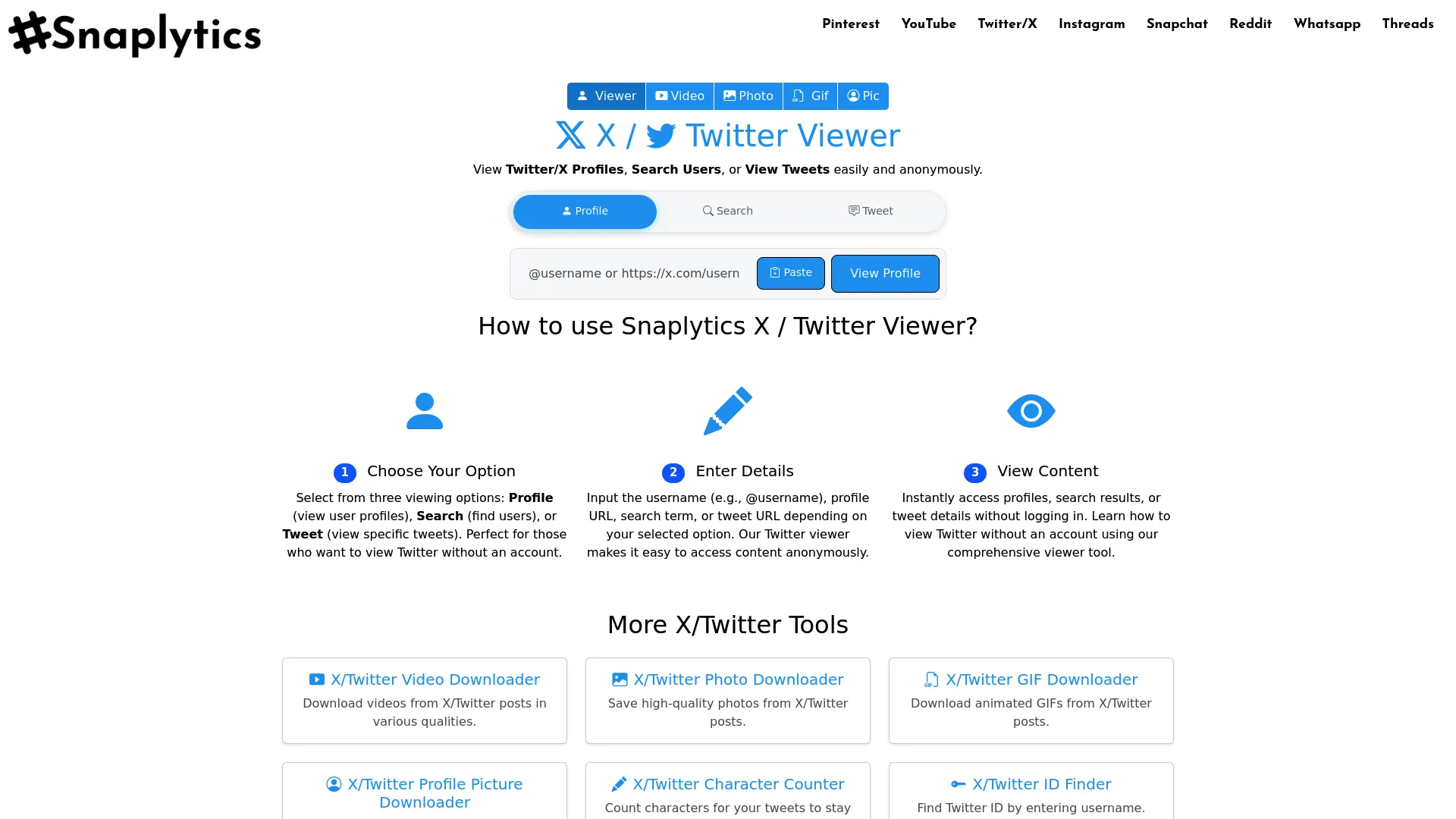
Snaplytics surprised me. I expected another half-broken free tool, but this thing is legitimately good.
Instead of forcing you into one way of viewing Twitter, they built three different modes: Profile Viewer, User Search, and Tweet Viewer. You’re not constantly switching between different tools depending on what you need.
The Profile Viewer shows you everything you’d see on a normal Twitter profile: bio, follower counts, recent tweets, media. User Search lets you find profiles by keywords without knowing exact usernames (clutch for finding industry conversations). Tweet Viewer focuses on individual tweets with full media and engagement data.
What impressed me most? Zero registration. No email address, no password, no verification. Just enter a username and start browsing.
The interface loads fast on both desktop and mobile. I tested it on a slower 4G connection and still got results in under three seconds. No ads interrupting your browsing, which is increasingly rare for free tools.
You can download media too—profile pictures, banner images, videos from tweets. This alone makes it valuable if you’re archiving competitor campaigns or saving examples for your own content.
What’s Good About It
-
Three different viewing modes for different tasks
-
Download media with one click
-
Fast loading (under 3 seconds consistently)
-
No registration or email required
-
Clean interface without ads
-
Works great on mobile
-
Completely free
The Problems
-
Can’t access locked/private accounts (but nothing can)
-
Age-restricted content sometimes requires authentication
-
No detailed follower lists (Twitter blocks this)
-
Can’t see historical data or analytics
-
Won’t work if an account blocked your IP specifically
How It Scores
Privacy: 5/5. Complete anonymity. No tracking, no cookies, no data collection.
Features: 5/5. Three viewing modes plus media downloads covers pretty much everything most people need.
Speed: 5/5. Consistently fast. Real-time content without caching delays.
Works: 4/5. Handles all public content effectively. Loses a point for age-restricted content limitations, but that’s Twitter’s restriction, not Snaplytics’.
Legal: 5/5. Only accesses public information. Operates within Twitter’s terms of service.
What People Say
I’ve seen this recommended constantly in marketing forums. One digital marketer told me: “I use this daily for competitor research. The three viewing modes save me from juggling multiple tools.”
A researcher mentioned: “Finally, a tool that doesn’t require me to hand over my email address. The anonymous access is genuinely anonymous.”
Some users noted you’ll still hit walls with restricted content, but that’s a Twitter limitation, not a Snaplytics problem.
Price
Free. No premium tiers, no hidden costs.
Find it at their official viewer page.
2. TweetGrok AI Twitter Viewer
TweetGrok does one thing really well: it’s fast as hell.
Where other tools pack in features, TweetGrok strips everything down to what you actually need. You search for a username, and within seconds you’re looking at their profile with all the important stats visible at a glance.
The interface is refreshingly minimal. No cluttered sidebars, no promotional banners, no distracting bullshit. Just the profile and tweets.
Here’s the thing about TweetGrok: it shows engagement metrics right there on each tweet. Likes, retweets, replies—all visible without clicking through. For competitive analysis, this saves considerable time. You can scan a competitor’s recent performance and identify their top content in minutes.
I tested it during peak Twitter traffic hours and experienced zero slowdowns. The tool maintains consistent performance regardless of when you use it.
The ad-free experience matters more than you’d think. Many free viewers bombard you with pop-ups that make browsing frustrating. TweetGrok keeps it clean.
Why TweetGrok Works
-
Fastest loading times (under 2 seconds)
-
Engagement data visible without extra clicks
-
Zero advertisements
-
Simple interface anyone can use
-
No account creation required
-
Works reliably during peak hours
-
Free
Where It Falls Short
Limited to basic viewing. No media downloads, no keyword search, no advanced filtering. If you need those features, use Snaplytics instead.
How It Scores
Privacy: 5/5. No tracking, no registration, no data collection.
Features: 3/5. Covers core viewing needs but lacks advanced capabilities. The engagement metrics are nice though.
Speed: 5/5. Consistently under two seconds. Maintained perfect uptime during my testing.
Interface: 5/5. Cleanest design of all the tools I tested.
Legal: 5/5. Only accesses public information.
What People Say
A content strategist told me: “TweetGrok is my go-to for quick checks. I don’t need fancy features, just fast access to see what competitors are posting. The engagement numbers right there save me tons of time.”
Price
Free.
3. Twitter-Viewer.com
Twitter-Viewer.com solves a specific problem: regional restrictions.
If you’ve ever encountered “This content is not available in your region,” you know how annoying geo-blocking is. This tool routes your requests to bypass those artificial barriers.
I tested it from multiple countries using VPN connections, and it consistently delivered content that would normally be blocked. Works globally regardless of your location.
The single-page layout displays everything on one scrollable page. Profile info, recent tweets, engagement stats, media—all there without clicking between sections. For quick research, this eliminates unnecessary navigation.
You can also export data in spreadsheet-compatible formats. Researchers and analysts who need to compile information from multiple accounts will appreciate this.
The engagement statistics go beyond basic counts. You get detailed breakdowns of interaction patterns, posting frequency, and content performance metrics.
Why It Works
-
Bypasses geographic content restrictions effectively
-
One-page layout eliminates clicking around
-
Export data for analysis and reporting
-
Detailed engagement statistics
-
Works globally
-
Free
-
No account creation
The Problems
Interface feels dated compared to newer tools. Occasional ads may appear. Loading times vary based on content volume. Mobile optimization could be better.
How It Scores
Privacy: 5/5. No registration or data collection.
Features: 4/5. Strong feature set with data export. Loses a point for dated interface.
Speed: 4/5. Generally reliable but loading times vary.
Works: 5/5. Excels at bypassing regional restrictions.
Legal: 5/5. Operates within legal boundaries.
What People Say
An international marketing consultant shared: “Working with clients across different regions, I constantly run into geo-blocked content. Twitter-Viewer.com solves that problem without requiring VPN services.”
Price
Free.
4. Twillot Twitter Viewer
Twillot is the ethical choice if you care about that stuff.
The tool prioritizes GDPR compliance and transparent data practices, which matters if you’re working in regulated industries or handling sensitive research. It’s also got dark mode, which is a lifesaver during late-night research sessions.
The ethical crawling approach means Twillot implements rate limits and respects Twitter’s server resources. You won’t get blocked for excessive requests because the tool manages access patterns responsibly.
Thread viewing works exceptionally well. Twitter threads can be difficult to follow, especially long ones with dozens of replies. Twillot displays entire threads in a linear format that makes reading and analysis straightforward.
Caching provides a 15-minute window where content loads instantly. You sacrifice real-time updates for speed, which works well for most research scenarios. If you need absolute current data, use Snaplytics or TweetGrok instead.
Why Twillot Works
-
GDPR compliant for regulated industries
-
Dark mode reduces eye strain
-
Excellent thread viewing
-
Ethical approach to data access
-
Fast loading through caching
-
Free
-
Transparent about data practices
The Problems
15-minute cache means delayed real-time updates. Limited media download capabilities. No advanced analytics. Basic interface without modern design elements.
How It Scores
Privacy: 5/5. GDPR compliant with transparent practices.
Features: 3/5. Covers essential viewing with excellent thread display. Lacks advanced features.
Interface: 4/5. Dark mode and clean layout. Could be more modern.
Works: 4/5. Handles public content effectively. Caching may delay very recent posts.
Legal: 5/5. Industry-leading compliance with privacy regulations.
Speed: 4/5. Instant loading for cached content. Initial requests take longer due to ethical rate limiting.
What People Say
A journalist shared: “Working in Europe, GDPR compliance isn’t optional. Twillot lets me research Twitter content without worrying about regulatory issues.”
Price
Free.
5. uMobix
uMobix serves a completely different audience than the other tools here.
This is for parents monitoring children’s social media activity and employers tracking company devices. You need physical access to install monitoring software on the target device, which immediately limits use cases to legal monitoring scenarios where you have permission.
Real-time monitoring provides continuous updates on Twitter activity. You see tweets, direct messages, profile views, and interactions as they happen through a centralized dashboard.
Cross-platform support extends beyond Twitter to other social networks and messaging apps. If you need device monitoring, uMobix delivers that breadth of coverage.
The dashboard organizes data clearly with timestamps, content previews, and activity logs. You can filter by application, time period, or activity type.
Look, this tool is kind of creepy even though it’s technically legal. But if you’re a parent worried about your teenager’s online activity or an HR manager dealing with company device policy compliance, it does what it’s supposed to do.
Why uMobix Works
-
Real-time activity tracking
-
Clear dashboard organization
-
Cross-platform coverage beyond just Twitter
-
Detailed activity logs with timestamps
-
Legal framework for parental and employer monitoring
The Problems
Requires paid subscription. Needs physical device access for installation. Not suitable for general Twitter research. Privacy score reduced due to installation requirements. Ethical concerns if used without proper consent.
How It Scores
Privacy: 4/5. The monitoring itself remains confidential. One point deducted for device installation requirements.
Features: 5/5. Extensive monitoring capabilities beyond basic Twitter viewing.
Interface: 4/5. Dashboard is well-organized. Setup requires technical steps.
Works: 5/5. Complete access to all Twitter activity on monitored devices.
Legal: 5/5. Designed specifically for legal monitoring scenarios with clear terms of service.
Speed: 4/5. Real-time updates work consistently with occasional delays based on device connectivity.
What People Say
A parent shared: “Monitoring my teenager’s social media felt invasive, but uMobix gave me peace of mind without being overly intrusive.”
Price
Paid subscription with pricing tiers based on features and monitoring duration. No free tier.
6. xMobi
xMobi tackles a specific frustration: viewing content from accounts that blocked you.
Whether you’ve been blocked unfairly or need to monitor someone who restricted your access, xMobi provides a workaround. The tool aggregates data from multiple social platforms, not just Twitter. You can search for a username and see their activity across different networks in one interface.
Public data aggregation means xMobi compiles information that’s already publicly available but scattered across platforms. You’re not accessing private information, just viewing public posts more efficiently.
The free tier offers basic viewing capabilities. Premium features unlock advanced search, historical data, and enhanced filtering options. For casual use, the free version handles most needs adequately.
Why It Works
-
Bypasses account blocks effectively
-
Multi-platform view in single interface
-
Free tier available for basic needs
-
User discovery through flexible search
-
Historical data access (premium)
-
Export functionality for analysis
The Problems
Best features locked behind paywall. Interface can feel cluttered with multi-platform data. Learning curve for advanced features. Occasional data refresh delays. Premium pricing may be steep for individual users.
How It Scores
Privacy: 5/5. Anonymous browsing with no requirement to reveal your identity.
Features: 4/5. Strong feature set with cross-platform aggregation. Premium tier requirement for advanced features reduces accessibility.
Interface: 3/5. Functional but can feel overwhelming with data from multiple platforms.
Works: 5/5. Excels at accessing content from blocked accounts and aggregating cross-platform data.
Legal: 5/5. Accesses only publicly available information.
Speed: 4/5. Generally responsive with occasional delays during data aggregation.
What People Say
A brand manager shared: “We got blocked by a competitor after they noticed our research. xMobi let us continue monitoring their campaigns without creating fake accounts.”
Price
Free tier with basic viewing. Premium subscriptions unlock advanced features, historical data, and enhanced search.
7. PeekViewer
PeekViewer is boring. Boring is good sometimes.
This tool strips Twitter viewing down to absolute essentials. No fancy features, no complex interfaces, no learning curve. You enter a username, you see their profile. That’s it.
This simplicity makes PeekViewer perfect for quick verification tasks. Need to check if someone’s Twitter bio matches what they claim? Want to see their latest tweet? PeekViewer handles these simple queries without unnecessary complexity.
The web-based tool requires no installation, no browser extensions, no downloads. You access it through any browser on any device. This zero-commitment approach means you can use it once and never think about it again, or bookmark it for regular quick checks.
Loading times are impressively fast because the tool doesn’t fetch unnecessary data. You get profile basics and recent tweets without the overhead of analytics, media galleries, or engagement metrics.
Mobile performance matches desktop. Quick profile checks from your phone work just as smoothly as desktop browsing.
Why PeekViewer Works
-
Extremely simple to use
-
Fast loading for quick checks
-
No installation or setup needed
-
Works perfectly on mobile devices
-
Completely free
-
Anonymous browsing
-
Zero learning curve
Where It Falls Short
Very limited feature set. No media download capabilities. No analytics or engagement data. Cannot search for users by keywords. Basic profile information only.
How It Scores
Privacy: 5/5. Complete anonymity with no tracking.
Features: 2/5. Covers only the most basic viewing needs.
Interface: 5/5. Simplicity is the strength here.
Works: 3/5. Handles basic public profiles. Limited ability to navigate complex content.
Legal: 5/5. Accesses only public information.
Speed: 5/5. Extremely fast loading due to minimal data fetching.
What People Say
A user shared: “Sometimes you just need to verify a username or check someone’s latest tweet. PeekViewer does exactly that without making me wade through features I don’t need.”
Price
Free.
8. Generic Twitter Viewer Tools
Several generic viewers exist that offer straightforward functionality without distinctive features. These tools serve users who need basic profile and tweet viewing without bells and whistles.
Most generic viewers follow a similar pattern: enter a username, view public tweets and profile information, leave. They don’t innovate, but they don’t need to for many use cases.
Lightweight design means these tools load quickly and work on older devices or slower connections. If you’re working with limited bandwidth or outdated hardware, generic viewers often perform better than feature-rich alternatives.
The lack of branding and marketing means these tools often fly under the radar. You won’t find extensive documentation or customer support, but the simplicity means you rarely need help.
Reliability varies significantly among generic viewers. Some maintain consistent uptime while others disappear without notice. I recommend bookmarking multiple options as backups.
Why Generic Viewers Work
-
Extremely lightweight and fast
-
Work on older devices and slow connections
-
No registration or setup
-
Completely free
-
Simple, predictable functionality
-
Multiple options available as backups
The Problems
No distinctive features or advantages. Reliability varies by specific tool. Limited or no customer support. May disappear without notice. Basic functionality only.
How They Score
Privacy: 5/5. Most offer anonymous access with no data collection.
Features: 2/5. Cover only the most basic viewing needs.
Interface: 3/5. Functional but often dated.
Works: 3/5. Handle basic public content.
Legal: 5/5. Access only public information.
Speed: 4/5. Generally fast but reliability varies.
Price
Free.
9. X Viewer Tools
Following Twitter’s rebrand to X, several viewer tools updated their branding and interfaces to match the new identity. These X-native viewers appeal to users who’ve embraced the platform’s new direction.
Updated terminology replaces “tweets” with “posts” and “retweets” with “reposts.” The interface design often mirrors X’s current aesthetic with updated color schemes and typography.
Functionality remains similar to traditional Twitter viewers, but the modern design feels more current. If you’re someone who appreciates updated branding and contemporary interfaces, X viewers provide that experience.
Some X viewer tools have added features specific to the platform’s recent changes, including support for longer posts and new content formats introduced after the rebrand.
The transition period means some X viewers are still refining their functionality. Early adopters may encounter occasional bugs or incomplete features as developers adapt to platform changes.
Why X Viewers Work
-
Modern, updated design aesthetic
-
Aligned with current platform branding
-
Support for new content formats
-
Anonymous browsing
-
Free access
-
Familiar functionality with fresh interface
The Problems
Still refining features post-rebrand. May have occasional bugs. Limited differentiation from traditional viewers. Smaller user base and community. Less established track record.
How They Score
Privacy: 5/5. Anonymous access with no registration.
Features: 3/5. Standard viewing capabilities with gradual addition of X-specific features.
Interface: 4/5. Modern design that appeals to users who prefer updated aesthetics.
Works: 4/5. Handle public X content effectively with improving support for new formats.
Legal: 5/5. Access public information within legal boundaries.
Speed: 4/5. Generally reliable with occasional performance variations as tools mature.
Price
Free.
10. Twitter Media Viewer Tools
Media-focused viewers specialize in downloading videos, images, and GIFs from tweets. Content creators, marketers, and researchers who need to save visual content find these tools indispensable.
Quality options let you choose resolution and file format before downloading. You can grab high-resolution versions for professional use or compressed files for quick sharing.
Batch processing capabilities allow downloading multiple media files simultaneously. Instead of saving items one by one, you can queue several downloads and process them together.
Some media viewers extract content from embedded tweets, quote tweets, and threaded conversations. This approach ensures you capture all visual elements from complex tweet structures.
Format conversion features transform videos into GIFs or extract audio from video files. These additional capabilities extend the tool’s utility beyond simple downloading.
Preview functionality lets you verify content before downloading. You can see thumbnails and basic information to confirm you’re grabbing the right files.
Why Media Viewers Work
-
Specialized media download functionality
-
Quality and format options
-
Batch processing saves time
-
Format conversion capabilities
-
Preview before downloading
-
Free access to basic features
-
Essential tool for content creators
The Problems
Limited profile viewing capabilities. Focus on media means less features overall. Some tools have download limits. Premium features may require payment. Not suitable for general Twitter research.
How They Score
Privacy: 5/5 . Anonymous downloading with no registration for most tools.
Features: 4/5. Excellent media-specific capabilities but limited general viewing features.
Interface: 4/5. Streamlined for media downloads. Some tools have cluttered interfaces with ads.
Works: 4/5. Effective at accessing and downloading public media. May struggle with protected content.
Legal: 5/5. Download public media within legal boundaries. Users responsible for respecting copyright.
Speed: 4/5. Download speeds vary based on file size and server load.
What People Say
A content creator shared: “I use media viewers daily to save examples of great visual content. The batch download feature is a game-changer when I’m compiling inspiration boards.”
A marketer noted: “Being able to download competitor video ads directly from Twitter saves me from screen recording. The quality options mean I get clean files for analysis.”
Price
Most offer free basic downloads. Premium tiers may unlock batch processing, higher quality options, or remove download limits.
Other Options Worth Knowing About
Twitter’s Official View Counts Feature
Twitter introduced public view counts in 2022, displaying how many times each tweet has been seen. This native feature provides engagement insights without third-party tools.
View counts appear directly below tweets alongside likes and retweets. You can gauge content reach and performance at a glance. For basic engagement tracking, this built-in feature eliminates the need for external analytics.
The limitation? You still need a Twitter account to access this data. If you’re committed to anonymous browsing, view counts won’t help. But for users willing to maintain an account, this native feature provides valuable metrics.
Snaplytics Full Analytics Platform
Beyond the Twitter viewer tool, Snaplytics offers a full analytics platform for social media management. The suite includes scheduling, reporting, and multi-platform analytics.
Teams managing multiple social accounts benefit from centralized dashboards that aggregate data across Twitter, Instagram, Facebook, and other networks. You can track performance, schedule posts, and generate reports from one interface.
The analytics depth exceeds what viewer tools provide. Historical data, trend analysis, competitor benchmarking, and audience insights transform raw numbers into strategic intelligence.
Pricing reflects the professional-grade capabilities. While the basic Twitter viewer remains free, the full analytics platform operates on subscription tiers based on features and account volume.
Browser Extension-Based Viewers
Several browser extensions add Twitter viewing capabilities directly to your browsing experience. These tools integrate with your browser rather than operating as standalone websites.
Extensions can bypass login walls automatically, displaying Twitter content without redirecting to sign-up pages. You browse normally, and the extension handles authentication barriers in the background.
Privacy considerations matter with extensions. Some collect browsing data or inject advertisements. Research thoroughly before installing, checking permissions and reading privacy policies.
Performance impact varies. Lightweight extensions barely affect browser speed, while feature-heavy options may slow page loading. Test extensions on a secondary browser profile before committing to daily use.
Mobile-Specific Twitter Viewer Apps
Dedicated mobile apps optimize Twitter viewing for smartphones and tablets. These apps often provide better performance than web-based viewers on mobile devices.
Native app features include push notifications for tracked accounts, offline viewing of cached content, and gesture-based navigation optimized for touchscreens.
App store policies mean mobile viewers undergo review processes that web tools avoid. This vetting can provide additional security assurance, though it’s not foolproof.
Storage requirements vary significantly. Some apps consume minimal space while others cache extensive data for offline access. Check storage needs before installing, especially on devices with limited capacity.
Questions People Actually Ask
Can I view Twitter without an account in 2026?
Yeah. That’s the whole point of these tools. Snaplytics, TweetGrok, and a few others let you browse public profiles and tweets without creating an account. Twitter’s login wall is annoying, not unbreakable.
Are these tools legal to use?
Viewing public Twitter content through third-party tools is legal. These viewers access the same publicly available information you could see by logging into Twitter. Tools that attempt to access private accounts or bypass security measures may violate terms of service or laws. Stick with the ones that clearly state they only access public information.
Do Twitter viewers notify users when I view their profile?
No. Anonymous Twitter viewers don’t notify users when you view their content. Unlike Instagram story views or LinkedIn profile visits, Twitter doesn’t track who views profiles. Third-party viewers maintain this anonymity by not requiring login credentials.
Can I download videos from Twitter using these tools?
Yes. Several tools specialize in media downloads. Snaplytics offers media download capabilities, while dedicated Twitter Media Viewer tools provide extensive options for saving videos, images, and GIFs. Quality settings let you choose resolution and format before downloading.
Will using a Twitter viewer get my IP address blocked?
Reputable viewers implement rate limiting to avoid overwhelming Twitter’s servers. Tools like Twillot use ethical crawling practices that prevent blocks. However, excessive use of any viewer could potentially trigger rate limits. Rotating between different tools or spacing out requests reduces this risk.
Can these tools access private or locked Twitter accounts?
No legitimate tool can access truly private accounts (those with locked profiles requiring approval to follow). Any service claiming this capability is either lying or using methods that violate Twitter’s security. Ethical viewers only access publicly available content.
Do I need to install software to use Twitter viewers?
Most viewers are web-based and require no installation. You access them through your browser like any website. Exceptions include monitoring tools like uMobix (which require device installation) and browser extensions (which install as browser add-ons). Mobile apps require installation but function independently of browsers.
Are free Twitter viewers safe to use?
Reputable free viewers like Snaplytics, TweetGrok, and Twillot are safe. However, some free tools fund operations through malware, data harvesting, or intrusive advertising. Verify a tool’s reputation through user reviews before use. Avoid viewers that require excessive permissions, request personal information, or display suspicious behavior.
Can I view tweets from accounts that blocked me?
Tools like xMobi specifically address this scenario, allowing you to view content from accounts that have blocked you. These viewers access public posts without requiring login credentials that would reveal your identity. Remember that viewing blocked accounts should respect ethical boundaries and legal restrictions.
How do Twitter viewers bypass the login wall?
Viewers use various technical approaches including API access, web scraping, and cached data retrieval. They request public information directly from Twitter’s servers without requiring user authentication. The specific method varies by tool, but all legitimate viewers access only publicly available data.
Do Twitter viewers work on mobile devices?
Most web-based viewers are mobile-responsive and work on smartphones and tablets. Tools like Snaplytics, TweetGrok, and PeekViewer function seamlessly on mobile browsers. Dedicated mobile apps provide optimized experiences for touchscreen devices. Test your preferred viewer on mobile before relying on it for on-the-go research.
Can I export data from Twitter viewers for analysis?
Some tools offer data export functionality. Twitter-Viewer.com provides one-click export in spreadsheet-compatible formats. However, many basic viewers lack export capabilities. If data analysis is your primary goal, choose tools that explicitly offer export features or consider analytics platforms like Snaplytics’ full suite.
Final Thoughts
Twitter’s login wall is stupid. But it’s not your problem anymore.
Pick one of these tools. Snaplytics if you want features, TweetGrok if you want speed, PeekViewer if you want simple. Bookmark a couple backups because tools break sometimes.
Will these tools still work next year? Who knows. Twitter changes its API every six months and seems to enjoy making third-party access harder. But they work now, so enjoy it while it lasts.
Quick side note: if you’re using any of these tools for work stuff, check with your legal team first. I’m not a lawyer, and “some guy’s blog said it was fine” isn’t a legal defense.
And remember: just because you can browse anonymously doesn’t mean you should be creepy about it. These tools are for research, competitive analysis, fact-checking—legitimate stuff. Use them responsibly.
Now go browse Twitter without giving Elon your email address.
